1. Distance and Displacement with Google Maps

Last updated about 7 years ago
15 questions
Note from the author:
In this formative, students use Google Maps to practice calculating distance and displacement.
Navigate to Google My Maps - https://www.google.com/maps/d/u/0/ and create a new map. Name it Distance and Displacement.

Displacement:

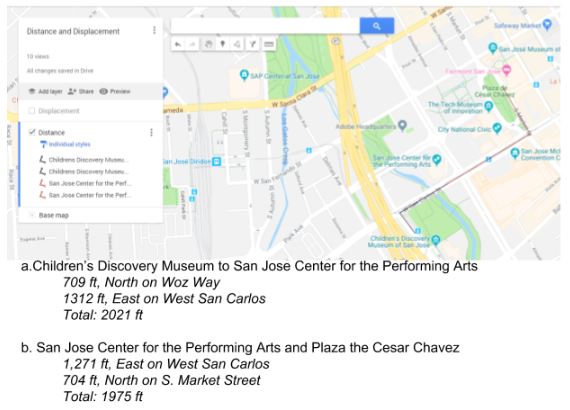
Use the line tool to add lines and measure following displacements. Label each line with its corresponding locations (look at the example above).
1. San Francisco, CA and San Jose, CA
2. Salinas, CA and San Jose, CA
3. Sacramento, CA and San Jose, CA
4. San Francisco, CA and Sacramento, CA

Use your map to answer the following questions.
1

What is the total displacement, in miles, between San Francisco, CA and San Jose, CA? (round to the nearest mile and use abbreviations)

1

What is the total displacement, in miles, between Salinas, CA and San Jose, CA? (round to the nearest mile and use abbreviations)

1

What is the total displacement, in miles, between Sacramento, CA and San Jose, CA? (round to the nearest mile and use abbreviations)

1

What is the total displacement, in miles, between San Francisco, CA and Sacramento, CA? (round to the nearest mile and use abbreviations)

1

Out of these four displacements, which one is the shortest?

1

Out of these four displacements, which one is the longest?

1

Rename the Untitled Layer as Displacement and take a partial screenshot of your work to upload it here.

Distance:

When traveling, you need to follow the roads and sidewalks. In this activity, we will measure the distance between several San Jose landmarks making sure we don’t become Superman and jump over buildings.

“Your family is receiving visitors, and your Mom wants to take them on a tour of downtown San Jose. You really don’t want to go, so you are turning to Google Maps to figure the shortest route you can take so that the tour won't take “forever”. Use the line tool again, to draw a possible route. If you do a good enough job, you may be able to stay home playing Fortnite while they go on the tour.”

Step 1: Add a new layer to your map and name it Distance
Step 2: Zoom in your google map to show downtown San Jose.
Use the line tool to draw your route, changing the color of the pen each time you move between landmarks. Remember to stay on the street. After drawing each set of lines, record each leg, and add the total distance traveled.
Example:
1

The Children’s Discovery Museum Railway Station and the Convention Center

1

Convention Center and Adobe building

1

The Adobe building and the San Jose Museum of Art

1

The San Jose Museum of Art and the Olympic Black Power Statue at San Jose University

1

The Olympic Black Power Statue at San Jose University and the Children’s Discovery Museum Railway Station

1

Take a partial screenshot of your map showing ONLY the distance layer you created above. Once your route is uploaded use the text tool to add a label that indicates the total displacement you had during your tour

Map it


Create your own trip! Plan your own road trip to a destination of your choice. You may start wherever in the world you want, just remember this is a road trip, so if you start out in Paris you cannot come to the US. You MUST travel at least 400 miles on your trip, but no more than 1000 and make 3 stops along the way. You can only travel on roads, so you will need to calculate each distance you travel. Show all your calculations.

Once you figure out all your distances, calculate your displacement.

Add a new layer to your map and call it My Trip from ____ to ____. Draw out your route on this layer, using both your distances and your displacement from where you started out.
1

Take a partial screenshot that shows only your My Trip layer. Once you upoad it, use the text tool to share the total distance traveled as well as the displacement from your point of origin.

10

Share your completed distance and displacement map with your teacher AND paste the URL to your completed map (with all three layers) here.