
This image (highly zoomed in) provides what functionality?
This image (highly zoomed in) provides what functionality?
This is a very basic quiz on some of the introductory parts of using Adobe Premiere Pro CC 2018. I use this as a check for students taking Introduction to Video Productions.
Area where you assemble, edit, and modify clips
Which below is the most used type of video file format?
Video effect used to remove a single color from a video clips.
This image (highly zoomed in) provides what functionality?
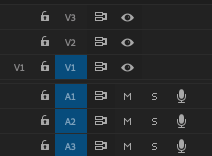
Items like V1, V2, and A3 are known as
Assembly, Editing, Color, Effects, and Audio are all types of...
Speed, Time, Effects, Position, and all clip parameters are found in...
A group of edited clips with effects, transitions, and titles.
Choose all that Apply: A keyframe is used to

This option allows users to

The "M" stands for:
The "S" stands for:
Choose 2: Which are the two ways we discussed in starting a new sequence?

This icon indicates the project file is a

This icon indicates the project file is a

This icon indicates the project file is a

This icon indicates the project file is a
In and Out Points indicate
When exporting your video, how do you change the name and save location of the file?
To adjust, edit, or remove an audio or video clip independently from its ajoining audio or video portion, which option should you choose?