Great sites to embed for Middle/High Schoolers!

Last updated almost 6 years ago
14 questions
Note from the author:
This formative is no longer being updated as of March 1st, 2020. For the latest instructions and examples for embedding your favorite sites, please clone this bundle: https://goformative.com/clone/DERXQE
How to use this formative!
This formative contains examples of websites that are great to embed in a formative, along with some example questions. Remember: Premium/Partner users can now embed within any question type!

The examples are:
  1. Edpuzzle (interactive videos)
  2. Coggle (mindmaps)
  3. Flipgrid (video response)
  4. Sutori (timelines)
  5. NewsELA (reading passages and comprehension)
  6. Explain Everything (interactive whiteboards)
  7. Nearpod (interactive lessons)
  8. PHET (science simulations)
  9. Geogebra (math tools)
  10. Desmos (math tools)
  11. Quizlet (flashcards and quizzes)
  12. Buncee (interactive presentations)
  13. Wakelet (curation / collections)
  14. Padlet (collaboration)
To embed a site into your formative, you can either:
  • Choose the embed content option:
  • Or click the "+" icon within a question, and select "Embed":

Tip: Not sure how to embed a site you use? Or want to share the awesome ways you embed sites in your formatives? Post about in our Community Center (https://discuss.goformative.com/)!
Edpuzzle

How to embed an Edpuzzle:
  1. Go to https://edpuzzle.com and log in / sign up as a teacher
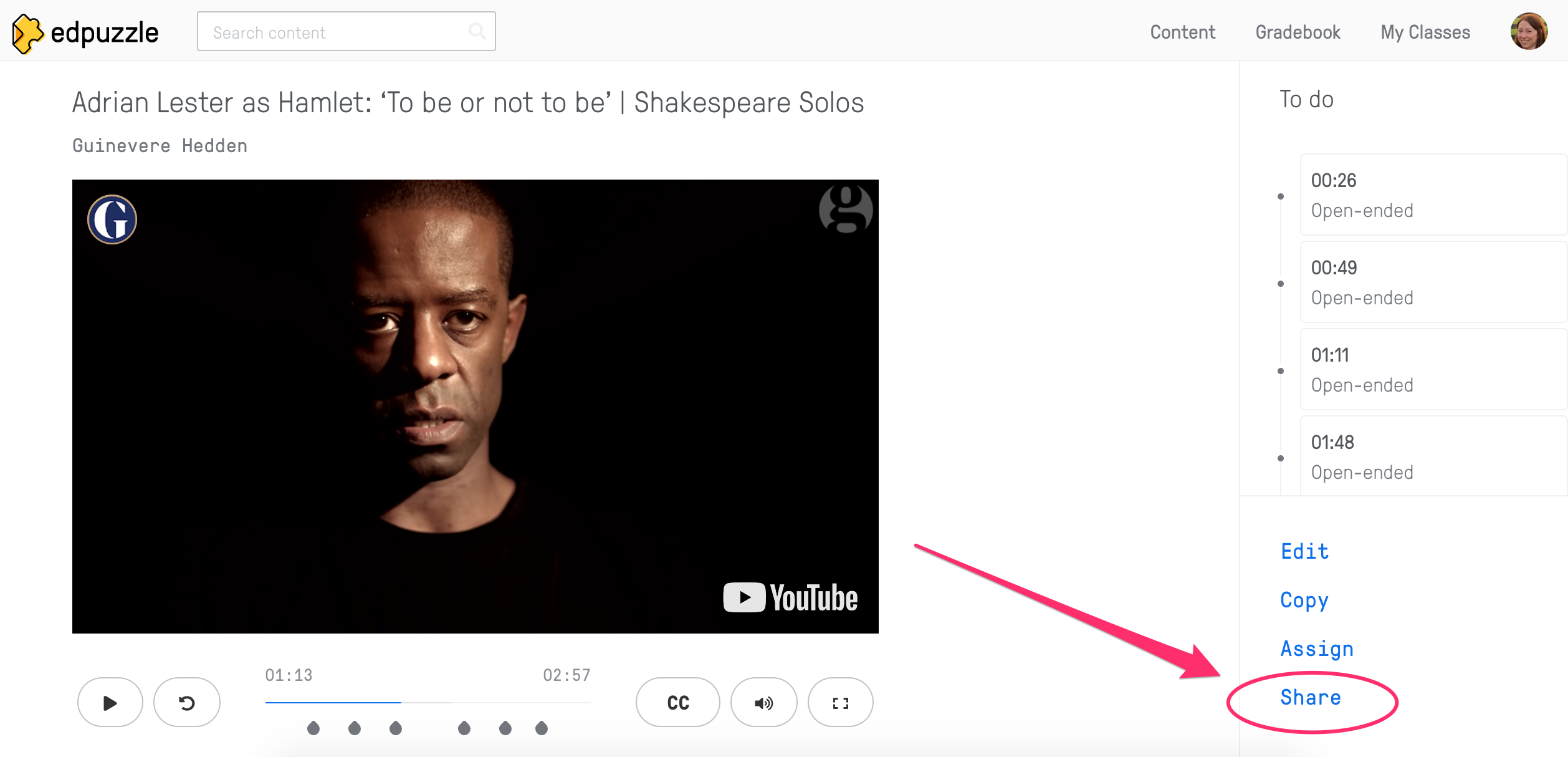
  2. Search for relevant content and then click on the "Share" link:

3. Or, create/edit your own content, assign to a class, then click "Share assignment"
4. Click on the "Copy link" button next to "Embedded code"
5. Paste the code into the Embed field in your formative!
10

First,
Watch this version of Hamlet's soliloquy, "To be or not to be," and answer the questions:

Then,
Write 1 paragraph answering this question:
What tone does this interpretation of the soliloquy have? How does the music in the background affect the tone? Explain.

Coggle

How to embed mindmaps from Coggle:
  1. Go to https://coggle.it and log in / sign up
  2. Search for relevant mindmaps in the Gallery or create your own
  3. Copy the URL
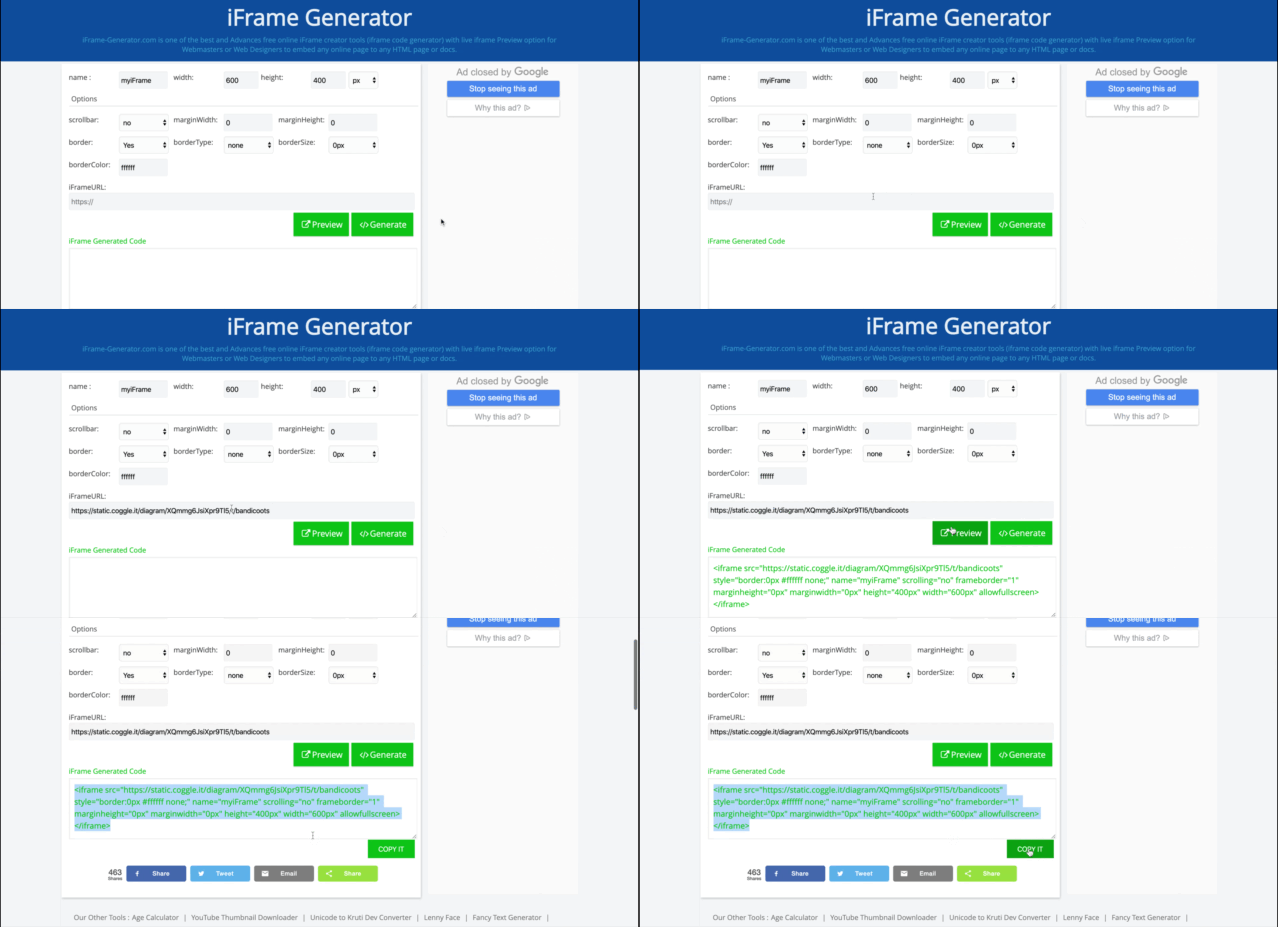
  4. Go to https://www.iframe-generator.com/ and paste the URL into the iFrameURL box
  5. Click "Generate" and then click the "Copy It" button:

6. Paste the code into the Embed field in your formative!
10

First,
Explore this mind map about bandicoots (small marsupials native to Australia):

Then,
Select all the threats to the bandicoots' habitat:

Flipgrid

How to embed Flipgrid grids:
  1. Go to https://info.flipgrid.com and log in / sign up
  2. Create a grid
  3. Click the "Share" button:

4. Copy the link
5. Go to https://www.iframe-generator.com/ and paste the link into the iFrameURL box
6. Click "Generate" and then click the "Copy It" button:

7. Paste the code into the Embed field in your formative!
10

First,
Log in to this Flipgrid and respond to the prompt:


Then,
Replay your video and write out a polished version of your response below. Make sure your vocabulary and grammar are correct!

Sutori

How to embed a timeline from Sutori:
  1. Go to https://www.sutori.com and log in / sign up
  2. Click on "Resources" to browse timelines, or create your own
  3. Click the "Share" button:

4. Choose "Embed" and copy the embed code 5. Paste the code into the Embed field in your formative
6. You will need to delete the sections of the code the begin with "<script" and end with "</script>", so that the embed code begins with "<iframe" and ends with "</iframe>", before you click the "Add Embed" button:

10

First,
Explore this timeline and answer the questions:


Then,
Put these events in order, from the earliest (at the top) to the latest (at the bottom):

  1. Europeans sail around the southern tip of Africa and reach India
  2. Christopher Columbus sails west
  3. Marco Polo travels east
  4. The Ottoman Empire closes the Silk Road
  5. Europeans sail north, attempting to find a "Northwest passage"

NewsELA

How to embed reading passages from NewsELA:
  1. Go to https://newsela.com and log in / sign up
  2. Click on "Explore Content" and use filters to find appropriate content
  3. Click the "Assign" button to assign a passage to your class
  4. In your Binder, click on the ⤵️ button and choose "Email"
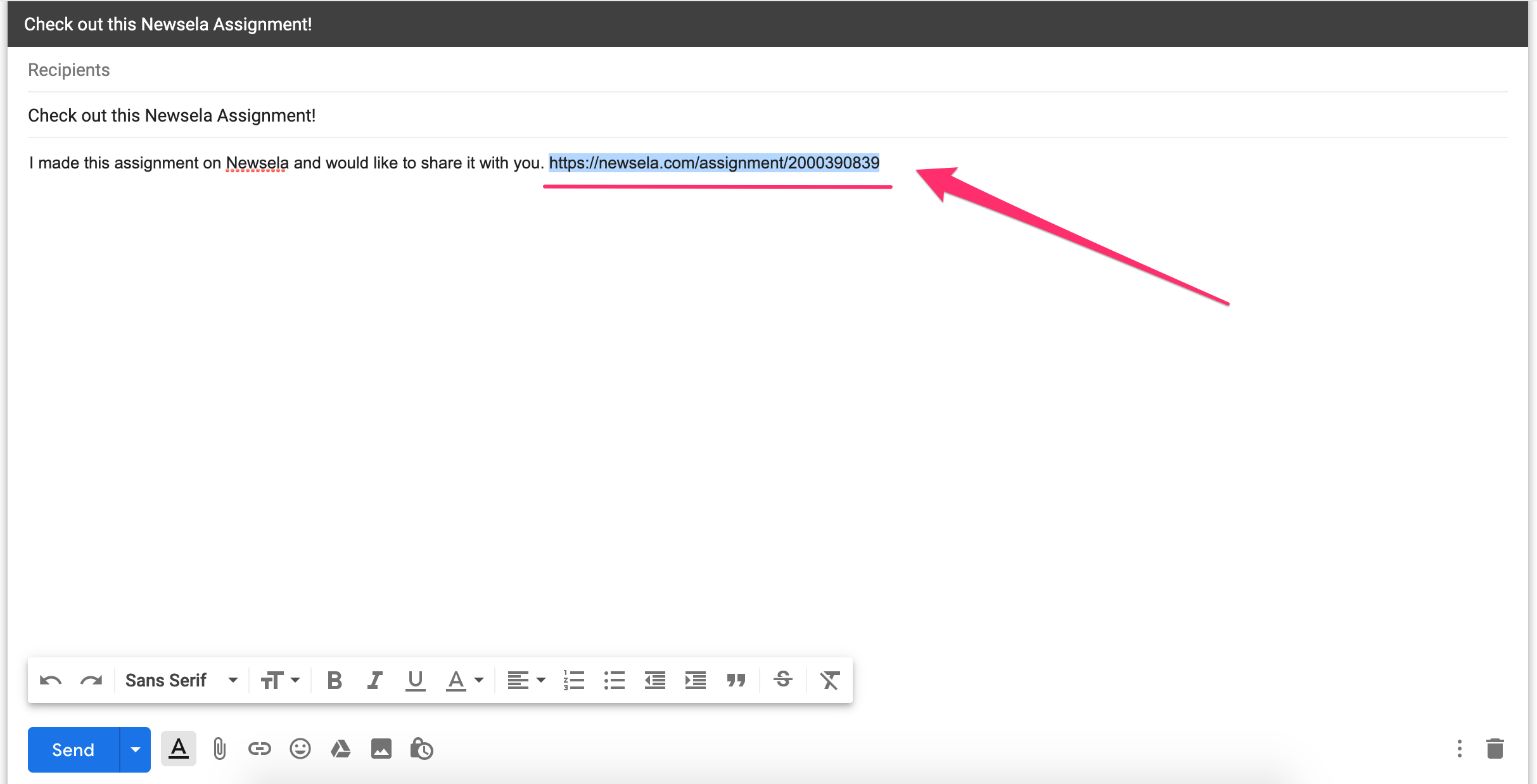
  5. Copy the link from the email message that appears:

6. Go to https://www.iframe-generator.com/ and paste the link into the iFrameURL box
7. Click "Generate" and then click the "Copy It" button:


8. Paste the code into the Embed field in your formative
9. Make sure you click "log out" in the top right, so that students can log in to their own accounts!
10

First,
Read this article about gene editing, and take the quiz:


Then,
Brainstorm the possible benefits and risks of gene editing:

Explain Everything

How to embed a whiteboard video from Explain Everything:
  1. Go to https://explaineverything.com and log in / sign up
  2. Create your own whiteboard or search to find other educators' whiteboards
  3. Click the ⤴️"Share" button - this will copy a link
  4. Go to https://www.iframe-generator.com/ and paste the link into the iFrameURL box
  5. Click "Generate" and then click the "Copy It" button:


6. Paste the code into the Embed field in your formative!
10

First,
Watch this video about how to solve multistep word problems.


Then,
Use the strategies from the video to solve this problem:
Leon needs 82 cupcakes for a birthday party. He already has 25 chocolate cupcakes and 19 vanilla cupcakes. How many more cupcakes should Leon buy?

Nearpod

How to embed a lesson from Nearpod:
  1. Go to https://nearpod.com and log in / sign up
  2. Create your own lesson or search in the Library for lessons
  3. Click the "Share" button and choose the "Embed" option (tip: choose the "Medium" option if your students are using tablets or laptops)
  4. Paste the code into the Embed field in your formative!
10

First,
View this lesson and answer the questions in it:


Then,
Check whether this statement is true or false:
When pressure increases, air molecules have more space to move.

PHET

How to embed a simulation from PHET:
  1. Go to https://phet.colorado.edu and click on "Simulations"
  2. When you find a simulation you like, click on "</> Embed" and copy the code
  3. Paste the code into the Embed field in your formative!
10

First,
Complete this simulation:


Then,
Screenshot your result and upload it here:

Geogebra

How to embed math tools from Geogebra:
  1. Go to https://www.geogebra.org and sign in or click on "Classroom Resources"
  2. When you find an activity you like, click on the triple dots in the top right of the page and select "Share"
  3. Click "Copy Link"
  4. Go to https://www.iframe-generator.com/ and paste the link into the iFrameURL box
  5. Click "Generate" and then click the "Copy It" button:
6. Paste the code into the Embed field in your formative!
10

First,
Drag the points in the picture below. Think about the questions as you complete the activity:

Then,
Answer these questions: What do you notice? What does this prove? How does this prove it?

Desmos

How to embed math tools from Desmos:
  1. Go to https://www.desmos.com (no log in required)
  2. When you find an activity you like, copy the page URL
  3. Go to https://www.iframe-generator.com/ and paste the URL into the iFrameURL box
  4. Click "Generate" and then click the "Copy It" button:
6. Paste the code into the Embed field in your formative!
10

Use the calculator below to solve for x:


Quizlet

How to embed flashcards or quizzes from Quizlet:
  1. Go to https://quizlet.com and sign up / log in
  2. Create your own study set, or search to find sets made by others
  3. When you find a set you like, click on the triple dots and select "Embed"

4. Choose how you want to embed the set (e.g. a matching activity, flashcards, etc) then click "Copy HTML"
5. Paste the code into the Embed field in your formative!
10

First,
Practice your definitions by playing this matching game:


Then,
Answer this question: which of the following are types of precipitation?

Buncee

How to embed Buncee presentations:
  1. Go to https://app.edu.buncee.com/home and sign up / log in
  2. Create your own presentation, or search the Ideas Lab or Staff Picks to find presentations made by others
  3. When you find a presentation you like, click on the "Share" button at the top right and click "Copy" next to the Embed Code:

4. Paste the code into the Embed field in your formative!
5. (You may need to edit the width="1920" height="1080" part of the code so that the buncee displays well on your student devices.)
10

First,
Check out this presentation about personal narrative writing:


Then,
Brainstorm a "watermelon" idea, a "slice" idea, and a "seed" idea that could become your personal narrative topic:

Wakelet

How to embed Wakelet collections:
  1. Go to https://wakelet.com/ and sign up / log in
  2. Create your own collection, or search for other people's collections in "Explore"
  3. When you find a collection you like, click on the triple dots at the top right and select "</> Embed"

4. Choose your layout and customize options, then click "Copy Embed Code"
5. Paste the code into the Embed field in your formative, and delete everything after </iframe>. For example:
10

First,
Read these resources about the Peterloo Massacre:


Then,
Categorize these facts about the massacre as true or false:

  • The massacre took place at St Peter's Field, Manchester, UK.
  • The massacre did not have significant political effects.
  • The massacre happened in 1819.
  • John Tyas ordered the massacre.
  • 18 people were killed and 650 were injured.
  • The protestors were calling for fewer taxes.
  • True
  • False

Padlet

How to embed a Padlet:
  1. Go to https://padlet.com/ and sign up / log in
  2. Create your own Padlet
  3. When you find an activity you like, copy the page URL
  4. Go to https://www.iframe-generator.com/ and paste the URL into the iFrameURL box
  5. Click "Generate" and then click the "Copy It" button:

6. Paste the code into the Embed field in your formative! You can adjust the numbers in the height=“px” width=“px” part of the code so that the Padlet displays in the way you’d like.
10

First,
Add at least one note about global geography to this Padlet:


Then,
Write a question you still have about geography here: