#E006P-2 - Exponet Practice 2
star
star
star
star
star
Last updated about 6 years ago
12 Nsɛmmisa
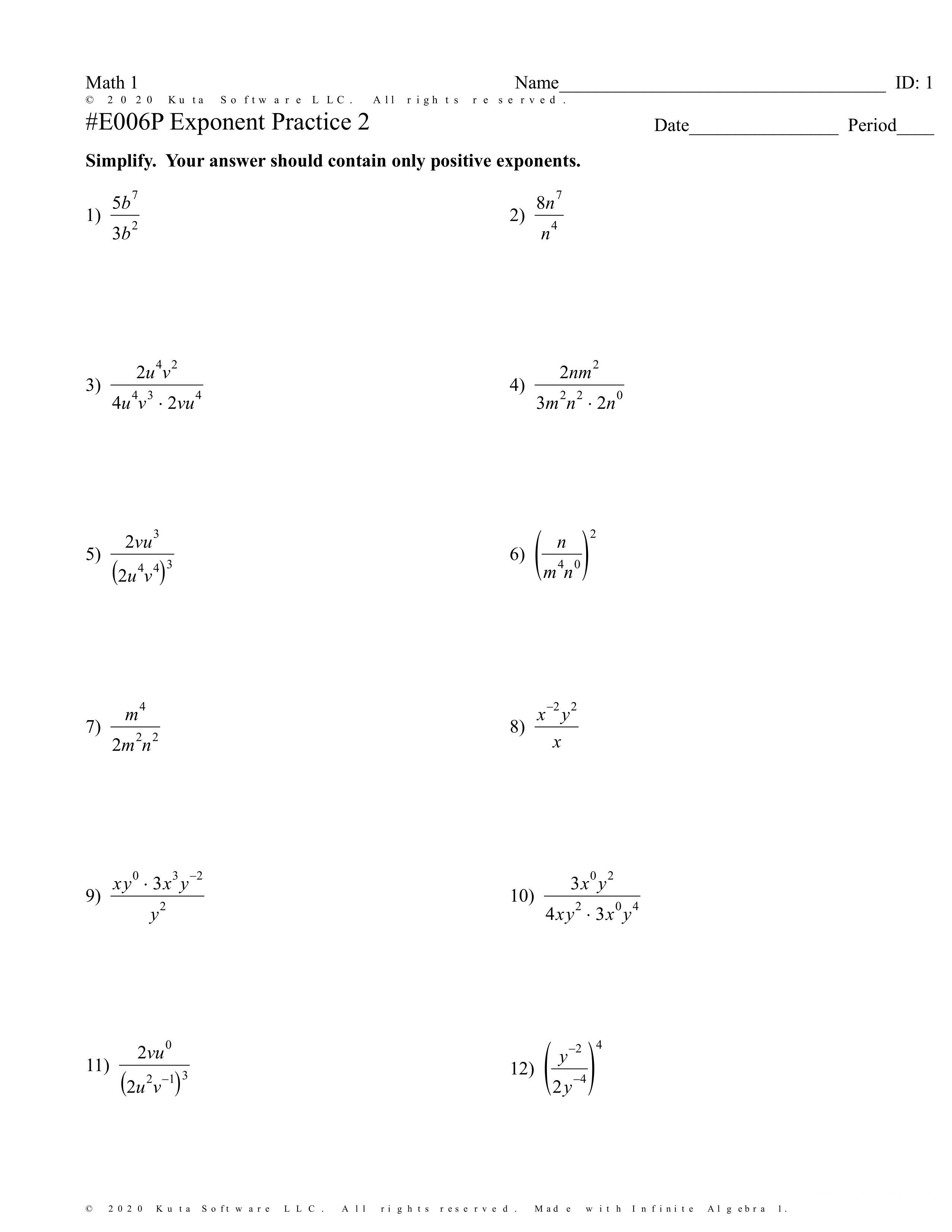
1. Use ^ before typing the value of the exponent. No spaces.
Example: x^2
For the division bar use / then the right arrow key right after the numerator.
Example: x^3/y
2. Use ^ before typing the value of the exponent. No spaces.
Example: x^2
For the division bar use / then the right arrow key right after the numerator.
Example: x^3/y
3. Use ^ before typing the value of the exponent. No spaces.
Example: x^2
For the division bar use / then the right arrow key right after the numerator.
Example: x^3/y
4. Use ^ before typing the value of the exponent. No spaces.
Example: x^2
For the division bar use / then the right arrow key right after the numerator.
Example: x^3/y
5. Use ^ before typing the value of the exponent. No spaces.
Example: x^2
For the division bar use / then the right arrow key right after the numerator.
Example: x^3/y
6. Use ^ before typing the value of the exponent. No spaces.
Example: x^2
For the division bar use / then the right arrow key right after the numerator.
Example: x^3/y
7. Use ^ before typing the value of the exponent. No spaces.
Example: x^2
For the division bar use / then the right arrow key right after the numerator.
Example: x^3/y
8. Use ^ before typing the value of the exponent. No spaces.
Example: x^2
For the division bar use / then the right arrow key right after the numerator.
Example: x^3/y
9. Use ^ before typing the value of the exponent. No spaces.
Example: x^2
For the division bar use / then the right arrow key right after the numerator.
Example: x^3/y
10. Use ^ before typing the value of the exponent. No spaces.
Example: x^2
For the division bar use / then the right arrow key right after the numerator.
Example: x^3/y
11. Use ^ before typing the value of the exponent. No spaces.
Example: x^2
For the division bar use / then the right arrow key right after the numerator.
Example: x^3/y
12. Use ^ before typing the value of the exponent. No spaces.
Example: x^2
For the division bar use / then the right arrow key right after the numerator.
Example: x^3/y