Twa kɔ nsɛm atitiriw so
Log in
Sign up for FREE
arrow_back
Laabri

Formative Tutorial for Students (with Premium Features)

star
star
star
star
star
Last updated over 3 years ago
25 Nsɛmmisa

Welcome to Formative!

In this activity, you will try out many of the features that Formative has to offer!

Three videos introducing Formative are embedded below.

Practice with other items

Ɛhia
1
Ɛhia
1
Ɛhia
1
Ɛhia
10
Ɛhia
1
Ɛhia
1
Ɛhia
1
Ɛhia
1
Ɛhia
5

You may skip this video.

Please watch this video and respond to the items below.

Ɛhia
1
Ɛhia
1
Ɛhia
1
Ɛhia
1
Ɛhia
1
Ɛhia
1

Please watch this video and respond to the items below.

Ɛhia
1
Asemmisa {{asɛmmisaAhyɛnsode}}
7.

True or False: As you answer questions, the dots at the top left of the Formative screen will become filled in with color.

Ɛhia
1
Ɛhia
1

For practice, click on the small chat icon near the blue "9" circle for the item above.

For this example, simply type the following into the chat field: Testing help requests.

Ɛhia
1
Asemmisa {{asɛmmisaAhyɛnsode}}
11.

Multiple Selection: Select the activities that are sports. Select all that apply.

Asemmisa {{asɛmmisaAhyɛnsode}}
12.

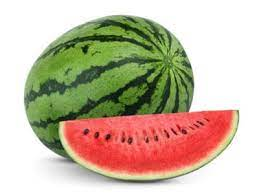
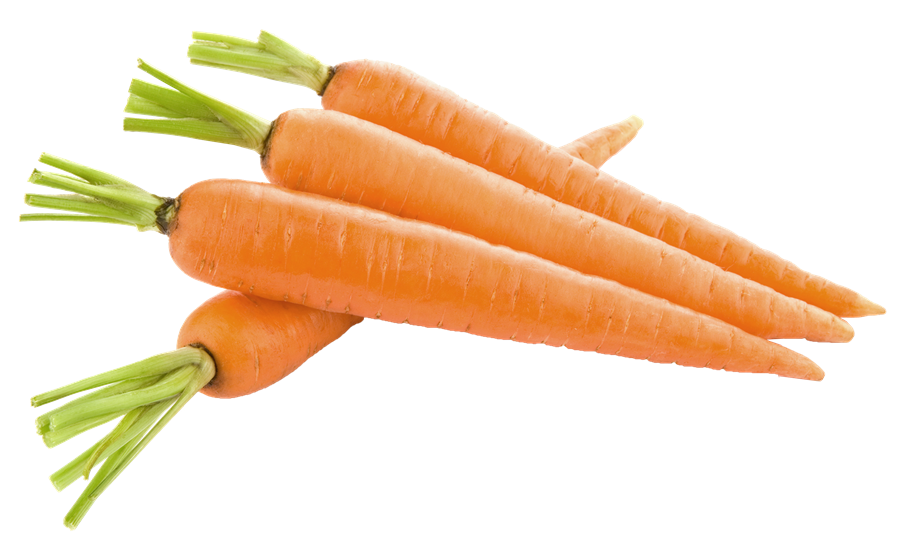
Categorize: Drag each food on the left into the correct category on the right.

  • Bananas

  • Green beans

  • Broccoli

  • Oranges

  • Fruits

  • Vegetables

Asemmisa {{asɛmmisaAhyɛnsode}}
13.

Matching: Drag the items on the left up and down until they match the correct colors on the right.

Hint: Assume that there is no yellow snow!

Draggable itemarrow_right_altCorresponding Item

Grass

arrow_right_alt

Blue

Sun

arrow_right_alt

Green

Snow

arrow_right_alt

Yellow

Sky

arrow_right_alt

White

Asemmisa {{asɛmmisaAhyɛnsode}}
14.

Spelling: Listen to this word:

Spell the word you heard in the response field. Write only the word.

For this item, capitalization of the first letter does NOT matter.

Asemmisa {{asɛmmisaAhyɛnsode}}
15.

Resequence: Drag the days of the week into chronological order.

  1. Monday

  2. Tuesday

  3. Friday

  4. Wednesday

  5. Thursday

Asemmisa {{asɛmmisaAhyɛnsode}}
16.

Numeric (math input): Open the math input keyboard and use it to write ONE of the two equations below.

8\times 2=16 OR \sqrt{16}=4

Do NOT add spaces in your response.

Asemmisa {{asɛmmisaAhyɛnsode}}
17.

Formative Graphing: In this item, graph the line representing the function y=2x-3 by plotting the points (0, -3) and (3, 3) on the Formative graphing utility below.

Always zoom and pan your graphs to establish an appropriate viewing window.

The way you leave your graph is the way your teacher sees it for grading and feedback.

  • Klik Graph tab (Graph 1, Graph 2, ne nea ɛkeka ho) so ma graph biara a ɛsɛ sɛ wobɔ.
  • Klik graph no akyi na fa asɛm bi ka ho. Fa nsɛntitiriw abien ka ho na yɛ graph. Twe asɛm bi anaa kyerɛw x ne y coordinates na sesa ne gyinabea. Klik asɛm bi so na popa.
  • Sɛ wobɔ wo graph no wie a, wubetumi ahyɛ dashed line box no mu.
Asemmisa {{asɛmmisaAhyɛnsode}}
18.

Desmos Graphing:

  1. Open Desmos's graphing calculator at desmos.com/calculator in a new tab for a little more screen real estate as you work.

  2. Graph the line representing the function y=2x-3.

  3. Zoom and pan your graph to establish an appropriate viewing window.

  4. Capture a screenshot of your graph and add it to the Show Your Work canvas. On a Chromebook, initiate a screenshot using ctrl+shift+(the key above 6).

Asemmisa {{asɛmmisaAhyɛnsode}}
19.

Show Your Work: Explore the basic tools provided on the "show your work" canvas and use them to complete the tasks listed below.

Pro Tips:

★ Hover your cursor over a tool's icon to reveal its name

★ Each item you add to the canvas then behaves like an image that can be moved, rotated, and resized using the Select tool.

Complete the following:

◆ Draw a flagpole (try the Scribble, Line, and Shape tools)

◆ Add a text box and type something (use the Text tool)

◆ Upload an image from your computer (use the Image tool)

◆ Add a green rectangle (adjust Color, Line Thickness, and Options, then use the Rectangle tool)

◆ Add a purple circle (adjust Color, Line Thickness, and Options, then use the Circle tool)

Enhanced Image: Identify the parts of this insect.

Ɛhia
1
Ɛhia
1
Ɛhia
1
Ɛhia
1
Ɛhia
1
Ɛhia
1
Asemmisa {{asɛmmisaAhyɛnsode}}
1.

True or False: Formative items (questions) can be answered in any order.

Asemmisa {{asɛmmisaAhyɛnsode}}
2.

Type your name in the response field and use the Show Your Work canvas to write your initials.

Asemmisa {{asɛmmisaAhyɛnsode}}
3.

Use the shape tool to add a solid orange rectangle to the canvas.

Asemmisa {{asɛmmisaAhyɛnsode}}
4.

Draw a smiley face on paper or on a whiteboard and use the camera tool to add an image of it to the canvas.

Asemmisa {{asɛmmisaAhyɛnsode}}
8.

Matching: When Formative assignments are set to return scores immediately, the dots at the top turn colors other than blue.

Use your intuition to match the type of response on the left with the color you expect its dot to turn on the right.

Draggable itemarrow_right_altCorresponding Item

Partial Credit

arrow_right_alt

Green

Correct

arrow_right_alt

Red

Needs graded by the teacher

arrow_right_alt

Yellow

Incorrect

arrow_right_alt

Gray

Asemmisa {{asɛmmisaAhyɛnsode}}
9.

True or False: Not only can you receive Formative Chat messages from your teacher on specific items, you can ask for help on any item right within Formative.

Notifications

🔔 As you work, watch out for feedback notifications on the bell icon at the top right of your screen.
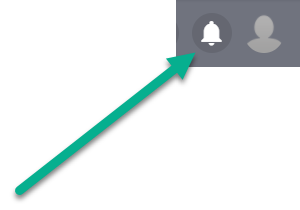
You should view notifications frequently to receive feedback promptly and clear the alert badge.

Respond to teacher feedback with questions or comments as needed.

🥇 Pro-Tip: Since clicking on a notification may open a new Formative assignment and take you away from your current work, consider duplicating the tab in your web browser before clicking. 😉
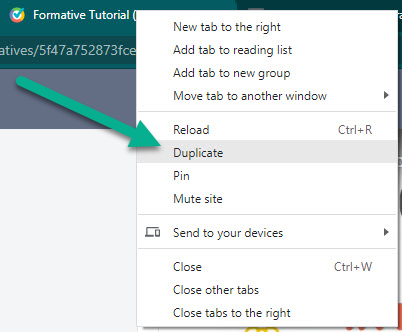
Asemmisa {{asɛmmisaAhyɛnsode}}
10.

What can you add to a Formative Chat conversation with your teacher? Select all that apply.

Asemmisa {{asɛmmisaAhyɛnsode}}
20.
Asemmisa {{asɛmmisaAhyɛnsode}}
21.
Asemmisa {{asɛmmisaAhyɛnsode}}
22.
Asemmisa {{asɛmmisaAhyɛnsode}}
23.
Asemmisa {{asɛmmisaAhyɛnsode}}
24.

Identify the body part indicated here by writing one of the words from this bank:

antennae

head

thorax

wings

abdomen

legs

Respond with only one word.

Asemmisa {{asɛmmisaAhyɛnsode}}
25.

Identify the body part indicated here by writing one of the words from this bank:

antennae

head

thorax

wings

abdomen

legs

Respond with only one word.