Deterine the angles of the main body of the critter.
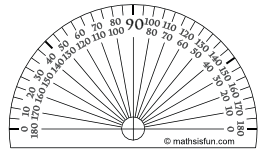
Deterine the angles of the main body of the critter.
Part 1: Create your Critter
Use the instructions on your paper worksheet to create your critter.
Take a picture of your complete critter using a camera or a scanner.
Upload the picture to the next question.
OR
Use the third slide in the Geometry Project Google Slide Presentation to create your critter.
Use the snipping tool on your Chromebook to take a screenshot of your complete critter.
Upload your screenshot to the next question
Please feel free to upload the finished Geometry Project Google Slide Presentation of all three graphed critters if you have trouble uploading a picture or screenshot in the next question.
Upload your second geometry critter.
Deterine the angles of the main body of the critter.
The main body of the critter has two sides measuring 19 cm long and a base of 13 cm long. Based on the angle measurements and side lengths, what type of triangle is used for the main body of the critter?
The ears and tail of the critter are _____________________ triangles.
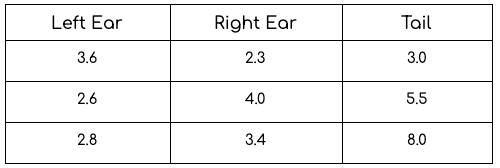
Examine the angles for the tail and the ears. Are the ears and tail acute or obtuse triangles? Explain how you know.
The back feet of your critter are rectangles, with an area of ____ square units.
Does your critter have any right angles? Explain.
Calculate the height and length of your critter if the image you have created is a scale drawing with a scale of 1 cm = 6 inches.