Place Value Practice 5
star
star
star
star
star
Last updated about 6 years ago
12 Nsɛmmisa
Hyɛ no nsow a efi ɔkyerɛwfo no hɔ:
CCSS 5.NBT.A.1 Identify Place Value. Practice writing numbers to the thousands place, standard form
CCSS 5.NBT.A.1 Identify Place Value. Practice writing numbers to the thousands place, standard form
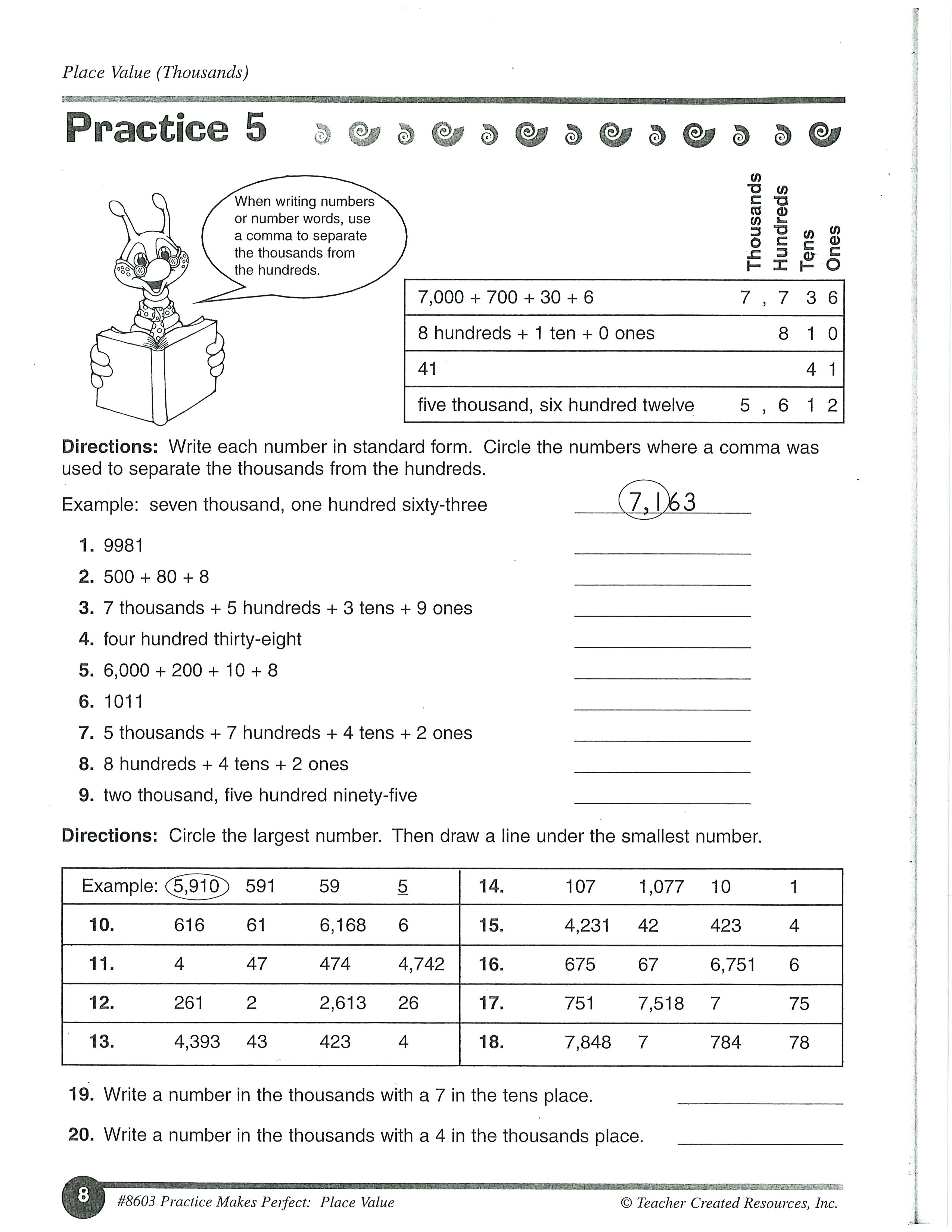
Click on Show Your Work. Using the tools type each number in standard form. Circle the numbers where a comma was used to separate the thousands from the hundreds.
Click on Show Your Work. Using the tools type each number in standard form. Circle the numbers where a comma was used to separate the thousands from the hundreds.
Click on Show Your Work. Using the tools type each number in standard form. Circle the numbers where a comma was used to separate the thousands from the hundreds.
Click on Show Your Work. Using the tools type each number in standard form. Circle the numbers where a comma was used to separate the thousands from the hundreds.
Click on Show Your Work. Using the tools type each number in standard form. Circle the numbers where a comma was used to separate the thousands from the hundreds.
Click on Show Your Work. Using the tools type each number in standard form. Circle the numbers where a comma was used to separate the thousands from the hundreds.
Click on Show Your Work. Using the tools type each number in standard form. Circle the numbers where a comma was used to separate the thousands from the hundreds.
Click on Show Your Work. Using the tools type each number in standard form. Circle the numbers where a comma was used to separate the thousands from the hundreds.
Click on Show Your Work. Using the tools type each number in standard form. Circle the numbers where a comma was used to separate the thousands from the hundreds.
Click on the image. Using the tools, CIRCLE the largest number. Then DRAW A LINE under the smallest number
Write a number in the thousands with a 7 in the tens place.
Write a number in the thousands with a 4 in the thousands place.