FM: Lesson 2.1 (9/28)
star
star
star
star
star
Last updated about 3 years ago
11 Nsɛmmisa

0
0

0
0
0
0
0
0
0
2
2
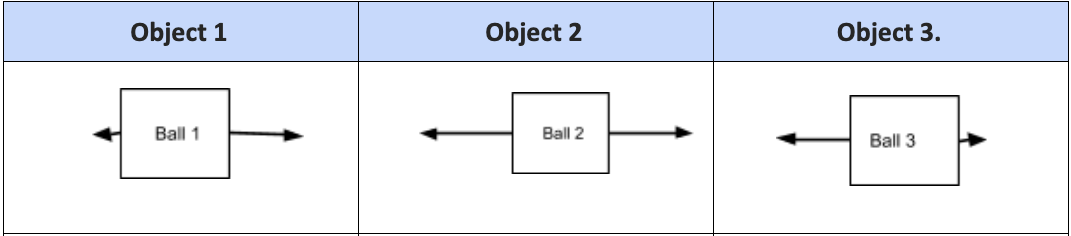
Identify which object will stop, move to the left, and move to the right
| Draggable item | arrow_right_alt | Corresponding Item |
|---|---|---|
Object 3 | arrow_right_alt | Left |
Object 1 | arrow_right_alt | Right |
Object 2 | arrow_right_alt | Stop |
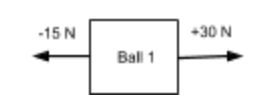
What is the net force on ball 1? If this ball is moving with a velocity of 30 m/s2 what do you expect will happen if 15 N are applied against it?
Amplify Science
Unit 2: Force and Motion
Chapter 2: Mass and Velocity
Lesson 2.1: Exploring Mass, Force, and Velocity
Activity: Simulation
PART I
Select 2.1 Motionless Objects from the top-left menu bottom.
Press RUN, then press ANALYZE to begin.
Observe the initial velocity (start velocity) of the objects, record in the table below
---------------
Go back to BUILD, press PREPARE FORCE to pause the Sim while you set up the forces described in your data table on the next page.
Use the arrows in the Force panel in the bottom right corner of the screen to set up the required force on Object A, B, C, and D.
Press EXERT FORCE to exert the forces and observe how each object’s velocity changes.
Press ANALYZE. Record each object’s change in velocity
How is mass related to the acceleration of an object?
CFS:
Accurately identifies changes in the dependent variable by analyzing the movement of objects
Accurately describes the relationship between force, mass, and acceleration
Accurately identifies the strongest sources of evidence from the experimental data
PART II
Select 2.1 Moving Objects from the top-left menu bottom.
Press RUN, then press ANALYZE to begin.
Observe the initial velocity (start velocity) of the objects, record in the table below
-------
Go back to BUILD, press the - 📷 - button on the top right to PREPARE FORCE and to pause the Sim while you set up the forces described in your data table on the next page.
Use the arrows in the Force panel in the bottom right corner of the screen to set up the required force on Object A, B, C, and D.
Press EXERT FORCE to exert the forces and observe how each object’s velocity changes.
Press ANALYZE. Record each object’s change in velocity.
Do you think the number of asteroid samples (adding or decreasing mass) a pod is carrying could make a difference to the pod's acceleration or direction of movement when the thrusters are activated?
CFS:
Accurately identifies changes in the dependent variable by analyzing the movement of objects
Accurately describes the relationship between force, mass, and acceleration
Background: The following three trials have the same mass and their initial velocity is the same. Model the force that would cause each velocity change.
For each, Insert a force arrow ‘During Force’, that would cause this velocity change.
Use the following table in answering the following questions.
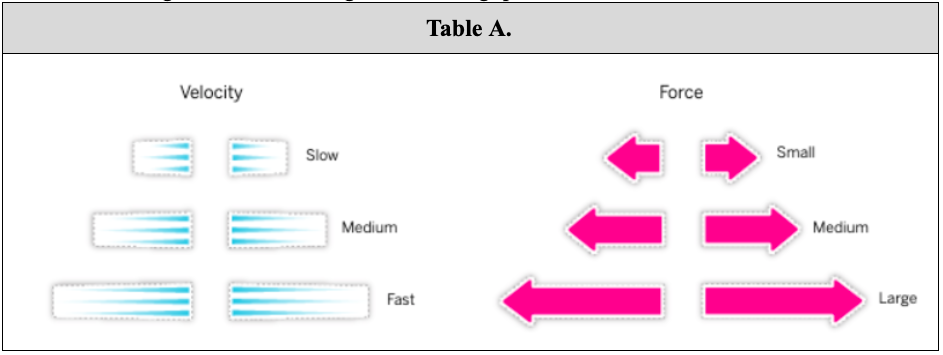
Which trial has the greatest change in speed?
What is the relationship between the change in speed, and the amount of force applied?
CFS:
Accurately identifies changes in the dependent variable by analyzing the movement of objects
Accurately describes the relationship between force, mass, and acceleration
Accurately identifies the strongest sources of evidence from the experimental data
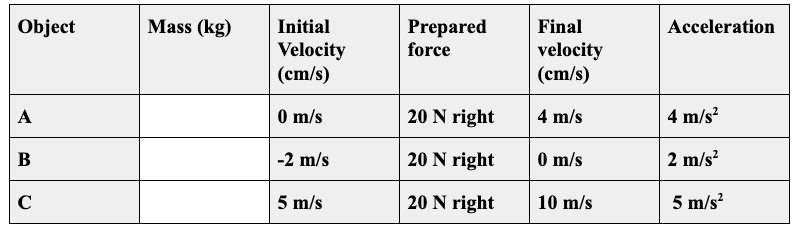
Which object(s) do you think have the greatest mass? How do you know?
CFS:
Accurately identifies changes in the dependent variable by analyzing the movement of objects
Accurately describes the relationship between force, mass, and acceleration
Identify the mass of each object