Asemmisa {{asɛmmisaAhyɛnsode}}1.
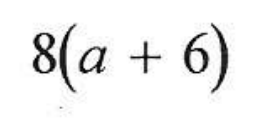
Use the distributive property to simplify the expression. No spaces when you type it in please.
Asemmisa {{asɛmmisaAhyɛnsode}}2.
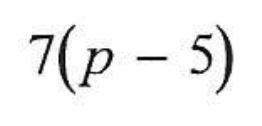
Use the distributive property to simplify the expression. No spaces when you type it in please.
Asemmisa {{asɛmmisaAhyɛnsode}}3.
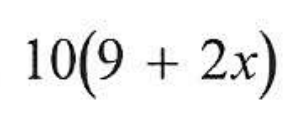
Use the distributive property to simplify the expression. No spaces when you type it in please.
Asemmisa {{asɛmmisaAhyɛnsode}}4.

Use the distributive property to simplify the expression. No spaces when you type it in please.
Asemmisa {{asɛmmisaAhyɛnsode}}5.
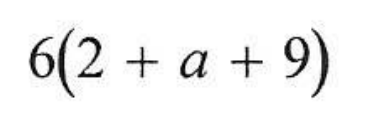
Use the distributive property to simplify the expression. No spaces when you type it in please.
Asemmisa {{asɛmmisaAhyɛnsode}}6.

Use the distributive property to simplify the expression. No spaces when you type it in please.
Asemmisa {{asɛmmisaAhyɛnsode}}7.

What is the error? Write it in complete sentences.
Asemmisa {{asɛmmisaAhyɛnsode}}8.
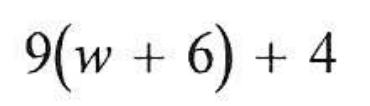
Use the distributive property to simplify the expression. No spaces when you type it in please.
Asemmisa {{asɛmmisaAhyɛnsode}}9.
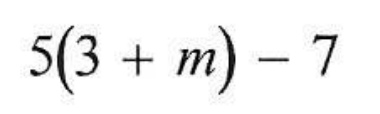
Use the distributive property to simplify the expression. No spaces when you type it in please.
Asemmisa {{asɛmmisaAhyɛnsode}}10.
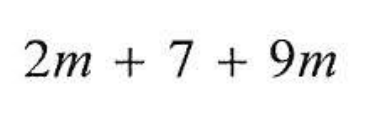
Use your properties to simplify the expression. No spaces when you type it in please.
Asemmisa {{asɛmmisaAhyɛnsode}}11.
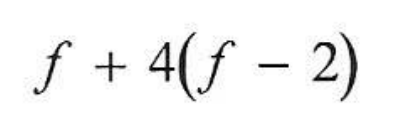
Use the distributive property to simplify the expression. No spaces when you type it in please.
Asemmisa {{asɛmmisaAhyɛnsode}}12.
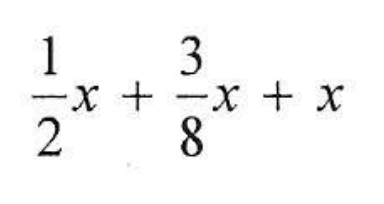
Use your properties to simplify the expression. No spaces when you type it in please.
Asemmisa {{asɛmmisaAhyɛnsode}}13.
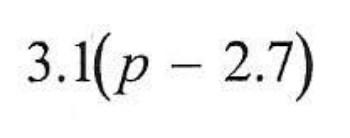
Use the distributive property to simplify the expression. No spaces when you type it in please.
Asemmisa {{asɛmmisaAhyɛnsode}}14.

Simplify the expression for perimeter. Remember, perimeter is where you ADD up all of the sides.
Asemmisa {{asɛmmisaAhyɛnsode}}15.
Simplify the expression for area. Use length x width.
Asemmisa {{asɛmmisaAhyɛnsode}}16.

Simplify the expression.