Asemmisa {{asɛmmisaAhyɛnsode}}1.
Use the Distributive Property to simplify each expression.
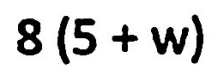
No spaces when you type it in.
Asemmisa {{asɛmmisaAhyɛnsode}}2.
Use the Distributive Property to simplify each expression.

No spaces when you type it in.
Asemmisa {{asɛmmisaAhyɛnsode}}3.
Use the Distributive Property to simplify each expression.
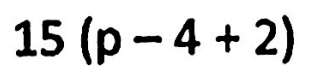
No spaces when you type it in.
Asemmisa {{asɛmmisaAhyɛnsode}}4.
Use the Distributive Property to simplify each expression.
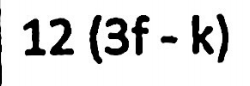
No spaces when you type it in.
Asemmisa {{asɛmmisaAhyɛnsode}}5.
Use the Distributive Property to simplify each expression.
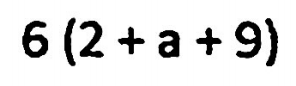
No spaces when you type it in.
Asemmisa {{asɛmmisaAhyɛnsode}}6.
Use the Distributive Property to simplify each expression.
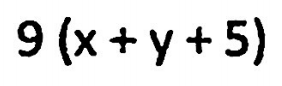
No spaces when you type it in.
Asemmisa {{asɛmmisaAhyɛnsode}}7.
Use the Distributive Property to simplify each expression.
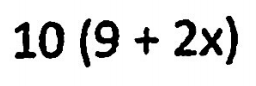
No spaces when you type it in.
Asemmisa {{asɛmmisaAhyɛnsode}}8.
Use the Distributive Property to simplify each expression.
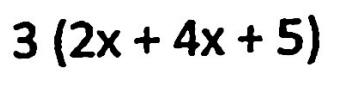
No spaces when you type it in.
Asemmisa {{asɛmmisaAhyɛnsode}}9.
Use the Cake Method to factor each expression. Do not answer it.
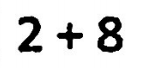
No spaces when you type it in.
Asemmisa {{asɛmmisaAhyɛnsode}}10.
Use the Cake Method to factor each expression. Do not answer it.
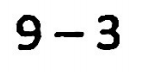
No spaces when you type it in.
Asemmisa {{asɛmmisaAhyɛnsode}}11.
Use the Cake Method to factor each expression. Do not answer it.
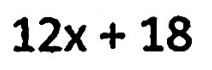
No spaces when you type it in.
Asemmisa {{asɛmmisaAhyɛnsode}}12.
Use the Cake Method to factor each expression. Do not answer it.
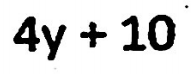
No spaces when you type it in.
Asemmisa {{asɛmmisaAhyɛnsode}}13.
Use the Cake Method to factor each expression. Do not answer it.
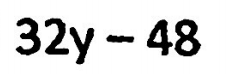
No spaces when you type it in.
Asemmisa {{asɛmmisaAhyɛnsode}}14.
Use the Cake Method to factor each expression. Do not answer it.
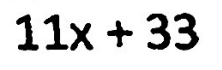
No spaces when you type it in.
Asemmisa {{asɛmmisaAhyɛnsode}}15.
Use the Cake Method to factor each expression. Do not answer it.
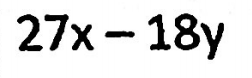
No spaces when you type it in.
Asemmisa {{asɛmmisaAhyɛnsode}}16.
Use the Cake Method to factor each expression. Do not answer it.
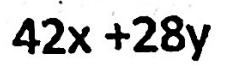
No spaces when you type it in.
Asemmisa {{asɛmmisaAhyɛnsode}}17.
Simplify the expression by Combining Like Terms.
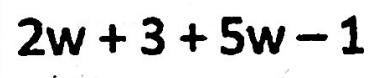
No spaces when you type it in.
Asemmisa {{asɛmmisaAhyɛnsode}}18.
Simplify the expression by Combining Like Terms.
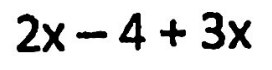
No spaces when you type it in.
Asemmisa {{asɛmmisaAhyɛnsode}}19.
Simplify the expression by Combining Like Terms.
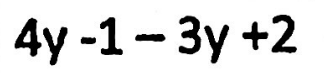
No spaces when you type it in.
Asemmisa {{asɛmmisaAhyɛnsode}}20.
Simplify the expression by Combining Like Terms.

No spaces when you type it in.
Asemmisa {{asɛmmisaAhyɛnsode}}21.
Simplify the expression by Combining Like Terms.

No spaces when you type it in.
Asemmisa {{asɛmmisaAhyɛnsode}}22.
Simplify the expression by Combining Like Terms.

No spaces when you type it in.
Asemmisa {{asɛmmisaAhyɛnsode}}23.
Simplify the expression by Combining Like Terms.

No spaces when you type it in.
Asemmisa {{asɛmmisaAhyɛnsode}}24.
Simplify the expression by Combining Like Terms.

No spaces when you type it in.
Asemmisa {{asɛmmisaAhyɛnsode}}25.
Write the phrase as an expression.

No spaces when you type it in.
Asemmisa {{asɛmmisaAhyɛnsode}}26.
Write the phrase as an expression.
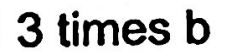
No spaces when you type it in.
Asemmisa {{asɛmmisaAhyɛnsode}}27.
Write the phrase as an expression.

No spaces when you type it in.
Asemmisa {{asɛmmisaAhyɛnsode}}28.
Write the phrase as an expression.

Use "n" for the variable. No spaces when you type it in.
Asemmisa {{asɛmmisaAhyɛnsode}}29.
Write the phrase as an expression.
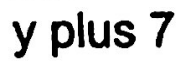
No spaces when you type it in.
Asemmisa {{asɛmmisaAhyɛnsode}}30.
Write the phrase as an expression.

Use "n" for the variable. No spaces when you type it in.
Asemmisa {{asɛmmisaAhyɛnsode}}31.
Write the phrase as an expression.

Use "n" for the variable. No spaces when you type it in.
Asemmisa {{asɛmmisaAhyɛnsode}}32.
Write the phrase as an expression.
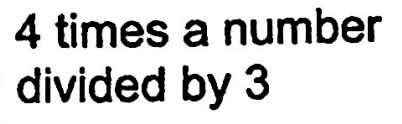
Use "n" for the variable. No spaces when you type it in.
Asemmisa {{asɛmmisaAhyɛnsode}}33.
Evaluate the expression when a=4, b=5, and c=10.
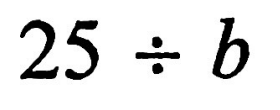
Use "n" for the variable. No spaces when you type it in.
Asemmisa {{asɛmmisaAhyɛnsode}}34.
Evaluate the expression when a=4, b=5, and c=10.
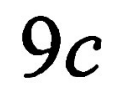
No spaces when you type it in.
Asemmisa {{asɛmmisaAhyɛnsode}}35.
Evaluate the expression when a=4, b=5, and c=10.

No spaces when you type it in.
Asemmisa {{asɛmmisaAhyɛnsode}}36.
Evaluate the expression when a=4, b=5, and c=10.
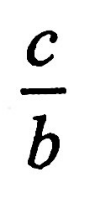
No spaces when you type it in.