Atomic Structure and Building Isotopes

Last updated about 5 years ago
24 questions
In this activity you will explore the atom using a computer simulation.
1. Open the Build an Atom Simlulation - click on the PHeT link above.
2. Click on the Atom option on the first screen.
3. Click on the green plus sign next to Net Charge
4. Click on the green plus sign next to Mass Number
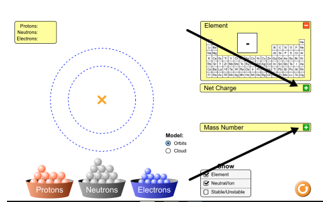
Part I - Explore the Atom
1

Atoms are made of three subatomic particles - protons, neutrons, and electrons. The atom has two main parts - the nucleus and the orbits (which are also called the electron clouds)
1. Drag a proton onto the atom. Where does it go?
2. Drag a neutron onto the atom. Where does it go?
3. Drag an electron onto the atom. Where does it go?

Draggable itemCorresponding Item
Proton
Nucleus
Neutron
Nucleus
Electron
Orbits (or Electron Cloud)
1

What element did you make when you added one proton, one neutron, and one electron?

1

Add another proton to the atom you made. What changes?

1

Add another neutron to the atom you made. What changes?

1

Add another electron to the atom you made. What changes?

1

Which subatomic particles are responsible for:

Draggable itemCorresponding Item
neutron
determining the MASS NUMBER of the atom
electron
determining the NET CHARGE of the atom
proton
determining the IDENTITY of the atom
Part II - Building Atoms of Elements: For questions 7-11, you will build an element using the Phet Simulation and then you will record the number of protons, neutrons and electrons, and then identify the element and its symbol.

1

1. Reset the simulation by pushing the orange circle with the arrow.

2. Click on the green plus sign next to Net Charge
3. Click on the green plus sign next to Mass Number
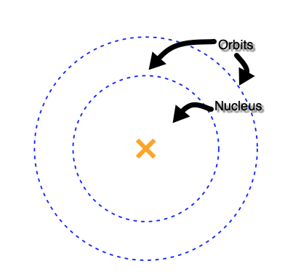
4. Add 5 protons. Add 6 neutrons. Add 5 electrons,
5. Add the correct information in the "SHOW YOUR WORK" area provided.

1

1. Reset the simulation by pushing the orange circle with the arrow.

2. Click on the green plus sign next to Net Charge
3. Click on the green plus sign next to Mass Number
4. Add 3 protons. Add 4 neutrons. Add 3 electrons,
5. Add the correct information in the "SHOW YOUR WORK" area provided.

1

1. Reset the simulation by pushing the orange circle with the arrow.

2. Click on the green plus sign next to Net Charge
3. Click on the green plus sign next to Mass Number
4. Add 7 protons. Add 8 neutrons. Add 7 electrons,
5. Add the correct information in the "SHOW YOUR WORK" area provided.

1

1. Reset the simulation by pushing the orange circle with the arrow.

2. Click on the green plus sign next to Net Charge
3. Click on the green plus sign next to Mass Number
4. Add 9 protons. Add 10 neutrons. Add 9 electrons,
5. Add the correct information in the "SHOW YOUR WORK" area provided.

1

For problem number 12 (that you just completed), what is the atomic mass, or mass number, of this isotope? (Please type in just the number, with no other words, symbols or punctuation.)

1

1. Reset the simulation by pushing the orange circle with the arrow.

2. Click on the green plus sign next to Net Charge
3. Click on the green plus sign next to Mass Number
4. Using the simulation build a STABLE, NEUTRAL atom of CARBON.
5. Add the correct information in the "SHOW YOUR WORK" area provided. Use the shapes icon to draw circles of red (protons), black (neutrons), and blue (electrons) in their proper locations in the atom. (You can change font colors by clicking on the top square with a line through it.)

Part III - Isotopes: For questions 12 - you will be building different isotopes, writing elements using isotopic notation, and identifying the number of protons, neutrons and electrons based upon the isotopic notation of an element. Remember: Isotopes are atoms of the same element that differ only in the number of neutrons.

Note: Unless stated otherwise, assume the isotopes in these questions are neutral, meaning they will have an equal number of protons (with positive charges) and electrons (with negative charges).
If you're still not sure what isotopes are, or you are wondering what they're useful for, watch this video below on Isotopes by RicochetScience.
1

1. Reset the simulation by pushing the orange circle with the arrow.

2. Click on the green plus sign next to Net Charge
3. Click on the green plus sign next to Mass Number
4. Using the simulation build an element with 6 protons, 7 neutrons and 6 electrons.
5. Write the correct isotopic notation in the "SHOW YOUR WORK" area provided.

1

For problem number 13 (that you just completed), what is the atomic mass, or mass number, of this isotope? (Please type in just the number, with no other words, symbols or punctuation.)

1

1. Reset the simulation by pushing the orange circle with the arrow.

2. Click on the green plus sign next to Net Charge
3. Click on the green plus sign next to Mass Number
4. Using the simulation build an element with 6 protons, 8 neutrons and 6 electrons.
5. Write the correct isotopic notation in the "SHOW YOUR WORK" area provided.

1

For problem number 15 (that you just completed), what is the atomic mass, or mass number, of this isotope? (Please type in just the number, with no other words, symbols or punctuation.)

1

Using a periodic table, consider this diagram, and write the element represented in isotopic notation. (This is an example of the format to use for isotopic notation: Hydrogen-2) Please take care to spell correctly.

1

1. Reset the simulation by pushing the orange circle with the arrow.
2. Click on the green plus sign next to Net Charge
3. Click on the green plus sign next to Mass Number
4. Click on the button Show "Stable/Unstable."
4. Using the simulation build a neutral atom of Lithium-9
5. Write the correct number of protons, neutrons and electrons, and draw a model of the atom in the "SHOW YOUR WORK" area provided. Use the shapes icon to draw circles of red (protons), black (neutrons), and blue (electrons) in their proper locations in the atom. (You can change font colors by clicking on the top square with a line through it.)

1

Based upon the model of Lithium-9 you built in question 18, is the isotope of Lithium-9 stable or unstable?

1

1. Reset the simulation by pushing the orange circle with the arrow.
2. Click on the green plus sign next to Net Charge
3. Click on the green plus sign next to Mass Number
4. Click on the button Show "Stable/Unstable."
4. Using the simulation build a neutral atom of Lithium-8
5. Write the correct number of protons, neutrons and electrons, and draw a model of the atom in the "SHOW YOUR WORK" area provided. Use the shapes icon to draw circles of red (protons), black (neutrons), and blue (electrons) in their proper locations in the atom. (You can change font colors by clicking on the top square with a line through it.)

1

Based upon the model of Lithium-8 you built in question 18, is the isotope of Lithium-8 stable or unstable?

1

Using a periodic table, consider this diagram, and write the element represented in isotopic notation. (This is an example of the format to use for isotopic notation: Hydrogen-2) Please take care to spell correctly.

1

Cobalt-60 is a radioactive (unstable) isotope of Cobalt that is produced artificially in nuclear reactors. Cobalt-60 is a useful source of high-intensity gamma rays.
Using a periodic table, determine the mass number, number of protons, neutrons, and electrons in a neutral atom of Cobalt-60.

2

In your own words, explain two things you learned about the structure of atoms and isotopes.
**In your response clearly explain, in complete sentences, WHAT you learned, not the topic of learning or not what you learned about.

Part IV: Play a game! Test your knowledge of isotopes and the structure of an atom.
Return to the top of this assignment to the Phet simulation. On the bottom, click on "Game." There are 4 games to choose from. The game with the the ? is the most challenging. See if you can complete the 5-question challenge for each game!