Elevator Lab: Above Average Elevator Company
star
star
star
star
star
Last updated almost 5 years ago
21 questions
Note from the author:
Students use the concepts of Newton's 2nd Law and apparent weight to determine the acceleration and cruising velocity of an elevator.
1
Before we Begin
You will be asked to show your work several times in this lab. Typing or "drawing" with your mouse/trackpad is time consuming and not easy to read, so let's try uploading a photo instead.(1) Draw a star on a piece of paper.(2) Open Photobooth on your computer.(3) Take a picture of the star. Leave Photobooth open and click Show Your Work below.(4) Click the image icon (looks like a photo of mountains) at left in the Show Your Work window. Then click My Computer.
From here you have two options:Option A: Drag the image you wish to upload from Photobooth to the file upload window that opens in the browser. This will automatically "find" the image. Click Open, then click Add Image.
Option B: On the left of the file upload window, click Photos and then Photobooth. Find the image you wish to upload. Click Open, then click Add Image.
If needed, click the Frame tool (under the text tool) in the toolbar at right to rotate, resize or delete.
Before we Begin
You will be asked to show your work several times in this lab. Typing or "drawing" with your mouse/trackpad is time consuming and not easy to read, so let's try uploading a photo instead.
(1) Draw a star on a piece of paper.
(2) Open Photobooth on your computer.
(3) Take a picture of the star. Leave Photobooth open and click Show Your Work below.
(4) Click the image icon (looks like a photo of mountains) at left in the Show Your Work window. Then click My Computer.
From here you have two options:
Option A: Drag the image you wish to upload from Photobooth to the file upload window that opens in the browser. This will automatically "find" the image. Click Open, then click Add Image.
Option B: On the left of the file upload window, click Photos and then Photobooth. Find the image you wish to upload. Click Open, then click Add Image.
If needed, click the Frame tool (under the text tool) in the toolbar at right to rotate, resize or delete.

1
Before the elevator starts to move, is the technician's acceleration upward, downward, or zero?
1
Why is this?
Why is this?
1
When the elevator is moving downward with an increasing speed, is the technician's acceleration upward, downward, or zero?
1
Why is this?
Why is this?
1
How is this possible?
1
When the elevator is moving downward at a constant speed, is the technician's acceleration upward, downward, or zero?
1
Why is this?
Why is this?
1
When the elevator is moving downward with a decreasing speed, is the technician's acceleration upward, downward, or zero?
1
Why is this?
Why is this?
1
Click "Show your Work" and draw free body diagrams for the technician in each situation:
A) before the elevator begins to moveB) while the elevator is moving downward with an increasing speedC) while the elevator is moving downward at a constant speedD) while the elevator is moving downward with a decreasing speed
Hint: draw all the weight vectors first. Include labels on your vectors. Be thoughtful with the relative length of the arrows you draw!
Click "Show your Work" and draw free body diagrams for the technician in each situation:
A) before the elevator begins to move
B) while the elevator is moving downward with an increasing speed
C) while the elevator is moving downward at a constant speed
D) while the elevator is moving downward with a decreasing speed
Hint: draw all the weight vectors first. Include labels on your vectors. Be thoughtful with the relative length of the arrows you draw!
1
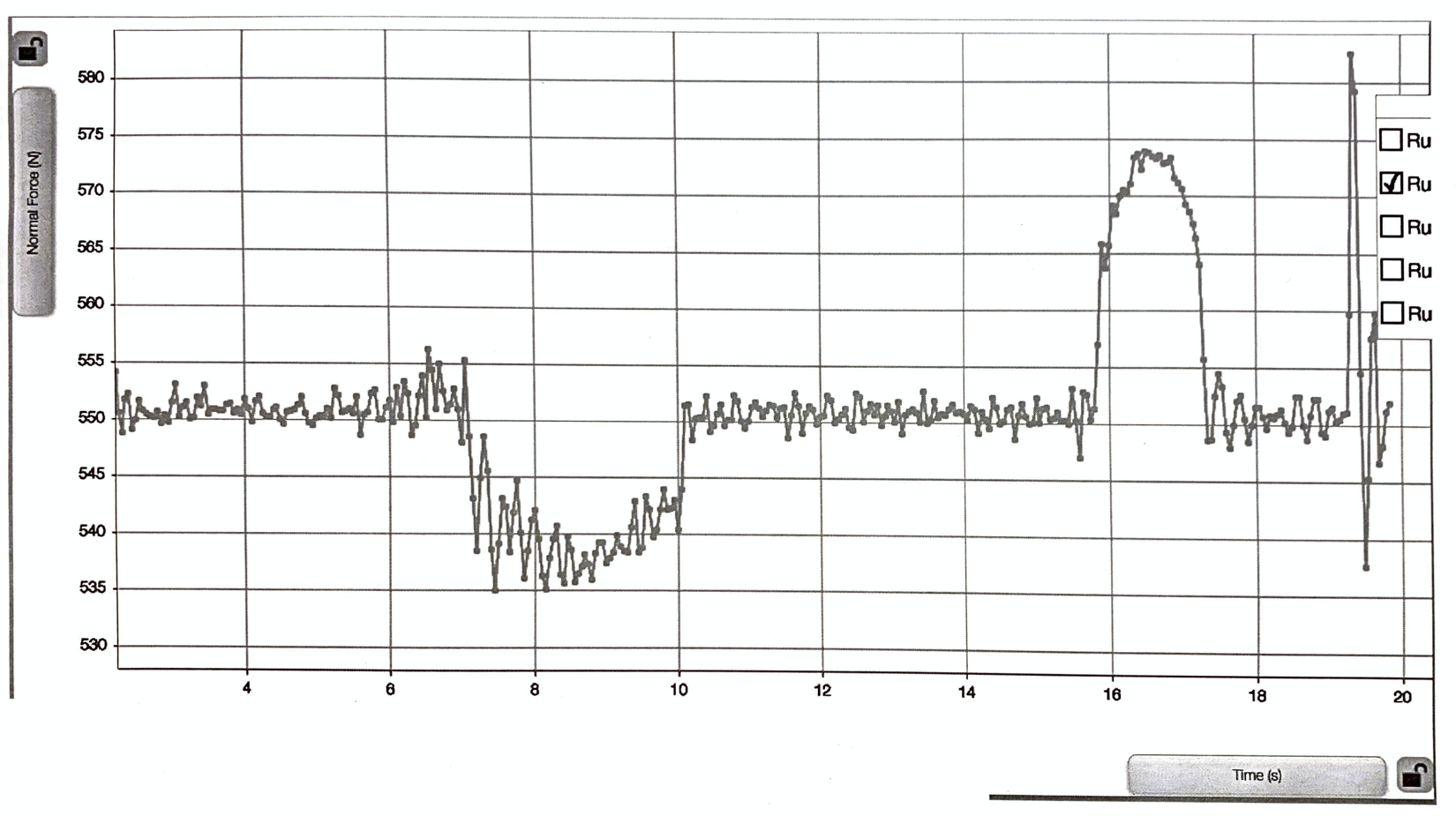
On the graph below, clearly label the different parts of the technician’s motion, each with the letter and in a different color:
(A) before the elevator begins to move(B) while the elevator is moving downward with an increasing speed(C) while the elevator is moving downward at a constant speed(D) while the elevator is moving downward with a decreasing speed(E) after the elevator comes to a complete stop
(ignore the crazy jiggle at the end - that's when the doors open!)
On the graph below, clearly label the different parts of the technician’s motion, each with the letter and in a different color:
(A) before the elevator begins to move
(B) while the elevator is moving downward with an increasing speed
(C) while the elevator is moving downward at a constant speed
(D) while the elevator is moving downward with a decreasing speed
(E) after the elevator comes to a complete stop
(ignore the crazy jiggle at the end - that's when the doors open!)
1
From the graph, determine the weight of the technician in Newtons.
Fg = Fearth on technician =
From the graph, determine the weight of the technician in Newtons.
Fg = Fearth on technician =
1
How did you determine this value?
1
Use the weight of the technician to calculate his mass in kilograms. Show your work. You can draw it, type it or upload a photo.
Use the weight of the technician to calculate his mass in kilograms.
Show your work. You can draw it, type it or upload a photo.
1
Use the free body diagrams you drew and information you can get from the graph to calculate the average acceleration of the elevator while it is speeding up. Clearly show your work. You can draw it, type it or upload a photo.
Use the free body diagrams you drew and information you can get from the graph to calculate the average acceleration of the elevator while it is speeding up.
Clearly show your work. You can draw it, type it or upload a photo.
1
Use the free body diagrams you drew and information you can get from the graph to calculate the average acceleration of the elevator while it is slowing down. Clearly show your work. You can draw it, type it or upload a photo.
Use the free body diagrams you drew and information you can get from the graph to calculate the average acceleration of the elevator while it is slowing down.
Clearly show your work. You can draw it, type it or upload a photo.
1
If the acceleration of the elevator exceeds 0.9 m/s2, then people will start getting sick. Will AAEC have to replace this elevator?
1
Use the graph to estimate the amount of time it takes the elevator to speed up. Explain how you determined this value.
1
Your last objective is to calculate the cruising velocity of the elevator when it is moving downward at a constant speed. Considering what you have already determined, which will be the best equation for this task?
1
Calculate the cruising velocity of the elevator when it is moving downward at a constant speed. Clearly show your work. You can draw it, type it or upload a photo.
Calculate the cruising velocity of the elevator when it is moving downward at a constant speed.
Clearly show your work. You can draw it, type it or upload a photo.
