Find the equation from the table below:
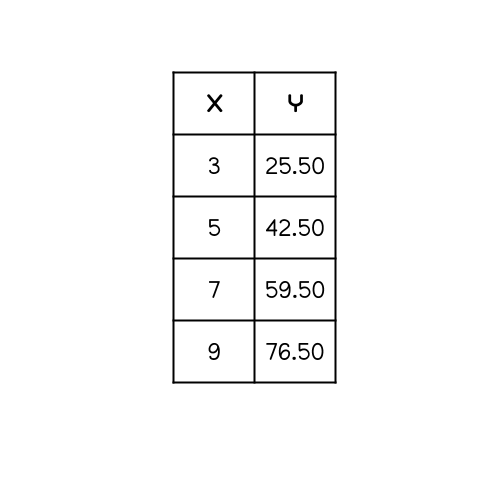
Find the equation from the table below:
What is something positive that happened yesterday?
Graph x=3
Graph y=-1
Find the equation from the table below:
Follow these steps to set up your TI-84 Calculator if you haven't already. When you complete these steps, upload a screenshot to show that you have the calculator ready to go!
Log into Chromebook using HCDE student email
Click on the settings gear (bottom right corner where the time is- click, then top right corner of the pop-up menu- click the gear beside the lock icon)
Once Settings has opened, click "Apps" on the left-hand menu
Click "Manage your apps"
Scroll until you see "TI-84 Plus CE App for Chrome OS", click this app
Then "Pin to Shelf" (the toggle button should turn blue and a TI calculator icon should now be appearing on your Chromebooks bottom toolbar)
Click the Calculator Icon and use as you would a physical TI-84 Calculator
Click the blue plus sign, then click image. Upload a screenshot of your new working calculator here!