Write the equation of the line in point-slope form.
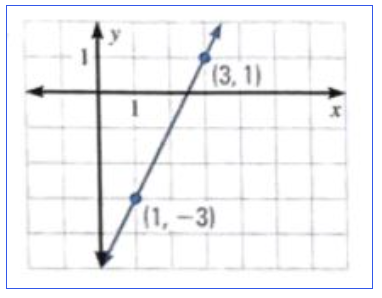
Write the equation of the line in point-slope form.
Find the x-intercept of the equation by graphing (using the Desmos calculator):
Write your answer as an ordered pair.
Show your work.
Find the y-intercept of the equation by graphing (using the Desmos calculator):
Write your answer as an ordered pair
Show your work.
Use the slope formula to find the slope of a line that passes through the points.
(-4, 3) and (7, 5)
Show your work.
Use the slope formula to find the slope of a line that passes through the points.
(1, 2) and (-2, 2)
Show your work.
Use the slope formula to find the slope of a line that passes through the points.
(-2, -1) and (2, -6)
Show your work.
Use the slope formula to find the slope of a line that passes through the points.
(4, -1) and (4, 3)
Show your work.
Find the slope of the equation:
Show your work.
Find the y-intercept of the equation:
Show your work.
Use the slope and y-intercept to graph the equation.
Write the equation in slope intercept form with the given information:
Write the equaiton of the line in slope intercept form with the given information:
Show your work in the box below.
Write the equaiton of the line in slope intercept form with the given information:
Show your work in the box below.
Write an equation in slope intecept form for a linear function f(x) that has the given values.
Hint: What are the two points?
Show your work in the box below.
Graph the linear function in the space provided.
Write an equation in point-slope form of the line that passes through the given point and has a given slope m.
(2, 1), m = 2
Write an equation in point-slope form of the line that passes through the given point and has a given slope m.
(7, -1), m = -6
Write an equation in point-slope form of the line that passes through the given point and has a given slope m.
(-8, 2), m = 5
Write an equation in point-slope form of the line that passes through the given point and has a given slope m.
(-11, -3), m = -9
Graph the equation on the graph below:
Write the equation of the line in point-slope form.
Write an equation of the line in point-slope form that passes through the given points. SHOW YOUR WORK IN THE BOX BELOW.
(-4, -1), (6, -7)
Write the equation of the given line in slope-intercept form.
Show your work.
Write the equation of the given line in standard form.
***Remember that standard form can only have integer coefficients!!
Show your work.
Write the equation of the line that passes through the two given points in point-slope form.
Show your work.
Write the equation of the line that passes through the two given points in slope-intercept form.
Show your work.
Write the equation of the line that passes through the two given points in standard form.
Show your work.
Graph the equation of the line that has an x-intercept of -5 and a y-intercept of 1
Graph the equation of the line.
Graph the equation using an input output table. Follow the steps below to make an input output table using the Desmos Calculator.
1) Press the "+" button in the upper right corner
2) Hit "Table" to create the table in Desmos calculator
3) Fill in values for x & y based on your equation.
4) Type the equation as you see it in the line below to draw a line through your points.
If your line does not go through the points, fix your table.
Hit the "home" button to re-center your graph.
Graph the equation using an input output table. Follow the steps below to make an input output table using the Desmos Calculator.
1) Press the "+" button in the upper right corner
2) Hit "Table" to create the table in Desmos calculator
3) Fill in values for x & y based on your equation.
4) Type the equation as you see it in the line below to draw a line through your points.
If your line does not go through the points, fix your table.
Hit the "home" button to re-center your graph.
Graph the equation using an input output table. Follow the steps below to make an input output table using the Desmos Calculator.
1) Press the "+" button in the upper right corner
2) Hit "Table" to create the table in Desmos calculator
3) Fill in values for x & y based on your equation.
4) Type the equation as you see it in the line below to draw a line through your points.
If your line does not go through the points, fix your table.
Hit the "home" button to re-center your graph.
Writing the equation of the line shown.

Writing the equation of the line shown.
What is the slope of a line parallel to the line formed by the equation?
Show your work.
What is the equation of the line parallel to the line formed by the equation and passes through the point (2, 4)?
Show your work.
What is the slope of the line perpendicular to the line formed by the equation?
Show your work.
What is the equation of the line perpendicular to the line formed by the equation that passes through the point (2, 4)?
Show your work.
Find the line of best fit with the Desmos graphing calculator. Round to the nearest tenth on your slope and intercept.
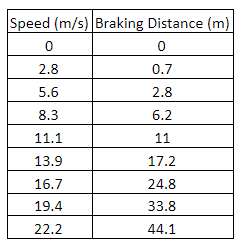
Given the equation above, what would you expect the breaking distance to be at a speed of 30 miles an hour?
Given the equation above, what would you expect the speed to be when the breaking distance is 10?