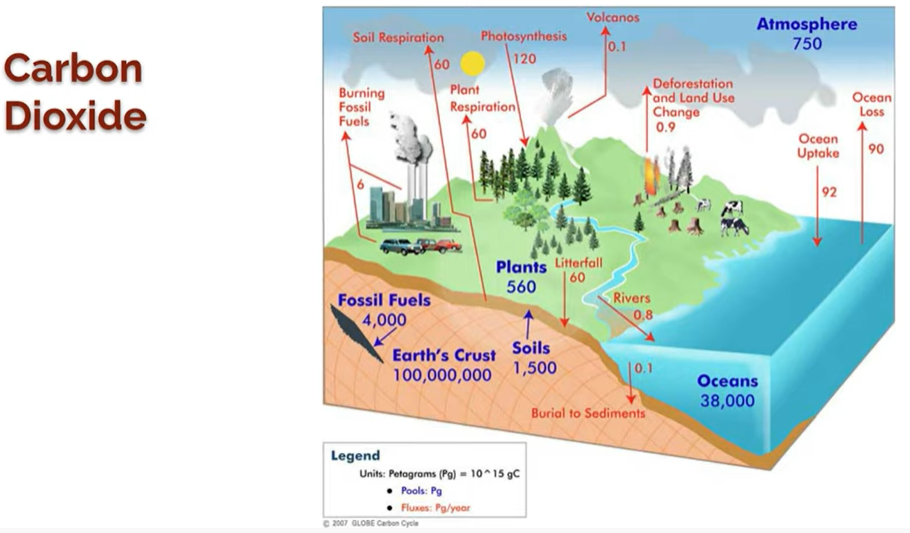
The diagram below shows the major sources of carbon dioxide, both anthropogenic and natural.
The diagram below shows the major sources of carbon dioxide, both anthropogenic and natural.
Using the diagram above, select the natural sources of CO2.
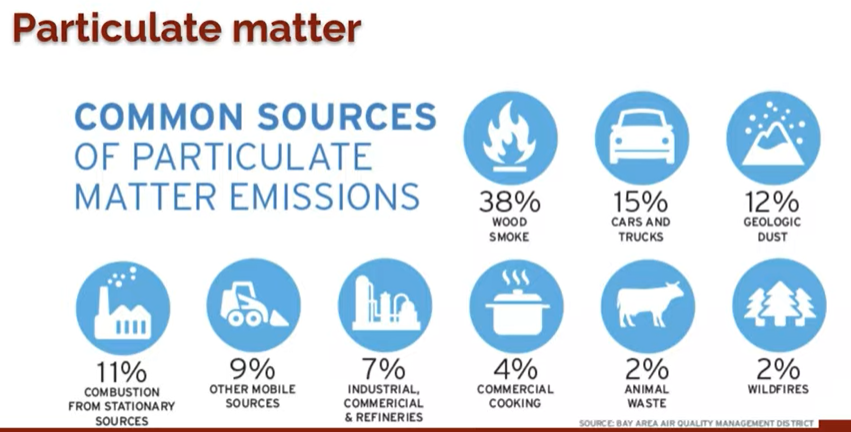
The diagram below shows the major sources of particulate matter, both anthropogenic and natural.
Using the diagram above, select the natural sources of particulate matter
In this lab, you will compare Air Quality Index (AQI) values for multiple pollutants for Harris County, TX and Los Angeles, CA for the years 1985 and 2019. Ideally, we would use more than two years for comparison, but this will give you a sense of how air quality has improved over time in two locations. You will also see how air quality compared between two parts of the country that have different size populations, types of industries, and geographic settings.
1. Go to the USEPA Outdoor Air Quality Data page: https://www.epa.gov/outdoor-air-quality-data/air-data-aqi-plot
2. Select first pollutant, second pollutant, and year (1985). You can choose any two pollutants you wish (except PM2.5 which isn't always measured), just choose different combinations than other partners are working on.
3. Select Geographic area. Choose “TX-Harris”
4. Hit the button “plot data.”
5. The plot will soon appear below your data entry area. The numbers on the right side of the chart show you how many days the city had AQI values for five different categories, ranging from good to very unhealthy. Record the number of days for each pollutant in the table below. Be sure to indicate the pollutant type (CO, NO2, etc) in each column header.
6. Take a screenshot of each AQI chart (4 total) and paste at the end of this document.This will preserve your raw data and prove you did the work. It will also help you to respond to some of the questions below.
7. Repeat steps 1-6 for TX-Harris in 2019, then “Los Angeles-Long Beach-Anaheim California” for both 1985 and 2019.
Fill in the table
Using your completed data table, make at least three quantitative comparisons between
Harris County, TX and Los Angeles. Example: “In 1985, Harris County had XX fewer days than Los Angeles on which the AQI for CO was >50”.
Look at each of your four graphs. What patterns, if any, do you observe about the time of the year/season during which the AQI index is poor? Make several observations.
What does the data reveal about how air quality has changed in Harris County between 1985 and 2019? Use data to support your response.
What does the data reveal about how air quality has changed in Los Angeles between 1985 and 2019? Use data to support your response.
Overall, which city has better air quality? Again, support your response with data.
Hypothesize about the causes of the air quality differences between the two cities. Provide at least three reasons.