Log in
Sign up for FREE
arrow_back
Library
3 - If statements, serial monitor, and digital signals
By Nathan Knauss
star
star
star
star
star
Share
share
Last updated about 4 years ago
17 questions
Add this activity
1
1
1
1
1
1
1
1
1
1
1
1
1
1
1
1
1
if-else Structure
These questions are based on the if-else slideshow found here.
Question 1
1.
Which of the following statements is true about if-blocks:
Starts with if
May have multiple else-ifs (or none)
May finish with an else (or not)
All of these statements are true
Question 2
2.
Inside of the parentheses of an if statement goes the true or false statement known as the:
Conditional expression
Assignment
Statement
Question
Question 3
3.
Which of the following does
NOT
require a conditional expression:
None of these
If
else
else if
Question 4
4.
Which of these phrases summarises a simple if...else structure:
Only decision trees more complex than these
Do
this
or do nothing
Do
this
,
that
, or
both
this and that
Do
this
or do
that
Question 5
5.
When you have an
if
with no else if and no else clause, which of the following summarizes its behavior:
Do
this
or do
that
Only decision trees more complex than these
Do
this
,
that
, or
both
this and that
Do
this
or do nothing
Digital Signals
These questions are based on the Digital Inputs slide show found here.
Question 6
6.
All input to the Arduino comes to it from the outside world in what form:
Analog signal
Digital signal
Buttons
Potentiometer
Question 7
7.
The Arduino will detect an input signal as digital with which of the following function calls?
inputValue=analogWrite(pin);
inputValue=digitalRead(pin);
inputValue=digitalWrite(pin);
inputValue=analogRead(pin);
Question 8
8.
Which statement is true about signals and messages
A signal is transmitted through a message
A message is transmitted through a signal
All messages are digital
All signals are digital
Question 9
9.
Which of the following functions is used for digital output?
analogRead()
output()
digitalWrite()
analogWrite()
digitalRead()
Question 10
10.
Which of the following is a good example of reading digital input from pin 4 and assigning the resulting value to the variable
inputValue
?
digitalRead(inputValue)=4;
digitalRead(4)=inputValue;
inputValue=digitalRead(4);
4=inputValue(digitalRead);
Question 11
11.
How do you check to see if the button is being pushed?
if(inputValue==HIGH)
if(inputValue==digitalRead(4))
if(inputValue==PUSHED)
if(inputValue==LOW)
Question 12
12.
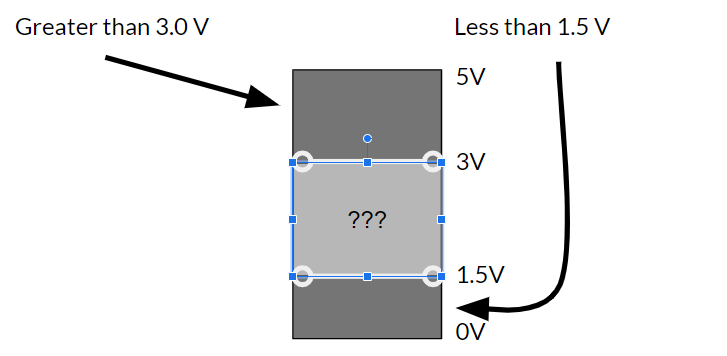
Match the signal value with the voltage level.
TRUE
1
FALSE
HIGH
LOW
0
Greater than 3.0 V
Less than 1.5 V
Serial Monitor
These questions are based on the serial monitor slide show found here.
Question 13
13.
What part of this command represents the value of the baud rate?
Serial.begin(9600);
Question 14
14.
Which of the following is always the first serial command to use in a program?
Serial.print()
Serial.begin()
Serial.println()
Question 15
15.
In what part of the program does the Serial.begin() function placed?
The loop
Global space
The setup
Question 16
16.
Write the serial command that creates a new line after printing its requested text. Do not include printable text or the semicolon.
Question 17
17.
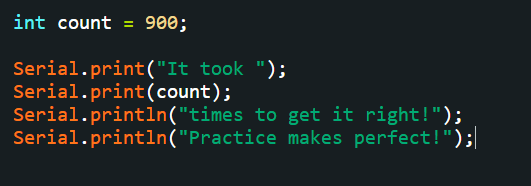
What will be the displayed in the serial monitor if the following lines of code are run?