Log in
Sign up for FREE
arrow_back
Library

Video Final Exam

star
star
star
star
star
Last updated about 5 years ago
30 questions
1
1
1
1
1
1
1
1
1
1
1
1
1
5
1
1
1
1
1
1
1
1
1
1
1
2
2
2
2
2
Multiple Choice/Matching Questions
Question 1
1.

Question 2
2.

Question 3
3.

Question 4
4.

Question 5
5.

Question 6
6.

Question 7
7.

Question 8
8.

Question 9
9.

Question 10
10.

Question 11
11.

Question 12
12.

Question 13
13.

Question 14
14.

Draggable itemarrow_right_altCorresponding Item
arrow_right_alt
arrow_right_alt
arrow_right_alt
arrow_right_alt
arrow_right_alt
Question 15
15.

Question 16
16.

Question 17
17.

Question 18
18.

Question 19
19.

Question 20
20.

Question 21
21.

Question 22
22.

Question 23
23.

Question 24
24.

Question 25
25.

Open Ended Questions
Question 26
26.

What is the term used to describe a transition style where the video gradually blends from one image to another?

Question 27
27.

What is the term used to describe the device that physically stabilizes a camera during photography?

Question 28
28.

A category of artistic, musical, or literary composition characterized by a particular style, form, or content is called a _______ (*hint - begins with a "G")

Question 29
29.

Name one of the four elements that make up a genre

Question 30
30.

What is the popular shot where a subject is shot from behind another, framing the subject anywhere from a Medium to Close-Up?

The shoulder, neck, and/or back of the head of the subject facing away from the camera remains viewable, making the shot useful for showing reactions during conversations. It tends to place more of an emphasis on the connection between two speakers rather than the detachment or isolation that results from single shots.
Which below is the most used type of video file format?
.mov
.mpeg
.mp4
.mp3
The effect that removes the green screen from a video clip can be found in this folder in the Effects Panel:
Distort
Keying
Generate
Noise & Grain
Choose the THREE that Apply: A keyframe is used to...
Add text to a project
Modify and change the scale of a clip during playback
Move objects around a scene at different times
Modify and change size and position of a clip during playback
Premiere Pro is organized into which of the following panels ? (hint: select 3)
Sound Bar Panel
Timeline Panel
Project Panel
Source Monitor Panel
After Effects is organized into which of the following panels? (hint: select 3)
Timeline Panel
Source Monitor Panel
Project Panel
Composition Panel
In all of the Adobe programs, the panels can be: (hint: select 3)
Undocked and moved around
Resized
Grouped together within the same panel area
Deleted from the program
This panel lets you import and organize the media assets you'll use in your project:
Program Monitor Panel
Project Panel
Source Monitor Panel
Timeline Panel
This Premiere Pro panel lets you preview the clips you've imported before editing them:
Project Panel
Source Monitor Panel
Program Monitor Panel
Timeline Panel
Select the correct panels for both After Effects and Premiere Pro (hint: select 2)
These panels lets you preview your project as you create it:
Project Panel
Composition Panel
Program Monitor Panel
Timeline Panel
This panel lets you arrange and edit your media assets to create your actual project:
Timeline Panel
Project Panel
Source Monitor Panel
Program Monitor Panel
You can import assets into your project by _______ the project panel, in Premiere Pro AND After Effects.
double clicking
closing
clicking on
opening
This vertical blue line, located in the Timeline Panel (which is referred to as the playhead, current time indicator, or scrubber by some) indicates:
the beginning of the sequence
the current position of the sequence/composition
the current position a keyframe
the end of the sequence
In Premiere Pro, to adjust, edit, or remove an audio clip independently from its adjoining video portion, which option should you choose?
Delete
Remove
Unlink
Disable
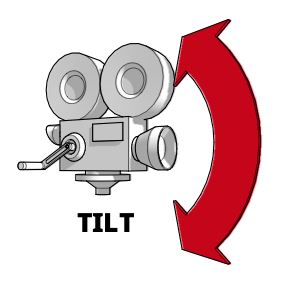
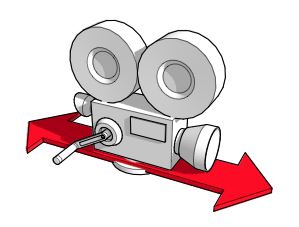
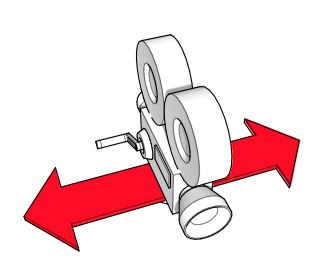
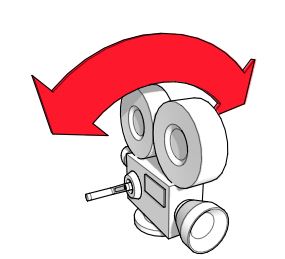
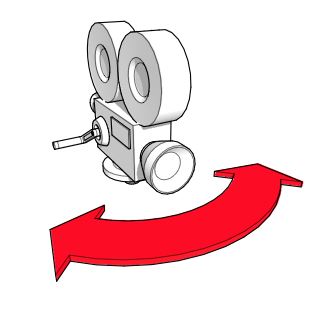
What is this camera motion called?
Dolly
Truck
Pan
Tilt
Roll
What kind of shot is a Close Up?
camera is pointed down at subject, makes it seem less powerful.
a shot taken with the camera very close to subject or object. allows audience to focus in emotions of people or details of object.
below eye level, looking up at subject. makes subject seem powerful.
cuts of subject at stomach/waist, head room to show character is talking or moving. especially if arms are moving which is important to show shows the subject from above.
What kind of shot is a High Angle?
below eye level, looking up at subject. makes subject seem powerful.
camera is pointed down at subject, makes it seem less powerful.
a shot taken with the camera very close to subject or object. allows audience to focus in emotions of people or details of object.
cuts of subject at stomach/waist, head room to show character is talking or moving. especially if arms are moving which is important to show shows the subject from above.
What kind of shot is a Low Angle?
a shot taken with the camera very close to subject or object. allows audience to focus in emotions of people or details of object.
below eye level, looking up at subject. makes subject seem powerful.
cuts of subject at stomach/waist, head room to show character is talking or moving. especially if arms are moving which is important to show shows the subject from above.
camera is pointed down at subject, makes it seem less powerful.
What kind of shot is a Medium Shot?
camera is pointed down at subject, makes it seem less powerful.
below eye level, looking up at subject. makes subject seem powerful.
a shot taken with the camera very close to subject or object. allows audience to focus in emotions of people or details of object.
cuts of subject at stomach/waist, head room to show character is talking or moving. especially if arms are moving which is important to show shows the subject from above.
What best describes a Point of View shot?
scene from directly above, shows position and motions of characters
used to show the whole character in relation to surroundings
as if the viewers are looking through the characters eyes
inside the face or part of object. showcases emotion/detail very highly
What best describes a Birds Eye View shot?
used to show the whole character in relation to surroundings
scene from directly above, shows position and motions of characters
as if the viewers are looking through the characters eyes
inside the face or part of object. showcases emotion/detail very highly
What best describes a Long Shot?
inside the face or part of object. showcases emotion/detail very highly
used to show the whole character in relation to surroundings
scene from directly above, shows position and motions of characters
as if the viewers are looking through the characters eyes
What is a Storyboard?
this is a rough draft of a script that includes most of the dialog, movements, and shot descriptions.
this is the device used to mark the beginning of a new shot for a scene.
the process of producing sketches of the shots of your script. The end result looks like a comic book of your film (Without the speech bubbles.) part of the preproduction (or planning) process that can include creating a logline, character development, scripting, and sound design.
The term for this technique has been used in many fields to remove a background (like a green screen) from the subject of a photo or video.
Equalizing
Dubbing
Keying (ultra key/keylight)
Transitioning
Emphasizes a small area or detail of the subject, such as the eye(s) or mouth
Extreme Close Up
Close Up
Long Shot
Extreme Long Shot
Shot in which the camera is set at an angle on its roll axis so that the horizon line is not level. It is often used to show a disoriented or uneasy psychological state.
German Angle
European Angle
Dutch Angle
French Angle