Log in
Sign up for FREE
arrow_back
Library
FA: U3D1 Speaking Practice
By Vivian Huang
star
star
star
star
star
Share
share
Last updated over 4 years ago
6 questions
Add this activity
1
1
1
1
1
1
Question 1
1.
Record
your response to the following question
in Chinese
based on the Textbook Dialogue.
To Record:
Click the "+" button in the upper right-hand corner.
Click "Audio"
Click "Record Audio"
Click "Add Audio"
To
delete
a recording, use the "Backspace" button on your keyboard
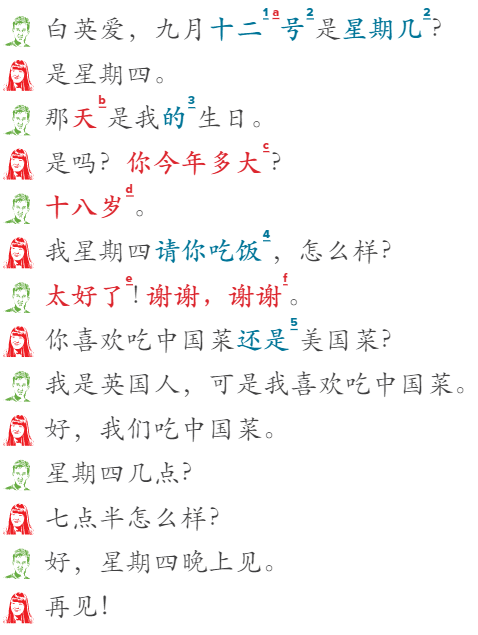
问题 | wèn tí | Question:
When is Gao Wenzhong’s birthday?
Question 2
2.
Record
your response to the following question
in Chinese
based on the Textbook Dialogue.
To Record:
Click the "+" button in the upper right-hand corner.
Click "Audio"
Click "Record Audio"
Click "Add Audio"
To
delete
a recording, use the "Backspace" button on your keyboard
问题 | wèn tí | Question:
How old is Gao Wenzhong?
Question 3
3.
Record
your response to the following question
in Chinese
based on the Textbook Dialogue.
To Record:
Click the "+" button in the upper right-hand corner.
Click "Audio"
Click "Record Audio"
Click "Add Audio"
To
delete
a recording, use the "Backspace" button on your keyboard
问题 | wèn tí | Question:
Who is going to treat whom?
Question 4
4.
Record
your response to the following question
in Chinese
based on the Textbook Dialogue.
To Record:
Click the "+" button in the upper right-hand corner.
Click "Audio"
Click "Record Audio"
Click "Add Audio"
To
delete
a recording, use the "Backspace" button on your keyboard
问题 | wèn tí | Question:
What is Gao Wenzhong’s nationality?
Question 5
5.
Record
your response to the following question
in Chinese
based on the Textbook Dialogue.
To Record:
Click the "+" button in the upper right-hand corner.
Click "Audio"
Click "Record Audio"
Click "Add Audio"
To
delete
a recording, use the "Backspace" button on your keyboard
问题 | wèn tí | Question:
What kind of food are they going to have?
Question 6
6.
Record
your response to the following question
in Chinese
based on the Textbook Dialogue.
To Record:
Click the "+" button in the upper right-hand corner.
Click "Audio"
Click "Record Audio"
Click "Add Audio"
To
delete
a recording, use the "Backspace" button on your keyboard
问题 | wèn tí | Question:
What time is the dinner?