Preskoči na glavni sadržaj
Prijava
Sign up for FREE
arrow_back
Biblioteka

FA: U7D2 Speaking Practice

star
star
star
star
star
Posljednje ažuriranje about 5 years ago
6
1
Pitanje 1
1.

Record your response to the following question in Chinese based on the Textbook Dialogue.

To Record:

  1. Click the "+" button in the upper right-hand corner.

  2. Click "Audio"

  3. Click "Record Audio"

  4. Click "Add Audio"

  5. To delete a recording, use the "Backspace" button on your keyboard
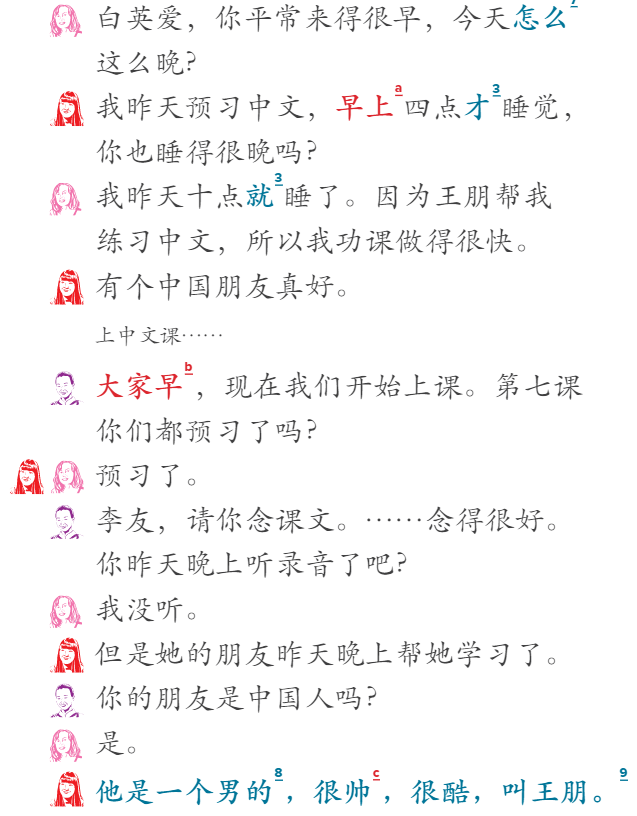
问题 | wèn tí | Question:

Why did Bai Ying'ai come so late today?

1
Pitanje 2
2.

1
1
1
1

Record your response to the following question in Chinese based on the Textbook Dialogue.

To Record:

  1. Click the "+" button in the upper right-hand corner.

  2. Click "Audio"

  3. Click "Record Audio"

  4. Click "Add Audio"

  5. To delete a recording, use the "Backspace" button on your keyboard

问题 | wèn tí | Question:

Why was Li You able to go to bed early last night?

Pitanje 3
3.

Record your response to the following question in Chinese based on the Textbook Dialogue.

To Record:

  1. Click the "+" button in the upper right-hand corner.

  2. Click "Audio"

  3. Click "Record Audio"

  4. Click "Add Audio"

  5. To delete a recording, use the "Backspace" button on your keyboard

问题 | wèn tí | Question:

Why did Bai Ying'ai say that it is nice to have a Chinese friend?

Pitanje 4
4.

Record your response to the following question in Chinese based on the Textbook Dialogue.

To Record:

  1. Click the "+" button in the upper right-hand corner.

  2. Click "Audio"

  3. Click "Record Audio"

  4. Click "Add Audio"

  5. To delete a recording, use the "Backspace" button on your keyboard

问题 | wèn tí | Question:

Which lesson is the class studying today?

Pitanje 5
5.

Record your response to the following question in Chinese based on the Textbook Dialogue.

To Record:

  1. Click the "+" button in the upper right-hand corner.

  2. Click "Audio"

  3. Click "Record Audio"

  4. Click "Add Audio"

  5. To delete a recording, use the "Backspace" button on your keyboard

问题 | wèn tí | Question:

Who did not listen to the audio last night?

Pitanje 6
6.

Record your response to the following question in Chinese based on the Textbook Dialogue.

To Record:

  1. Click the "+" button in the upper right-hand corner.

  2. Click "Audio"

  3. Click "Record Audio"

  4. Click "Add Audio"

  5. To delete a recording, use the "Backspace" button on your keyboard

问题 | wèn tí | Question:

How did Bai Ying'ai describe Li You’s friend?