FA: U8D1 Speaking Practice

Last updated over 4 years ago
7 questions
1

Record your response to the following question in Chinese based on the Textbook Dialogue.

To Record:
  1. Click the "+" button in the upper right-hand corner.
  2. Click "Audio"
  3. Click "Record Audio"
  4. Click "Add Audio"
  5. To delete a recording, use the "Backspace" button on your keyboard
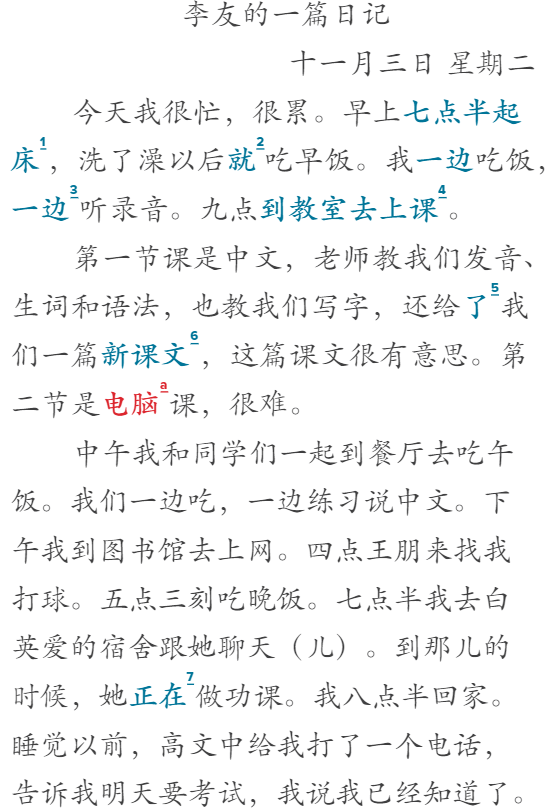
问题 | wèn tí | Question:
What did Li You do after getting up?

1

Record your response to the following question in Chinese based on the Textbook Dialogue.

To Record:
  1. Click the "+" button in the upper right-hand corner.
  2. Click "Audio"
  3. Click "Record Audio"
  4. Click "Add Audio"
  5. To delete a recording, use the "Backspace" button on your keyboard
问题 | wèn tí | Question:
Did Li You have breakfast?

1

Record your response to the following question in Chinese based on the Textbook Dialogue.

To Record:
  1. Click the "+" button in the upper right-hand corner.
  2. Click "Audio"
  3. Click "Record Audio"
  4. Click "Add Audio"
  5. To delete a recording, use the "Backspace" button on your keyboard
问题 | wèn tí | Question:
How many classes did Li You have?

1

Record your response to the following question in Chinese based on the Textbook Dialogue.

To Record:
  1. Click the "+" button in the upper right-hand corner.
  2. Click "Audio"
  3. Click "Record Audio"
  4. Click "Add Audio"
  5. To delete a recording, use the "Backspace" button on your keyboard
问题 | wèn tí | Question:
What did the teacher do in Li You’s first class?

1

Record your response to the following question in Chinese based on the Textbook Dialogue.

To Record:
  1. Click the "+" button in the upper right-hand corner.
  2. Click "Audio"
  3. Click "Record Audio"
  4. Click "Add Audio"
  5. To delete a recording, use the "Backspace" button on your keyboard
问题 | wèn tí | Question:
What did Li You do during her lunch hour?

1

Record your response to the following question in Chinese based on the Textbook Dialogue.

To Record:
  1. Click the "+" button in the upper right-hand corner.
  2. Click "Audio"
  3. Click "Record Audio"
  4. Click "Add Audio"
  5. To delete a recording, use the "Backspace" button on your keyboard
问题 | wèn tí | Question:
What did Li You do at the library?

1

Record your response to the following question in Chinese based on the Textbook Dialogue.

To Record:
  1. Click the "+" button in the upper right-hand corner.
  2. Click "Audio"
  3. Click "Record Audio"
  4. Click "Add Audio"
  5. To delete a recording, use the "Backspace" button on your keyboard
问题 | wèn tí | Question:
What did Li You do after dinner?