FA: U9D1 Speaking Practice
star
star
star
star
star
Last updated about 5 years ago
4 Nsɛmmisa
1
Record your response to the following question in Chinese based on the Textbook Dialogue.
To Record:
Click the "+" button in the upper right-hand corner.
Click "Audio"
Click "Record Audio"
Click "Add Audio"
To delete a recording, use the "Backspace" button on your keyboard
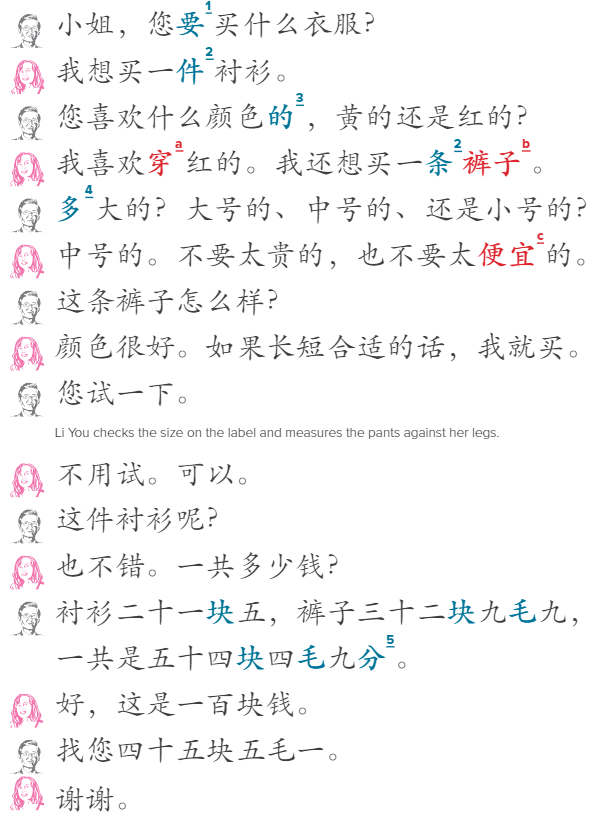
问题 | wèn tí | Question:
What does Li You want to buy?
Record your response to the following question in Chinese based on the Textbook Dialogue.
To Record:
Click the "+" button in the upper right-hand corner.
Click "Audio"
Click "Record Audio"
Click "Add Audio"
To delete a recording, use the "Backspace" button on your keyboard
问题 | wèn tí | Question:
What does Li You want to buy?
1
Record your response to the following question in Chinese based on the Textbook Dialogue.
To Record:
Click the "+" button in the upper right-hand corner.
Click "Audio"
Click "Record Audio"
Click "Add Audio"
To delete a recording, use the "Backspace" button on your keyboard
问题 | wèn tí | Question:
What color does Li You like?
Record your response to the following question in Chinese based on the Textbook Dialogue.
To Record:
Click the "+" button in the upper right-hand corner.
Click "Audio"
Click "Record Audio"
Click "Add Audio"
To delete a recording, use the "Backspace" button on your keyboard
问题 | wèn tí | Question:
What color does Li You like?
1
1