LW 2.3 (11/30) Version B
star
star
star
star
star
Last updated about 3 years ago
10 Nsɛmmisa
0
Identify the wavelength and wave amplitude of the following waves.
Identify the wavelength and wave amplitude of the following waves.
0
0
Identify the wavelength and wave amplitude of the following waves.
Today you will make custom light waves. You will make two of the types of light that you read about in the “Harvesting Sunlight” article and compare them side by side. This will help you to understand what makes types of light different
Amplify Science:
Unit 6: Light Waves
Chapter 2: Light as a wave
Lesson 2.3: Wave Properties
Make a Custom Wave and adjust its properties.
1. Open the Light Waves Simulation.
2. Choose the CUSTOM light source and then press EDIT WAVE.
3. Adjust AMPLITUDE by dragging the vertical arrows up and down. Notice how the light wave changes.
4. Adjust WAVELENGTH by dragging the horizontal arrows left and right. Notice how the light wave changes.
Sim Mission: Plants and custom waves
Create a type of light that will cause a plant to photosynthesize.
Create a type of light that will cause a plant to be damaged.
Return to the Sim and adjust Amplitude and/or Wavelength until you have created a type of light that can cause a plant to photosynthesize or be damaged.
Press CONFIRM and turn on the light.
Drag the plant to the testing area and press INSPECT to observe the results.
Record the wavelength and amplitude that cause photosynthesis and damage below and complete the statements below.
Record the wavelength and amplitude that cause photosynthesis and damage below and complete the statements below.
What type of light did you make?
If the two waves above are light waves, what distinctions can you make between their outcomes?
CFS:
Accurately identifies the differences in light sources
Accurately describes the relationship between wave properties and outcomes
If the waves above are light wave I think that they will be different because ...
We have been investigating properties of waves so that we can answer the Investigation Question, What makes types of light different?
CFS:
Accurately identifies the differences in light sources
Accurately describes the relationship between wave properties and outcomes
Light is different because
Examine the diagram below. Observe the waveform and effect for Light Source 1, and the effect for Light Source 2. Then, decide which waveform (A, B, or C) could represent the light emitted by Light Source 2. Consider the following questions to help you decide:
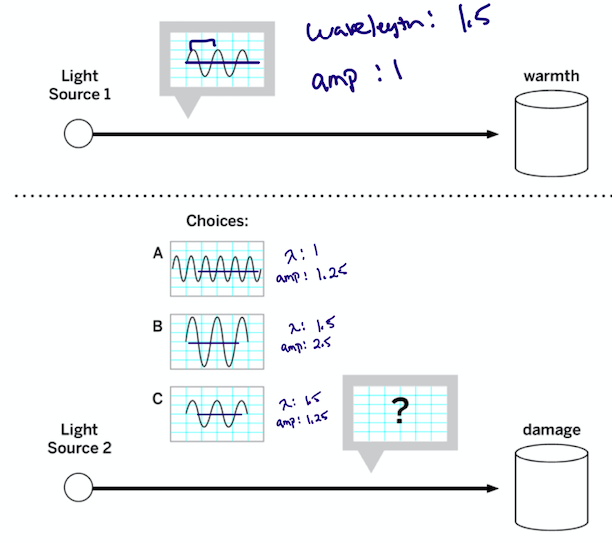
Which light choice (A, B or C) have the same amplitude as the type of light emitted from source 1? (select all that apply)
_____________________ causes the light to change type.
Did the light you made cause photosynthesis or damage?
How did you create different types of light?
Looking at light Source 2, which choice is emitting light that is the same and different from the type of light emitted by Light Source 1? What evidence can you find to support your thinking?
CFS:
Accurately identifies the differences in light sources
Accurately describes the relationship between wave properties and outcomes
I think wave (A/B/C) has a different type of wave because ...
