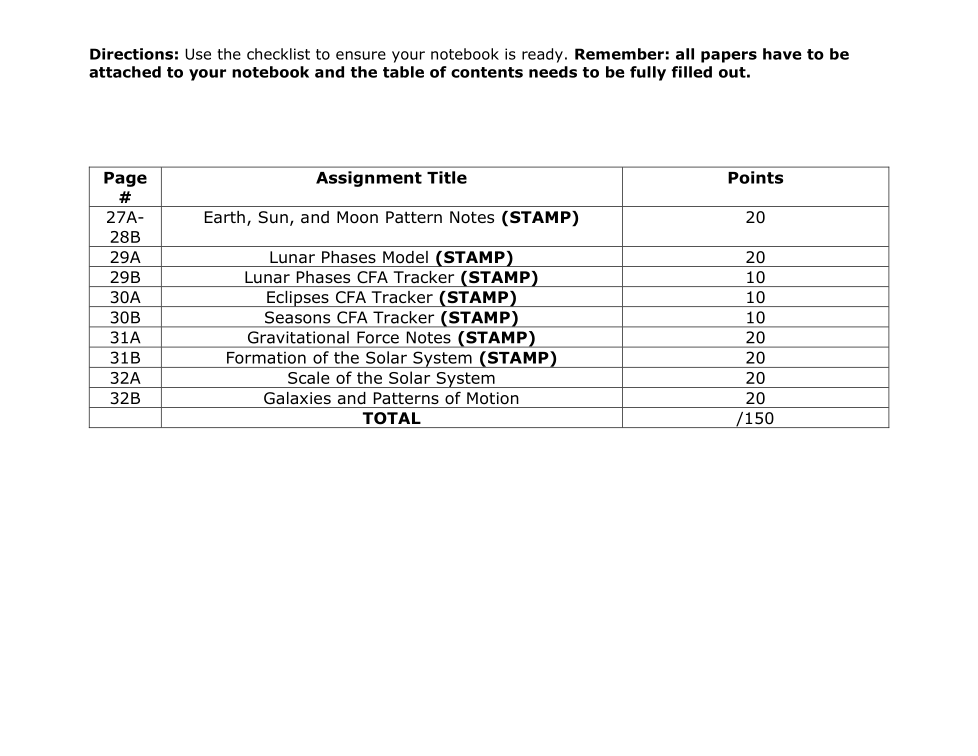
Upload a picture of your fully updated Table of Contents.
(You can find my Table of Contents in Google Classroom - go to "Classwork" and search under the Miscellaneous section.)
Upload a picture of page 27A-28B: Earth, Sun, and Moon Patterns Notes.
*This page must be stamped for full credit.*
Upload a picture of page 29A: Lunar Phases Model.
*This page must be stamped for full credit.*
Upload a picture of page 29B: Lunar Phases CFA Tracker.
*This page must be stamped for full credit.*
Upload a picture of page 30A: Eclipes CFA Tracker.
*This page must be stamped for full credit.*
Upload a picture of page 30B: Seasons CFA Tracker.
*This page must be stamped for full credit.*
Upload a picture of page 31A: Gravitational Force Notes.
*This page must be stamped for full credit.*
Upload a picture of page 31B: Formation of the Solar System.
*This page must be stamped for full credit.*
Upload a picture of page 32A: Scale of the Solar System.
*This page must be complete for full credit.*
Upload a picture of page 32B: Galaxies and Patterns of Motion.
*This page must be stamped for full credit.*