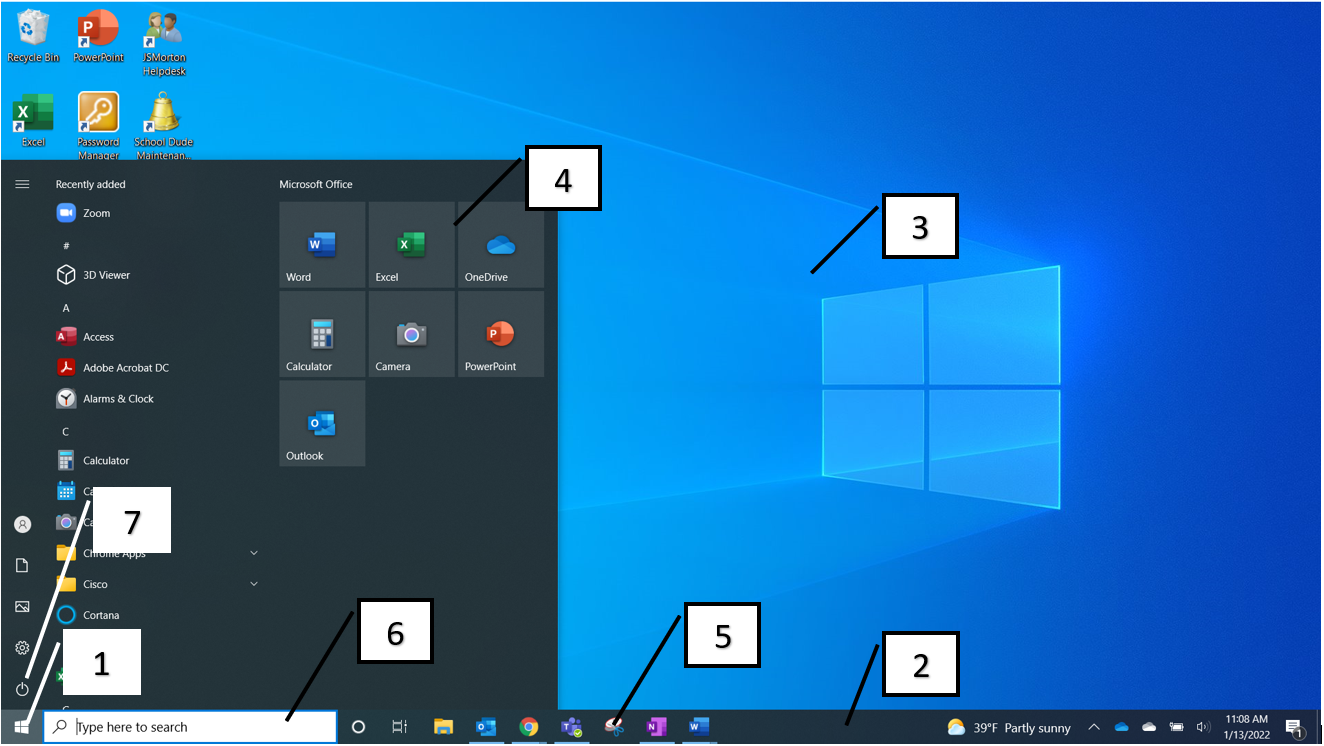
DigLit U1 The Windows Interface
star
star
star
star
star
Last updated over 3 years ago
5 questions
7
| Draggable item | arrow_right_alt | Corresponding Item |
|---|---|---|
desktop | arrow_right_alt | #2 |
type the name of an app/program here to open it without scrolling through the list | arrow_right_alt | #3 |
tiles | arrow_right_alt | #1 |
task bar | arrow_right_alt | #5 |
start menu | arrow_right_alt | #6 |
snipping tool | arrow_right_alt | #7 |
where you would click to log off or restart your computer | arrow_right_alt | #4 |
1
What tool allows you to view more than one window on your screen at a time?
1
What are the four modes of the snipping tool?
1
What tool allows you to group your open programs/apps and windows into task-specific groups?
1
What button allows you to quickly see all of your open windows and choose which one you want to work on next?