SAMPLES 2 - LaTex

Last updated over 3 years ago
12 questions
1

Using \LaTeX in GoFormative

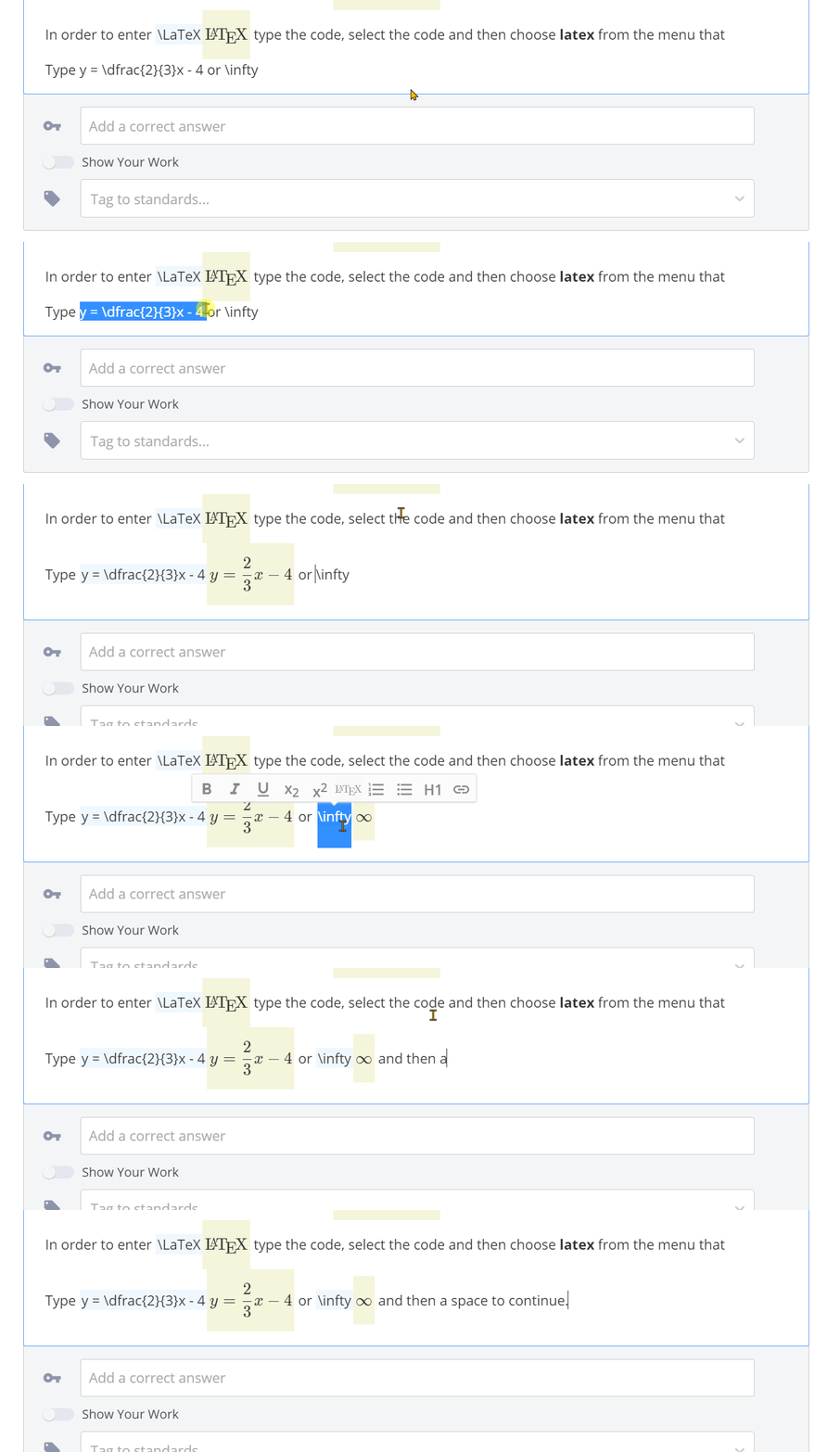
When you want to enter a \LaTeX expression type the code, select it and choose LaTeX. For reference, the supported KaTeX functions will all work here. The LaTeX source code you selected will be highlighted in blue and hidden on students' screens while the rendered output will appear highlighted in yellow-ish(?) and be shown to students. (see below๐Ÿ‘‡๐Ÿ‘‡๐Ÿ‘‡)
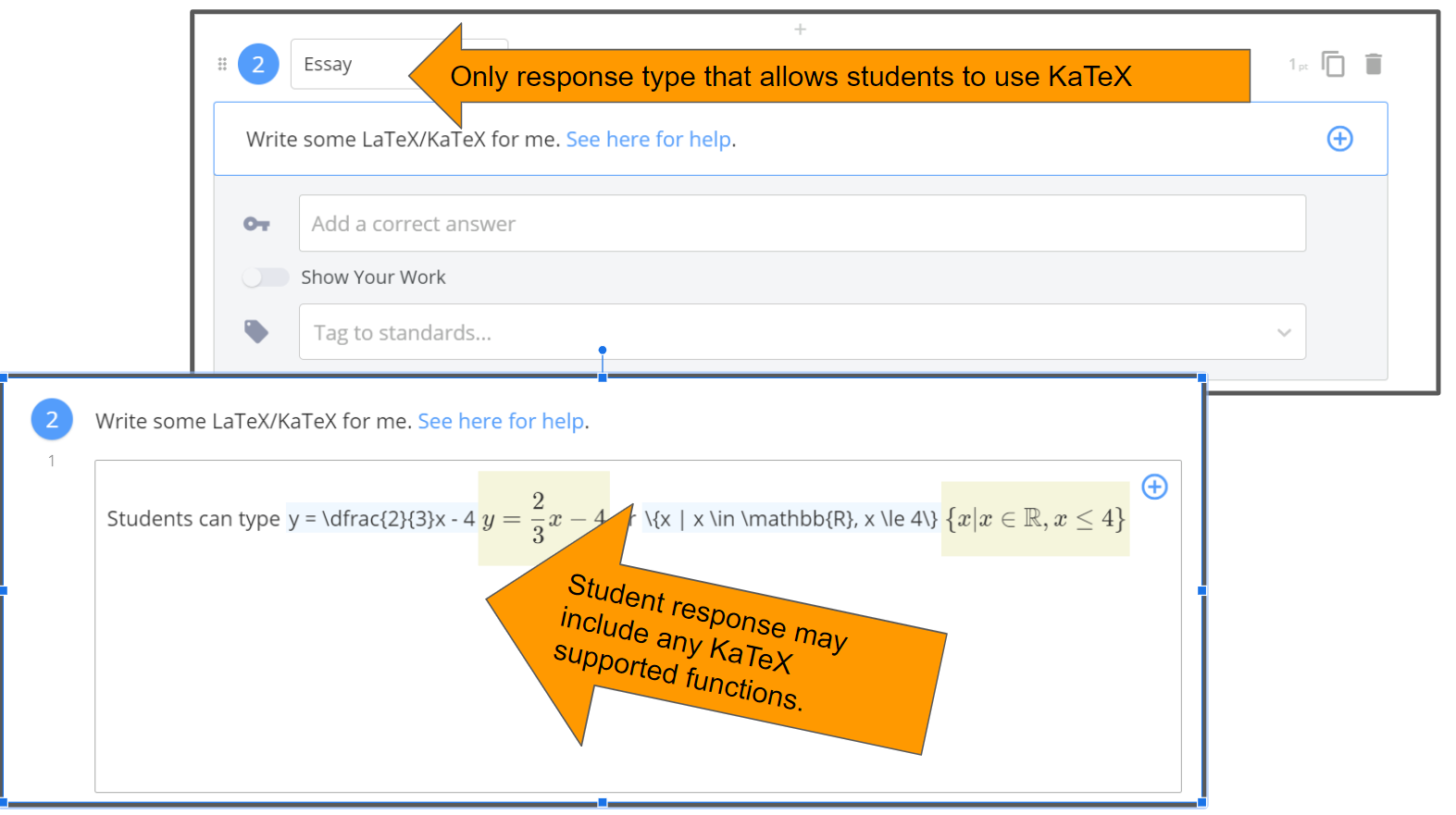
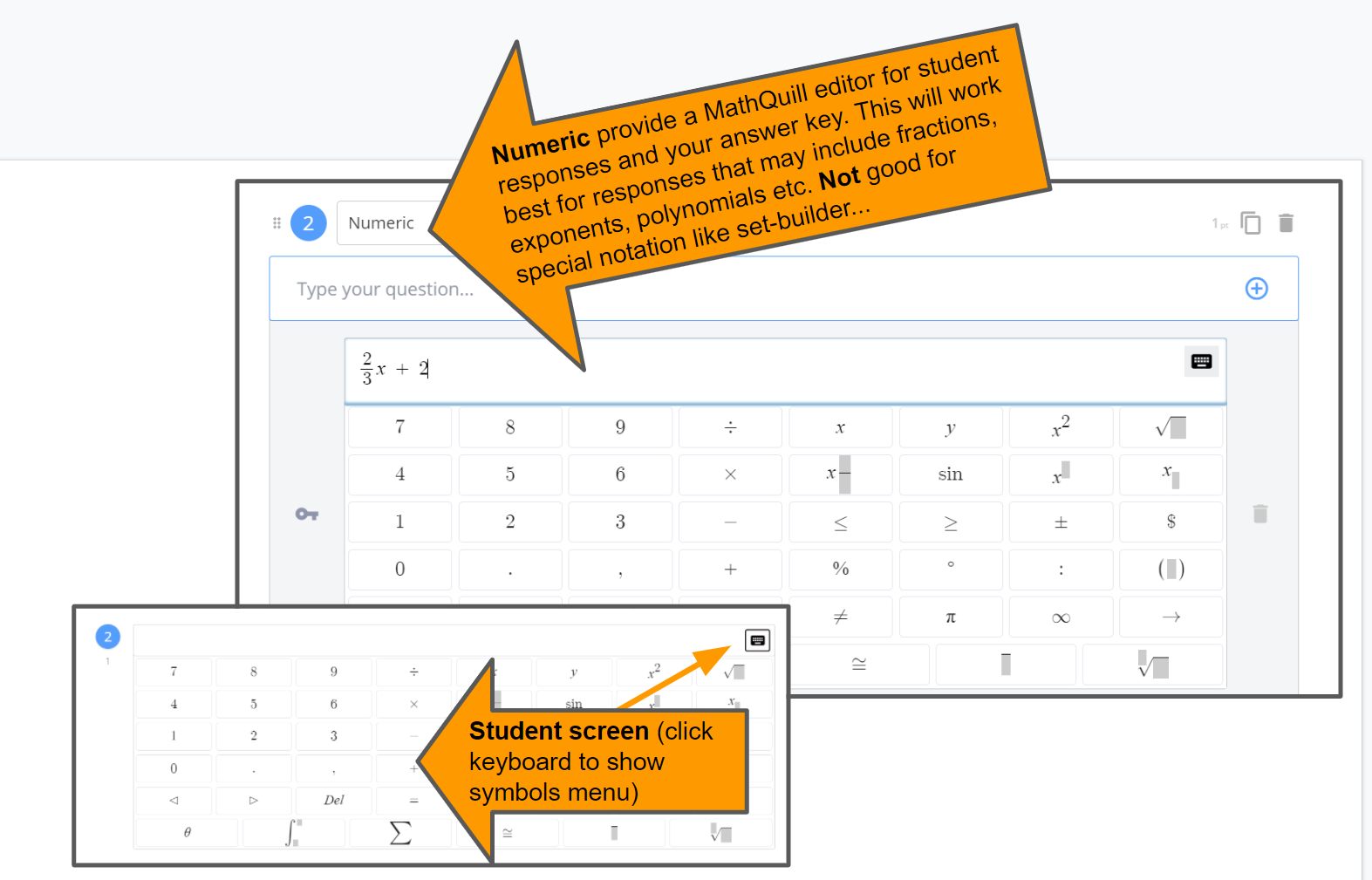
Two systems for math formatting in GoFormative.

In GoFormative teachers can write LaTeX code in many text areas (Text blocks and question statements), students can use KaTeX in Essay Responses. GoFormative uses KaTeX to render this, so the KaTeX supported functions is the source to read if you are looking for what's possible or how to get a particular symbol or expression rendered. Note: the only place that student responses can access this tool are in Essay-type questions.


When you use Numeric Repsonse or the (+) Math button you are writing text that GoFormative uses a program called MathQuill to render. This is also the tool that controls student responses in numeric response types. This tool will do things like expect closure so typing "|" automatically becomes "| |" (absolute value group with closing symbol).


You can see a list of supported LaTeX functions at KaTeX documentation here.

Use the eyeball tool above to see how the items below would be seen by a student (blue will be hidden and only yellow displayed).
In order to enter \LaTeX type the code, select the code and then choose latex from the menu that hovers (see below)

1

Write some LaTeX/KaTeX for me. See here for help.

1

If you want to work out the steps to solve an equation in \LaTeX see the example below.

Use the aligned environment to type a multi-line equation. You can add & to preserve the vertical alignment of the = by typing &= instead of just =. The end of each line in this environment should have a double slash \\. Note that the equation begins and ends with \begin{aligned} and \end{aligned} and do not use \\ for the last line. Use \boxed{} to draw a rectangle around text.

\begin{aligned} 3x + 2 &= x - 5 \\ 3x + 2 {\color{red} -x} &= x - 5 {\color{red}- x} &\text{ subtract $x$ from both sides} \\ 2x + 2 &= -5 \\ 2x + 2 {\color{red} - 2} &= -5 {\color{red} -2} &\text{Subtract $2$ from both sides} \\ 2x &= -7 \\ {\color{red}\dfrac{{\color{black}2x}}{2}} &= {\color{red}\dfrac{{\color{black}-7}}{2}} &\text{ Divide by 2 to isolate $x$}\\ x &= -\dfrac{7}{2} \\[2pc] 3{\color{red}\left(\dfrac{-7}{2}\right)} + 2 &= {\color{red}\left(\dfrac{-7}{2}\right)} - 5 &\text{Substitute ${\color{red}\dfrac{-7}{2}}$ in for $x$ to check}\\ -\dfrac{21}{2} + \dfrac{4}{2} &= \dfrac{-7}{2} - \dfrac{10}{2} \\ -\dfrac{17}{2} &= -\dfrac{17}{2}\checkmark&\text{ So, $\boxed{x = -\dfrac{7}{2}}$ satistifies the original equation!} \end{aligned}
Show an alternate way to solve 3x + 2 = x - 5 use labels to show how your work connects to the process shown here.

1

To express a system/simultaneous equations use aligned.

\begin{aligned} 2x + 3y &= 4 \\ y &= 2x - 5 \end{aligned}
Notice that the & here is used to create a vertical alignment (stacking the "=" symbols) by the character following the &. So, &= in each line produces the equation you see above.

You can also use {\color{a color} expression} to change the color. See a list of available colors.

\begin{aligned} 2x + 3y &= 4 \\ y &= {\color{orange}2x - 5} \\ 2x + 3\left({\color{orange} 2x - 5}\right) &= 4 \\ 2x + 6x - 15 &= 4 \\8x - 15 &= 4 \\ 8x &= 19 \\ x &= {\color{red}\dfrac{19}{4}} \\ y &= 2\left({\color{red}\dfrac{19}{4}}\right) - 5 \\ &= \dfrac{38}{4} - \dfrac{20}{4} \\ &=\dfrac{18}{4} = {\color{orange}\dfrac{9}{2}} \\[1pc]\end{aligned}
So we can say that the solution in (x, y) form is \left({\color{red}\dfrac{19}{4}}, {\color{orange} \dfrac{9}{2}}\right)

1

Set-builder notation can be written \{x \mid x \in \mathbb{R}, -3 \leq x < 7\}. Note that other number sets can be written with \mathbb{letter}. So \mathbb{Q}, \mathbb{Z}, etc.
Note that you cannot use these forms as correct answers...

1

For operations consider

2\cdot(3 \cdot 4)^{2 + 1} will produce output with \cdot for multiplication dot and a^{b} where b is the exponent.

\sqrt{2} and \sqrt[4]{128} produce radicals with and without indices.

1

For Geometry - you can type \overline{AB} \cong \overline{CD}. Or note that two triangles are congruent \triangle ABC \cong \triangle DEF. Angle comparisons can be written \angle A \cong \angle B or m\angle A = 30^\circ. For lines, rays and segments try
\overleftarrow{AB}, \overrightarrow{BC}, \overline{AB}, \overleftrightarrow{DE}. You can denote other shapes like a cirlce with \bigcirc A or \bigodot A and arcs with \overgroup{AB} or \widehat{AB}. For example m\overgroup{AB} = 45^\circ

1

Explain why x = 4 is not a solution to the equation 3x + 1 = 14.

1

The quadratic formula states that for any quadratic equation of the form ax^{2} + bx + c = 0. The solutions will lie at x = \dfrac{-b \pm \sqrt{{\color{green}b^{2}-4ac}}}{2a}. Note that the parabola will have a line of symmetry at x = \dfrac{-b}{2a} and there are three cases to consider determined by the sign of the discriminant {\color{green}b^{2}-4ac}.
\begin{cases}b^2-4ac < 0 & \text{ 2 distinct imaginary roots} \\b^2 - 4ac = 0 &\text{ 1 double root} \\ b^2 -4ac > 0 &\text{ 2 distinct real roots}\end{cases}
Determine the type of roots for 2x^{2} - 5x + 3=-1.

1

You can express matrices in a variety of environments. I chose bmatrix for examples below.
\begin{bmatrix} a&b \\ c & d \end{bmatrix}
\begin{bmatrix} a & b & c \\ d & e & f \\ g & h & i \end{bmatrix}
Note that everything goes on one-line. Use & to end a column and \\ to end a row. The matrix starts with \begin{bmatrix} and ends with \end{bmatrix}.
The inverse of a 2-by-2 matrix can be found with \dfrac{1}{ad - bc}.
\begin{bmatrix} 1 & 2 \\ 3 & 1 \end{bmatrix}^{-1} = \underbrace{\dfrac{1}{1 \cdot 1 - 2 \cdot 3}}_{\text{using $ad - bc$}} = \dfrac{1}{1 - 6} = \boxed{-\dfrac{1}{5}}

1

You can also incorporate notation for vectors. A few examples
\vec{a} = \begin{pmatrix} 2 \\ 3 \\ 4 \end{pmatrix}
Cross products: \vec{a} \times \vec{b}
or
Bold and b with \vec{\mathbf{a}} \times \vec{\mathbf{b}}
You may also find \wedge, \mathbf{x} \wedge \mathbf{y} wedge is similar to logical \land.

1

m\overgroup{XW} = (4x + 1)^\circ and since we know that \left((x - 6) + (4x + 1)\right)^{\circ} = 180^\circ, we can say that 5x - 5 = 180 which gives x = 37. Since we want m\overgroup{XW} we compute 4(37)+1 = 149 \text{ so we have } m\overgroup{XW} = \boxed{149^{\circ}}