Log in
Sign up for FREE
arrow_back
Library

April Roar Academy by Michelle Brumley

star
star
star
star
star
Last updated almost 4 years ago
14 questions
Note from the author:
How to use multiple platforms in the classroom. Professional Development Formative using Nearpod, Pear Deck, and Formative.

Nearpod
Pear Deck
Formative
1
2
1
2
1
1
Assessment
10
5
Getting started with Nearpod.

1
Question 1
1.
_______ helps educators make any lesson interactive whether in the classroom or virtual.
Question 2 | 00:15
Question 3 | 00:27
00:00/00:00
Question 2
00:15
keyboard_arrow_down
1
Question 3
00:27
keyboard_arrow_down
1

Getting started with Pear Deck.

🍐 🍐🍐 🍐 Pear Deck🍐 🍐🍐 🍐

Click on the link to the left to learn about Pear Deck.

1
Question 4
4.

What feature of Pear Deck did you like the most?

Getting started with Formative.

Question 5
5.

Create the line for the equation.

We have released a new and improved Graphing question type! Students will no longer be able to answer this question.
Question 6
6.

This might be the best feature that integrates with our NEW LAPTOPS!!!

Review the student notes before proceeding to the questions.

Question 7
7.

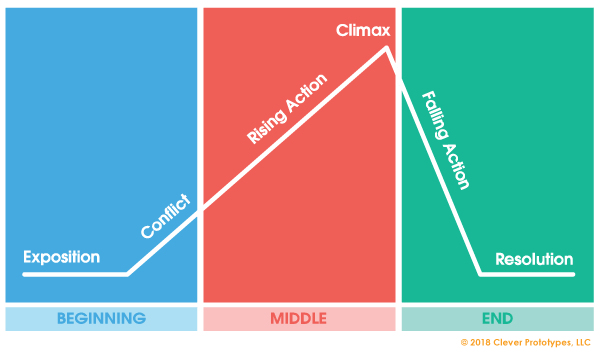
Identify the point at which the highest level of interest and emotional response is achieved on the plot diagram.

1
Question 8
8.

What country did Texas belong to before 1836?

1
Question 9
9.

What battle started the Texas Revolution?

Question 10
10.

Word Bank:

cytoplasm, nucleus, mitochondria, golgi apparatus, etc.

Question 11
11.

Is this a plant or animal cell?

Question 12
12.

Justify your answer.

Question 13
13.

Sort the features for each platform. FYI---this list is by far not all of the features for any of these platforms!

  • Available library of resources
  • Teacher paced and student paced modes
  • Quick Formative assessment
  • Easy grading/feedback
  • Use rubric grading
  • A platform that I am going to use in the future!!!
  • Draw features
  • Tag standards
  • Interactive
  • Track standards
  • Add video
  • Engaging
  • Multiple question types
  • Use your own content (slides, pdfs, etc.)
  • Add video with embedded questions
Question 14
14.

I ♥ feedback! What do you ♥ the most? What do you want to learn more about?

Question 2
2.

What can you do with nearpod?

Question 3
3.

What type of formative assessment does nearpod incorporate?