1
1
1
1
1
1
1
1
1
1
1
1
1
1
1
1
1
1
1
1
1
1
1
1
1
1
1
1
Part 1: Motion (No Friction):
Click on the Motion tab. Click on all the buttons in the box in the upper right of your screen: Force Values, Masses, Speed.
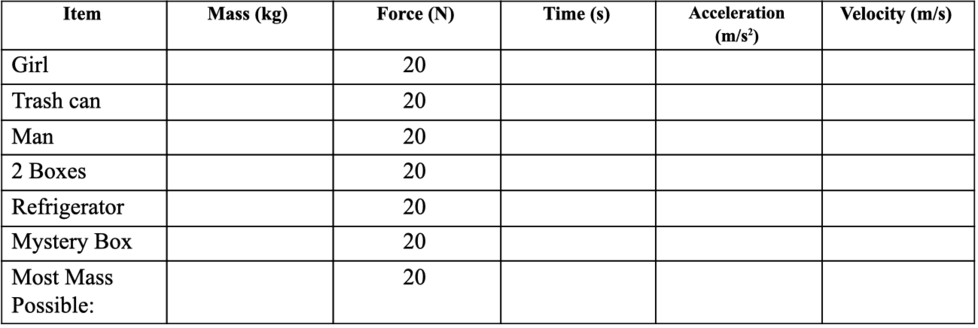
Remove the crate from the skateboard. Put each item listed in the table below (starting with the girl) on the cart, one at a time. Press the blue pause button. Set the force 20 N to the right in the Force Box.
Using a timing device, time how long it takes for the object on the skateboard to reach the second tick mark on the speed dial (speed dial is in the cloud) . It should be close to or exactly 4.0 m/s. Record the mass and time on the chart. You will have to press the blue play button to start the motion.
Calculate the acceleration of the object by using the equation a = F/m. (F = force, m = mass)
The velocity is the speed given to you on the speed dial.
Replace the object you tested with the next object on the list. This should reset the speed, etc., but if it doesn’t, click Reset All before you test the next object. This will clear all your buttons, so you will need to recheck those after every trial. Do this before plugging in 20 N each time.
Find the mass of the mystery box by comparing it’s time to the known masses. Fill in your guess for the mass of the box.
Pile as many objects onto the cart as possible. Write down in the last row the list of objects you chose, the total mass, find the time it takes to accelerate to the speed of the other objects, and calculate the acceleration and velocity.
There are three different situations in which mass is doubled (40→ 80 kg, 50 → 100 kg, and 100 → 200 kg). What happens to the time to reach the final velocity (4.0 m/s) each time the mass is doubled?
What happens to the acceleration of the object each time the mass is doubled?
What would it take for a 100 kg mass to have the same acceleration as a 50 kg mass, given the values you are allowed to change in the simulation? Hint: try it in the simulation
1. Click on the Friction tab.
2. Click on the Forces, Sum of Forces, Values, Masses and Speed buttons.
3. Leave Friction at the center. You will need to reselect all these every time you reset the simulation.
4. Note that Sum of Forces is what we call Net Force.
Directions Continued:
1. Place 50 kg on the ground.
2. Type in 50 N of force and hit Play.
3. Fill in the values and direction for Applied Force, Friction Force, and Sum of Forces into the chart below.
4. Don’t forget direction arrows or you can put “left” or “right”.
5. Repeat steps 1- 4 for the remaining forces in the chart.
Static friction acts on objects when they are resting on a surface. For example, if you are playing basketball, there is static friction between your shoes and the court each time you put down your foot. Without this static friction, your feet would slip out from under you, making it difficult to win the game. In fact, that's exactly what happens if you try to walk on ice. That's because ice is very slippery and offers very little friction
Sliding friction is friction that acts on objects when they are sliding over a surface. Sliding friction is weaker than static friction. That's why it's easier to slide a piece of furniture over the floor after you start it moving than it is to get it moving in the first place. Sliding friction can be useful. For example, you use sliding friction when you write with a pencil. The pencil “lead” slides easily over the paper, but there's just enough friction between the pencil and paper to leave a mark.
Based on your data and the information above, what is the maximum value for Static Friction (force when the box doesn't move)?
Based on your data and the information above, what is the maximum value for Sliding Friction (force when the box does move)?
Which direction is the Net Force (Sum of Forces) after the maximum speed is reached
What other quantity is the Net Force (Sum of Forces) equal to after the max speed is reached?
Now use 2 boxes totaling 100 kg and repeat what you did for the previous data table increasing the force by 100 N each time. Fill in the data table below.
What happens to the maximum value of Sliding and Static friction at double the mass? Why?
Directions:
Click on the Acceleration Lab tab. Click on the Forces, Sum of Forces, Values, Masses, Speed, and Acceleration buttons.
Leave Friction at the mid-point.
Put one box on the ground.
Put the Force to 200 N.
Fill in the first row of the chart.
Figure out what value you need to double the Net Force (Sum of Forces) on the box. Hint: This will not be double the Applied Force.
Let the speed reach the maximum allowed, then fill in the chart for when the box is slowing down, and after it comes to a stop. Be sure to pay attention to the value (+ or -) of the acceleration.
Why is the force to double acceleration not double the Applied Force?
When you doubled the Net Force (Sum of Forces), by what factor did acceleration increase?
Turn off Friction. Put in 200 N of force and let the speed max out. What happens to the box after the man falls away? Why?
Place the glass of water in front of the man. Starting at 200 N, increase the force by 100 N increments until you get to 500 N. What happens to the water level in the glass? Why?
Mass of girl (just type a number)
Time of girl (just type a number)
Acceleration of girl (just type a number)
Velocity of girl (just type a number)
Mass of trash can (just type a number)
Time of trash can (just type a number)
Acceleration of trash can (just type a number)
Velocity of trash can (just type a number)
Mass of Man (just type a number)
Time of Man (just type a number)
Acceleration of Man (just type a number)
Velocity of Man (just type a number)
Mass of 2 boxes (just type a number)
Time of 2 boxes (just type a number)
Acceleration of 2 boxes (just type a number)
Velocity of 2 boxes (just type a number)
Mass of Refrigerator (just type a number)
Time of Refrigerator (just type a number)
Acceleration of Refrigerator (just type a number)
Velocity of Refrigerator (just type a number)
You will have to guess the mass of mystery box based off of the time it takes the mystery box to reach 4.0 m/s. (just type a number)
Time of mystery box (just type a number)
Acceleration of mystery box (just type a number)
Velocity of mystery box (just type a number)
Pile as many items as you can on the skateboard. What is the mass? (just type a number)
Time of "most mass" (just type a number)
Acceleration of "most mass" (just type a number)
Velocity of "most mass" (just type a number)