Brian uses a linear regression to model the relationship between cricket chirp rate and temperature shown in the table.
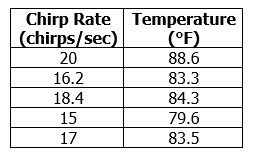
What is the equation of the line given the table?
Brian uses a linear regression to model the relationship between cricket chirp rate and temperature shown in the table.
What is the equation of the line given the table?