This course includes resources provided by the following:
LEGO Education
CS-STEM Network from Carnegie Mellon University
EV3-Scratch documentation provided by Raphael Holzer
Joe Olayvar & Evelyn Lindberg in association with the Washington State Library
🌏 Click here to access the LEGO Education website.
📑 Click here to access the EV3-Scratch documentation.
🎓 Click here to access the online EV3 course from CS2N.
📕 Click here to access the LEGO Mindstorms EV3 Programming Basics document in its entirety.
▶️ Click here to access the entire LEGO Mindstorms EV3 YouTube playlist from the Washington State Library.
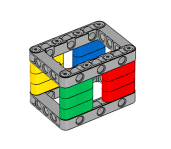
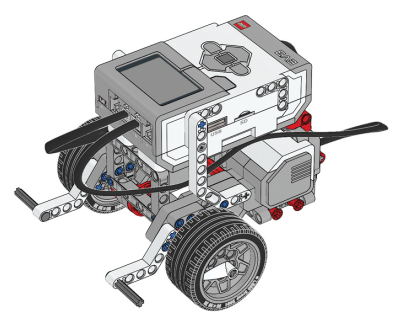
Before you continue, ensure that you have completed the following builds:
Why might the Rangefinders (Laser or Ultrasonic) be preferred over Touch Sensors for detecting walls and obstacles?
In this section, you will build a simple proximity detector that plays a sound when someone passes near the sensor.

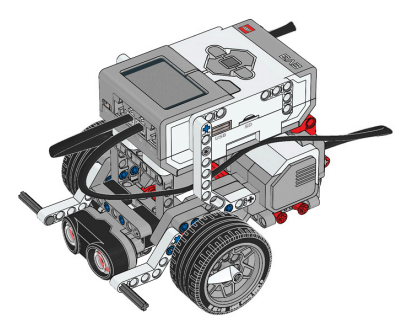
Robot Configuration: Ultrasonic Drive Base
Ultrasonic Sensor Configuration

For this chapter, the Ultrasonic Sensor is required to complete sections of this chapter as well for the final challenge. Ultrasonic Sensor Driving Base build instructions:
https://drive.google.com/file/d/1HdjMBLyfRvVz9tNQjpcWWVzvrgkxuiI9/view?usp=share_link
Start with a new project and program.
.gif "null")
Go to the light blue Sensors palette, and add an Ultrasonic Sensor “wait until distance” Block to your program.

You can leave the “less than (<)” and “15 cm” threshold default settings.
After the Wait, go to the purple Sound Palette and add a “play sound until done” Block.

The Sound Block plays a sound through the EV3's speakers. Specifically, it plays the sound that is selected in the drop-down menu. In this case, it is going to say “Hello!”.
Drag a “stop [and exit program]” block from the Control palette, and place it at the bottom of the stack.
.gif "null")
Rename the program as “UltrasonicHello”.

Download your program and set up the robot in an area with nothing in front of it. Run the program, then walk or wave your hand in front of the robot!

Which of the following blocks should be used to wait until the Ultrasonic Range Finder senses an object less than 10 cm away?
The Ultrasonic Sensor uses the speed that waves travel to measure distance to an object.
What does the Wait Block do if you set it to wait for a value Greater Than the Threshold instead of Less Than? Change the Wait for block’s "Compare Type" setting to Greater Than.

Place an object in front of the robot, and download and run the program. Now, try moving the object and see what happens.
You can have multiple sounds play one after another to form sentences. Try adding a second Sound Block to your program so it says "Object Detected" instead of just "Hello"!

"Object" and "Detected" can be found in the list of the dropdown menu. How would you get the EV3 to say them one after another?
In addition to "Comparing" the value of the sensor against the Threshold, the Wait Until Block can also look at the amount the sensor value has changed since the command started.
Place an object in front of the Ultrasonic Sensor.
Change the Mode of the Wait Until Block to - changed more than.
Set the Amount setting to "5"
Run the program, then move the object 5 cm closer to or further away from Ultrasonic Sensor

The Ultrasonic Sensor uses the speed that sound waves travel to measure the distance to an object. The sensor has two openings on its front; one opening emits ultrasonic waves, while the other receives them. The Ultrasonic Sensor measures distance by timing how long it takes for an ultrasonic wave sent out by the emitter to bounce off an object and come back to the receiver.
🎚 Threshold Value
Using the Ultrasonic Sensor, adjust the threshold value to 10cm!

Using the Ultrasonic Sensor, set the threshold value so that the robot plays a sound when it detects an object within 10 cm of the sensor.
🌐 A virtual version of this challenge is available HERE.
📸 Document It: Capture a screenshot (or multiple screenshots) of your completed program and upload or paste it onto the Formative canvas.
⬆️ Upload It: Upload your completed program.
In this lesson, you will program the robot to move until the Ultrasonic Sensor detects a wall or other object nearby.

Just like in Forward until Touch, you will turn the robot’s motors on, leave them on while Waiting for the Ultrasonic Sensor to detect the wall, then Stop the motors.

Create a new project and program.
.gif "null")
Place a “start moving [straight]” Block in the stack. This will tell the motors to turn on

Next, add an Ultrasonic Sensor “wait until distance is” block.
.gif "null")
To have the robot stop its motors, add a “stop moving” block.
.gif "null")
Drag a “stop [and exit program]” block from the Control palette, and place it at the bottom of the stack.
.gif "null")
Rename the program as “ForwardNear”.

The motors turn on, the robot Waits for the Ultrasonic Sensor to detect something Less Than 15 centimeters away, and then turns the motors off.

True or False: The Ultrasonic Range Finder can sense objects that are 15cm away at most.
Which of the following block combinations correctly shows the robot to move forward until it is exactly 25 cm away from an object?
📏 Backward Until Far
Using an Ultrasonic Sensor, program the robot to move backward until it is far enough from the wall!

Place a robot close to a wall with the Ultrasonic Sensor facing directly at it. Program the robot to move backward until the Ultrasonic Sensor reads a value greater than 30cm, and then stop.
🌐 A virtual version of this challenge is available HERE.
📸 Document It: Capture a screenshot (or multiple screenshots) of your completed program and upload or paste it onto the Formative canvas.
⬆️ Upload It: Upload your completed program.
📏 Maze
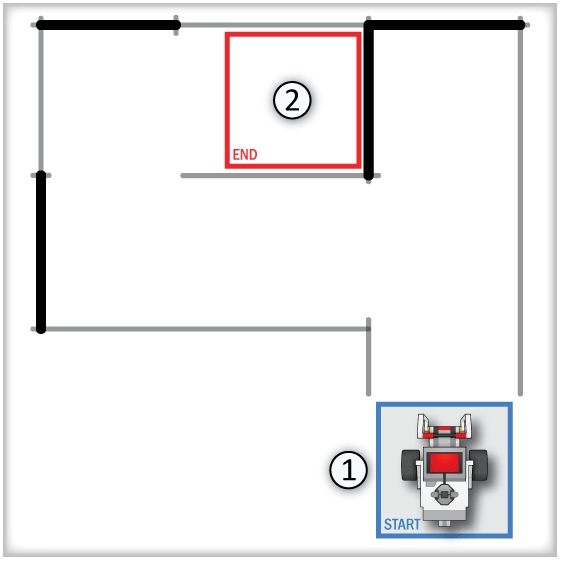
For this challenge, create a maze with walls, similar to the one illustrated below. Then program your robot to navigate the maze, from start to end, using the Ultrasonic Sensor AND not touching any walls.

Rules and Procedures:
Recreate the maze with tall objects, such as books or binders.
The robot must start entirely within the start box (1), as well as stop entirely inside the end box (2).
Walls marked by gray lines can move slightly.
Walls marked by dark black lines cannot be moved.
The robot must not touch any walls as it navigates throughout the maze.
Hints:
The patterns of turns cannot change, so you don’t need to worry about using a sensor (other than Rotation) during turns.
Look carefully at what distances in the maze are guaranteed not to change. Try to use those distances in combination with the Ultrasonic Sensor to orient yourself.
🌐 A virtual version of this challenge is available HERE.
📸 Document It: Capture a screenshot (or multiple screenshots) of your completed program and upload or paste it onto the Formative canvas.
⬆️ Upload It: Upload your completed program.
🧠 Retrieval Practice:
Summarize the content of this lesson. What topics, ideas, and vocabulary were introduced?