Preskoči na glavni sadržaj
Prijava
Sign up for FREE
arrow_back
Biblioteka

4.4 Budgeting Tools

star
star
star
star
star
Posljednje ažuriranje over 1 year ago
25
Napomena autora:
Intro-Warm-Up
Learn It
12
2
Practice It
Learn It
Practice It
Application

OBJECTIVES & STANDARDS

Math Objectives

  • Write equations that represent real life scenarios

Common Core Math Standards

  • Link to all CCSS Math

  • CCSS.PRACTICE.MP4

  • CCSS.HSA.CED.A.1

  • CCSS.7.EE.B.4

  • CCSS.HSM

Personal Finance Objectives

  • Explore different budgeting apps

  • Create your own budget using a spreadsheet

National Standards for Personal Financial Education

Spending

  • 1b: Develop a budget to allocate current income to necessary and desired spending, including estimates for both fixed and variable expenses.

  • 1d: Evaluate the advantages of using budgeting tools, such as spreadsheets or apps

  • 9a: Explain how having a system for financial record-keeping can make it easier to make financial decisions.

DISTRIBUTION & PLANNING

Distribute to students

  • Student Activity Packet

  • Application Problems

OBJECTIVES & STANDARDS

Math Objectives

  • Write equations that represent real life scenarios

Common Core Math Standards

  • Link to all CCSS Math

  • CCSS.PRACTICE.MP4

  • CCSS.HSA.CED.A.1

  • CCSS.7.EE.B.4

  • CCSS.HSM

Personal Finance Objectives

  • Explore different budgeting apps

  • Create your own budget using a spreadsheet

National Standards for Personal Financial Education

Spending

  • 1b: Develop a budget to allocate current income to necessary and desired spending, including estimates for both fixed and variable expenses.

  • 1d: Evaluate the advantages of using budgeting tools, such as spreadsheets or apps

  • 9a: Explain how having a system for financial record-keeping can make it easier to make financial decisions.

DISTRIBUTION & PLANNING

Distribute to students

  • Student Activity Packet

  • Application Problems

QUESTION OF THE DAY: What are the top 3 types of products/services Gen Z is most likely to splurge on?

Answer the Question of the Day then compare your answer to the chart on the second slide. Finally, answer the follow-up questions below.

3
Pitanje 1
1.

What are the top 3 categories that Gen Z splurges on?

1
Pitanje 2
2.

Do you know what your own budget breakdown is without estimating or guessing?

1
Pitanje 3
3.

What strategies would you use to track your expenses?

ARTICLE: The 6 Best Budgeting Apps

In the previous lesson, you were exposed to a number of strategies to create a budget. In this article, you’ll read about several different budgeting apps and how they can help you maintain your budget.

Pitanje 4
4.

Imagine that you just graduated college and moved into your first apartment. Complete the table below to highlight which feature of each app would be most beneficial to you in this situation and the reason that you made that choice. When stating the budgeting method, you can choose from 50/30/20, Zero-Based, Cash Envelope, or Other.*Mint closed as of Jan 24*

Pitanje 5
5.

Which app do you think would be best suited for your own personal budget right now? Explain why you made that choice.

Writing Equations

Apps are a convenient way to keep track of your budget. However, they often cost money, they are not customizable to your needs and you are sharing your financial information with a third party. Spreadsheets are a great way to build a custom budget without running into these issues.

Let’s start by reviewing an essential math skill that we’ll need when we use spreadsheets to build a budget: Writing equations to describe a situation.

For each scenario, write an equation that uses the given variables.

1
Pitanje 6
6.
1
Pitanje 7
7.
1
Pitanje 8
8.
1
Pitanje 9
9.

VIDEO: Creating a Budget in Google Sheets

Watch the video on creating a custom budget in Google Sheets. Follow along and pause the video as needed

20
Pitanje 10
10.

Create your own version of this custom budgeting spreadsheet and paste a link to the budget below. (and include a screen shot in the show your work) *Start from scratch using a google sheet*

ACTIVITY: Comparing Budgets

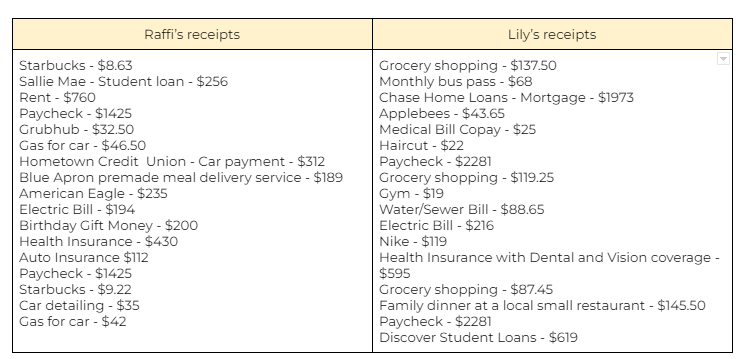
Raffi and Lily have been saving receipts from all of their recent purchases. They also saved their most recent pay stubs. Below is a list of their receipts for the most recent month.
1
Pitanje 11
11.

With a partner, you will be comparing their spending by making a zero-based budget for Raffi and Lily. One person should make a budget for Raffi while the other makes a budget for Lily. Remember that in a zero-based budget, every dollar should be assigned to a category. You can add new categories or change existing ones if needed, but both budgets should have the same list of categories to make comparison easier. Use the budgets to answer the questions below. *Add a screen shot of your budget below*

1
Pitanje 12
12.

Who spent more money on food costs this month?

1
1
1

Level 1:

Finishing Farah’s Budget

Farah started her budget spreadsheet but needs your help. She entered all of her expenses and income but needs help with a couple of final tasks.

12
Pitanje 16
16.
1
Pitanje 17
17.
2
Pitanje 18
18.

Give Farrah 2 suggestions about expenses that she could change that would help bring her budget out of the negative.

1
Pitanje 19
19.

Farrah forgot to add her Hulu subscription to her budget! Which category would be most appropriate to put this money in?

Level 2:

Entering Eric’s Data

Eric is transferring his budget from a budgeting app to his own custom spreadsheet and needs help entering data and finishing his calculations.

20
Pitanje 20
20.
1
Pitanje 21
21.

Looking at Eric’s final budget, it looks like he has extra money left over. Make a suggestion about where he can assign that money so that he meets the criteria of a zero-based budget.

5
Pitanje 22
22.

**Bonus**Extra 25 Formative Points for Uploading Spreadsheet & answering these three questions.

Level 3

Creating Caleb’s Budget

  1. Caleb needs your help making a zero-based budget.  He has his box of receipts and asks you to make a budget spreadsheet that meets the following criteria:

  2. Contains appropriate categories for expenses and income

  3. Formats all currency appropriately with $ and two decimal places

  4. Calculates the sum of all Income and Expense items

  5. Calculates the difference between total income and total expenses

  6. Calculates the % of total income that each expense category uses.  (Tip:  To calculate percent of net income, divide the expense by net income, then multiply by 100)

  7. Categorize each expense as NEED, WANT, or SAVING/DEBT REDUCTION

  8. Adds up all expense percentages into appropriate NEED, WANT and SAVINGS/DEBT REDUCTION categories

List of Receipts for one month:

  • Gym Membership - $40

  • Health Insurance with Dental and Vision Coverage - $516

  • Eating at Restaurants - $64

  • Money Made Delivering for GrubHub - $550

  • Car Insurance - $112

  • Hotel Room - $89

  • Student Loan Payment - $190

  • Coffee Shops - $93

  • Hair Cut - $22

  • Homeowners Insurance - $120

  • Music and Streaming Subscriptions - $88

  • Cable and Internet - $84

  • Groceries - $512

  • Full Time Job paychecks - $5,115

  • Gas for Car - $92

  • Cell Phone - $41

  • Mortgage - $2.215

  • Airline Flight - $245

  • Car Payment - $300

  • Concert Tickets - $40

  • Water/Electricity/Gas - $202

0
Pitanje 23
23.

Upload Link to Spreadsheet & Screen Shot

0
Pitanje 24
24.
0
Pitanje 25
25.

Make suggestions about how Caleb can adjust his expenses to meet the criteria of 50/30/20.

Pitanje 13
13.

Raffi received a birthday gift of $200. Should this be included in his monthly budget? Why or why not?

Pitanje 14
14.

Who was able to assign more money to savings?

Pitanje 15
15.

The 50/30/20 budget rule says that you should try to assign 20% of your net income to savings, debt reduction and retirement goals. Did either have enough money left after paying their wants and needs to meet this 20% goal? (Calculate this by dividing any savings money by total monthly income and multiplying by 100)