Log in
Sign up for FREE
arrow_back
Library

B15 | Math 8

star
star
star
star
star
Last updated over 1 year ago
12 questions
0.25
0.25
0.5
Question 1
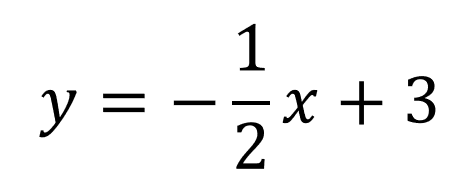
1.

Write the number that represents the slope.

Question 2
2.

Write the number that represents the y-intercept

Question 3
3.

Graph the line.

  • Click a Graph tab (Graph 1, Graph 2, and so on) for each graph you need to plot.
  • Click on the graph background to add a point. Add two points to create a graph. Drag a point or type in x and y coordinates to edit its position. Click on a point to delete it.
  • After creating your graph, you can check the dashed line box.
0.25
Question 4
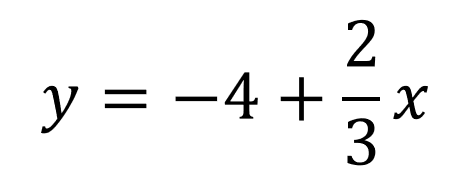
4.

Write the number that represents the slope.

0.25
0.5
0.25
Question 7
7.

Write the number that represents the y-intercept.

0.25
0.5
0.25
Question 10
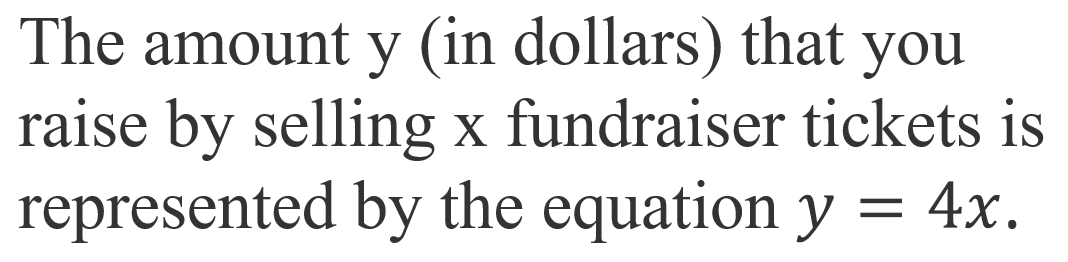
10.

Write the number that represents the slope.

0.25
0.5
Question 5
5.

Write the number that represents the y-intercept.

Question 6
6.

Graph the line.

  • Click a Graph tab (Graph 1, Graph 2, and so on) for each graph you need to plot.
  • Click on the graph background to add a point. Add two points to create a graph. Drag a point or type in x and y coordinates to edit its position. Click on a point to delete it.
  • After creating your graph, you can check the dashed line box.
Question 8
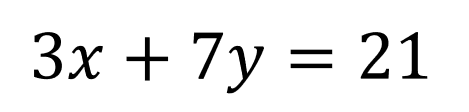
8.

Write the number that represents the x-intercept.

Question 9
9.

Graph the line.

  • Click a Graph tab (Graph 1, Graph 2, and so on) for each graph you need to plot.
  • Click on the graph background to add a point. Add two points to create a graph. Drag a point or type in x and y coordinates to edit its position. Click on a point to delete it.
  • After creating your graph, you can check the dashed line box.
Question 11
11.

Write the number that represents the y-intercept.

Question 12
12.

Graph the line.

  • Click a Graph tab (Graph 1, Graph 2, and so on) for each graph you need to plot.
  • Click on the graph background to add a point. Add two points to create a graph. Drag a point or type in x and y coordinates to edit its position. Click on a point to delete it.
  • After creating your graph, you can check the dashed line box.