Find the most important keys: [Home/On], [esc], and [enter]
Find the most important keys: [Home/On], [esc], and [enter]

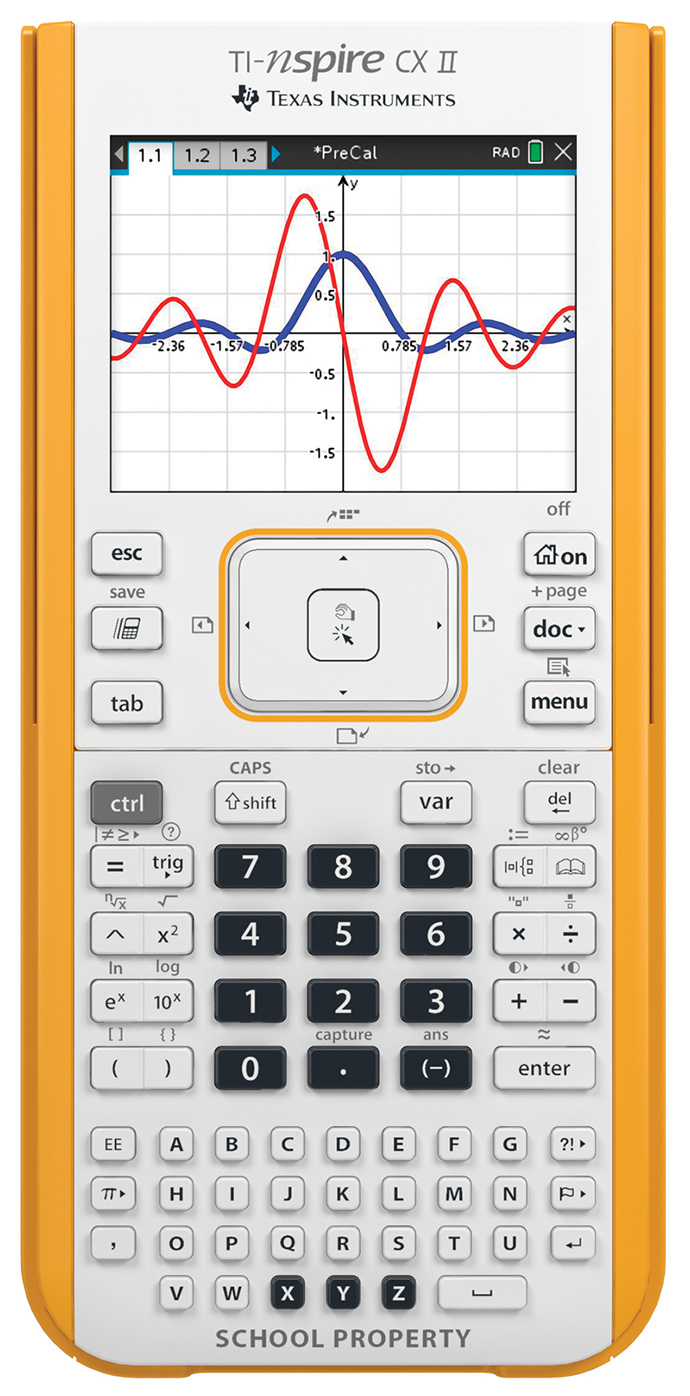
Getting to Know the Keypad – Draw arrows from these descriptions to the picture of the TI-NSpire
CX shown at right.
Getting to Know the Keypad – Draw arrows from these descriptions to the picture of the TI-NSpire
CX shown at right.
Find the most important keys: [Home/On], [esc], and [enter]
Find Other useful symbols
a. Comma [ , ]
b. Delete
c. “Flying calculator” aka Scratchpad
d. Space [ _ ]
e. Shift
Which key do you push to access the light gray functions on the key pad? ____________
Why do you think the X , Y and Z keys are not the same color as the rest of the letter keys?
The CLICK button is located in the center of the TouchPad.
What do you think the icons on the CLICK button mean?
How many choices do you have from the home screen? (Include choices made by pressing letters, numbers or the arrow keys).
What is the difference between the two “Scratchpad” choices on the left side of the
screen?
Use the letter and number keys, or the arrow keys around the TouchPad, to navigate around the
HOME screen and explore these choices:
Which option might you select to graph a line?
Which option might you select to construct a triangle?
Which option might you select to collect some data?
Which option might you select to get to a “calculate” screen?
−12.1 − 15.3
143.72 times 8.9
Find the following Math Symbols:
a. Multiplication & Division
b. Addition & Subtraction
c. Exponent [^]
d. Pi [π]
e. Equals [=]
f. Negative numbers [(-)](note: this is NOT the subtraction
key!)


