Asemmisa {{asɛmmisaAhyɛnsode}}
3.
Knowledge DUMP LOSSY COMPRESSION
Knowledge DUMP LOSSLESS COMPRESSION
Think of compression as packing for a trip. When you pack your suitcase, you fold your clothes neatly and arrange them to take up less space. This allows you to fit more items in your suitcase. Compression works similarly - it reduces the size of data so that it takes up less storage space and can be transmitted more quickly over a network.
In computing, data compression is used in many different file formats. Here are some concrete examples:
Text Files (.zip, .rar):Techniques like Huffman coding are used, which assign shorter bit sequences to frequently occurring characters. Lossless compression ensures the original text can be perfectly reconstructed.
Images (.jpg, .png):Lossy compression like JPEG discards imperceptible color information and details. Lossless compression like PNG uses techniques like run-length encoding (RLE), which replaces repeated "runs" of identical pixel values with a single instance and a count.
Audio (.mp3, .aac):Lossy compression identifies and removes frequencies that are less perceptible to the human ear based on psychoacoustic models. Lossless compression like FLAC encodes audio in a way that allows perfect reconstruction.
Removing redundant information:
Eliminating duplicate definitions of shapes, colors, or gradients.
Removing unnecessary metadata.
Simplifying mathematical expressions:
Rounding coordinates to reduce decimal places.
Simplifying complex paths into simpler ones.
Encoding techniques:
Using binary encoding for paths and shapes.
BITMAP COMPRESSION
Bitmap images represent images as a grid of pixels. Each pixel has a specific color value. Compression techniques for bitmaps include:
Run-Length Encoding (RLE):Lossless compression technique. Replaces repeated "runs" of identical pixel values with a single instance and a count. Effective for images with large areas of uniform color.
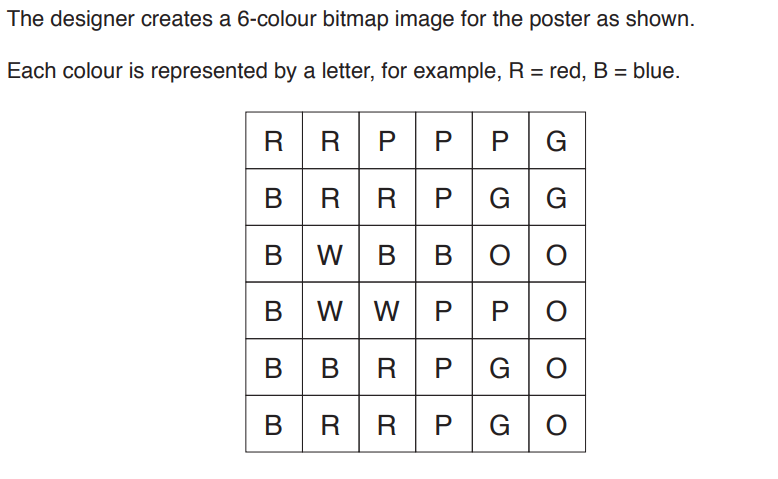
State the minimum number of bits needed to represent each pixel in the image
Calculate the minimum file size of the image shown
The designer takes a photograph to put on the poster. The photograph has a resolution of 50000 pixels by 50000 pixels. The colours are represented using 4 bytes per pixel. Estimate the file size of the photograph in gigabytes. Show your working.
Lossy | Lossless | |
|---|---|---|
Cropping the image | ||
Reducing the resolution of the image | ||
Using run-length encoding (RLE) | ||
Reducing the colour depth of the image |
Explain how run-length encoding would compress the image
Reduces file size by discarding some data that the human ear is less likely to notice.
Perceptual music shaping: Identifies and removes sound frequencies that are outside the range of human hearing, or that are masked by louder sounds in the same range.
Approximation techniques: Simplifies the audio by reducing the precision of certain elements, such as softer background noises.
Bitrate reduction or bit-depth reduction, and it involves decreasing the precision of each sound sample. In audio, higher bit-depth means more detailed sound information per sample. By reducing the bit-depth (e.g., from 16-bit to 8-bit), some of the finer audio details are lost, but the file size is significantly reduced.
Common formats: MP3
This process makes the compressed file smaller by permanently removing parts of the audio, so the decompressed file isn’t identical to the original.
Compresses audio without losing any data, maintaining the original sound quality.
Redundancy removal: Identifies and eliminates repetitive or redundant data. For instance, if certain sound patterns or notes repeat, the file compresses them more efficiently without loss. Reversible algorithms: Uses complex encoding techniques like Huffman coding or FLAC’s run-length encoding, which allow the exact original audio file to be recreated when decompressed.
Common formats: FLAC
The decompressed file is identical to the original, making lossless ideal for professional audio or archival purposes.
Key Points/Questions
Redundancy Removal: Text often contains repeated patterns or characters. Compression algorithms identify these patterns and replace them with shorter representations.
Encoding Schemes for Redundancy Removal: Compression uses specific algorithms to encode the data. Some common methods include:
Run-Length Encoding (RLE): Replaces consecutive repeated characters with a single character and a count (e.g., "aaa" becomes "a3").
hello hello hello
Identifying Patterns:"hello" appears three times.
Compressed Representation: Using RLE: The string could be represented as "3hello".
Stored Size:Original: 15 bytes (including spaces). Compressed: 8 bytes ("3hello").
Huffman Coding: Assigns shorter codes to more frequently occurring characters and longer codes to less common ones based on their frequencies. - don't need to know how it works for A-Level