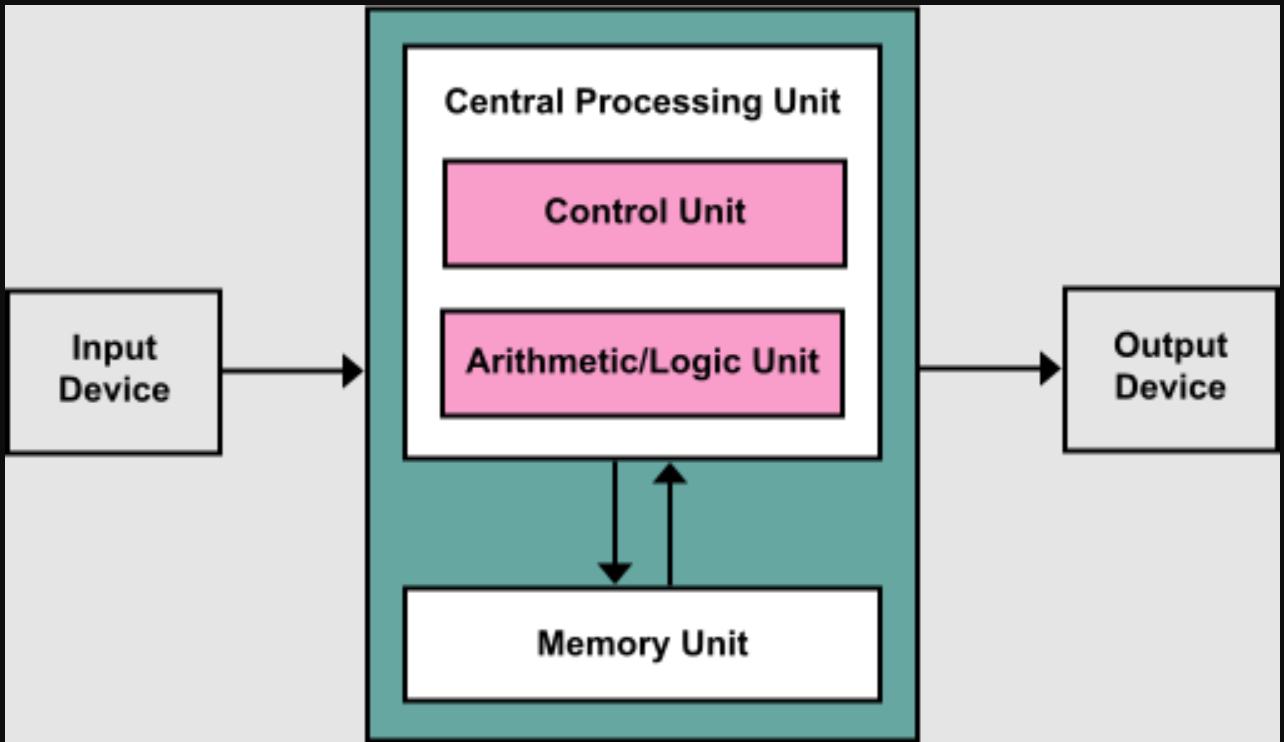
The Von Neumann Model is a design architecture for digital computers proposed by mathematician John von Neumann in the 1940s. It consists of four main components:
Central Processing Unit (CPU):
Control Unit (CU): Directs the operation of the computer by interpreting instructions and controlling the flow of data.
2. Arithmetic Logic Unit (ALU): Performs arithmetic and logical operations.
Together, the CU and ALU form the "brain" of the computer.
3. Memory: Stores data and instructions temporarily.
Divided into small, addressable units, each of which can store a binary number (e.g., 0s and 1s).
4. Input/Output (I/O) Devices: Allow the computer to interact with the external world by taking input (e.g., keyboard, mouse) and providing output (e.g., monitor, printer).
5 Bus System:
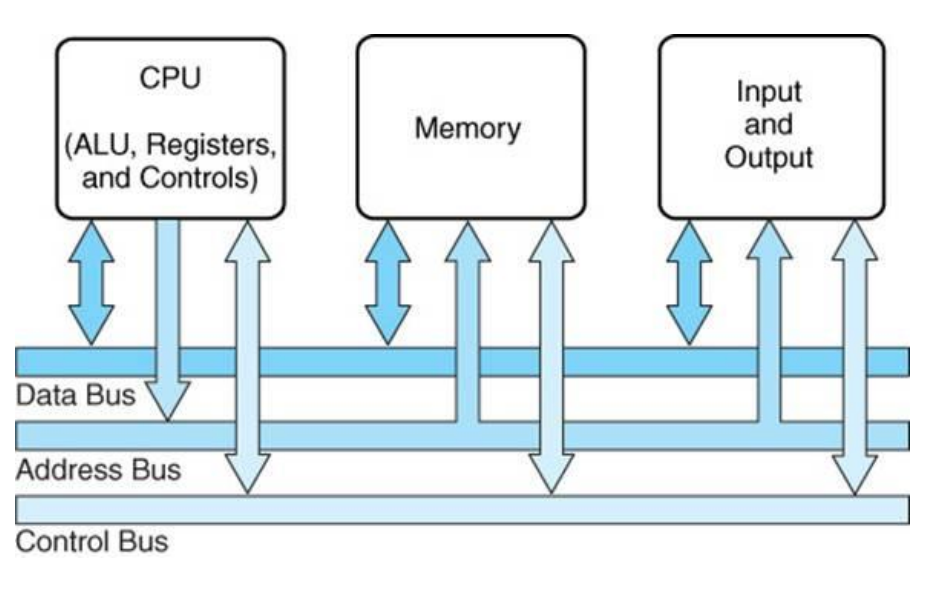
Facilitates communication between the CPU, memory, and I/O devices. It includes:
Data Bus: Transfers actual data.
Address Bus: Specifies where the data should go.
Control Bus: Manages operations like reading or writing data.
The stored program concept
This concept was revolutionary and remains a cornerstone of modern computing. It refers to the idea that:
Instructions and data are stored together in memory: Both the program's instructions and the data it processes are stored in the computer's memory in binary format.
Execution occurs sequentially: The computer fetches one instruction at a time from memory, decodes it, executes it, and then proceeds to the next instruction. This is often called the fetch-decode-execute cycle.
Advantages:Simplifies hardware design because the CPU doesn't need to distinguish between data and instructions.
Allows programs to be easily modified by changing the contents of memory.
Makes computers programmable and versatile for a wide range of tasks.
1 point
1
Question 2
2.
List all registers here
Registers are small, high-speed storage locations inside the Central Processing Unit (CPU). They temporarily hold data and instructions during processing, enabling the CPU to operate efficiently by reducing the need to access slower main memory.
General-Purpose Registers (GPRs):
Used to hold temporary data or intermediate results during execution.
Programmers or compilers can use them freely for various operations.
Example: In some architectures, registers like R1, R2, etc., serve as general-purpose registers.
Faster than RAM
Example:
ARM Architecture (Used in Smartphones and Tablets)
Registers: ARM processors typically have R0 to R15
R0–R12: General-purpose registers for data manipulation and storage of intermediate results.
Example in action: When you play a game on your phone, GPRs like R0 and R1 may hold the coordinates of your character and calculate your movement before the result is passed to the screen. Therefore it doesn't have to be used in the RAM.
Special Purpose Registers
Each special-purpose register has a unique function in the CPU's operation. Here are some key examples:
Program Counter (PC):Purpose: Holds the memory address of the next instruction to be executed.
Role: Ensures the CPU knows the sequence of instructions to execute. After fetching an instruction, the PC increments to point to the next instruction or updates to a new address during a jump.
Memory Data Register (MDR):Purpose: Temporarily stores data being transferred to or from memory.
Role: Acts as a buffer between the CPU and main memory. For example:During a read operation, the MDR holds data fetched from memory.
During a write operation, it holds data to be written to memory.
Memory Address Register (MAR):Purpose: Holds the address of the memory location being accessed.
Role: Specifies where data should be read from or written to in memory. The MAR works in tandem with the MDR.
Accumulator (ACC):Purpose: Temporarily stores intermediate results of arithmetic and logic operations.
Role: Acts as a workspace for the ALU (Arithmetic Logic Unit). For example, when adding two numbers, one is held in the ACC while the other is fetched and added.
Index Register (IX):Purpose: Holds an offset or index value used in indexed addressing.
Role: Allows the CPU to access arrays or data structures by combining the index value with a base memory address.
Current Instruction Register (CIR):Purpose: Holds the instruction currently being executed.
Role: Decoded by the CPU's control unit to determine the required operation. It ensures the CPU knows what action to perform.
Status Register:Purpose: Stores information about the current state of the CPU.
Role: Tracks flags (e.g., Zero, Carry, Overflow, Negative) that are set or cleared based on the result of operations. For example:The Zero Flag is set if an operation results in zero.
The Carry Flag is set if an arithmetic operation produces a carry-out.
Special Purpose Registers
Scenario: Adding Two Numbers in an Embedded System
Imagine you’re programming a digital speedometer for a car. The CPU in the system calculates the total distance traveled by adding new increments of distance to the current total.
1. Initial Setup
Current Distance (stored in a register):255 kilometers (stored as 8-bit binary: 1111 1111).
Increment to Add:5 kilometers (stored as 8-bit binary: 0000 0101).
The CPU performs the addition: 255 + 5.
2. The Status Register in Action
During this addition, the CPU uses the status register to track specific conditions:
Carry Flag:
What happens:255 in binary is 1111 1111 (maximum value for 8 bits).
Adding 5 causes an overflow beyond 8 bits: 1111 1111 + 0000 0101 = 1 0000 0100 (requires 9 bits).
Carry Flag is set:The extra 1 that "carries out" of the 8th bit is tracked in the Carry Flag of the status register.
Why it matters:The CPU knows an overflow occurred and can handle it (e.g., update a second register to represent larger numbers).
Zero Flag:
What happens:Let’s assume the car stops, and the distance increment becomes 0. Adding 0 to the total (255 + 0) results in 255.
Zero Flag is NOT set:The result isn’t zero, so the Zero Flag remains cleared.
If the CPU later performs a subtraction that results in 0, like 255 - 255, the Zero Flag would be set.
3. Real-World Implications
Carry Flag:Indicates when the result exceeds the current bit-width (e.g., 8-bit limit).
Ensures accurate calculations by prompting the CPU to handle overflows, which is critical in embedded systems.
Zero Flag:
Helps in decision-making. For instance:If the distance increment is 0, the CPU may decide to stop updating the display.
Summary
Carry Flag: Set when the CPU adds 255 + 5 and overflows the 8-bit limit.
Zero Flag: Set if a calculation like 255 - 255 results in zero.
These flags allow the CPU to monitor its state and ensure accurate and efficient execution of tasks like distance tracking in a speedometer.
1 point
1
Question 3
3.
What is the purpose of a general-purpose register in a CPU?
Answer: General-purpose registers are used to store temporary data or intermediate results during processing. They allow the CPU to perform calculations and operations quickly without needing to access slower RAM.
1 point
1
Question 4
4.
During the fetch-decode-execute cycle, what role does the Memory Address Register (MAR) play?
Answer: The MAR holds the memory address of the data or instruction that the CPU is about to fetch from memory.
1 point
1
Question 5
5.
What does the Zero Flag in the status register indicate, and when is it set?
Answer: The Zero Flag indicates whether the result of an operation is zero. It is set if the result of a calculation is zero.
1 point
1
Question 6
6.
What is the stored program concept in the Von Neumann model?
Answer: The stored program concept means that both the program instructions and data are stored in the same memory. Instructions are fetched, decoded, and executed sequentially.
1 point
1
Question 7
7.
A CPU performs the subtraction 10−1010 - 1010−10. Explain how the status register would change after this operation.
Answer: The result of 10−1010 - 1010−10 is 000. The Zero Flag in the status register would be set to indicate that the result is zero. Other flags like the Carry Flag or Negative Flag would remain unaffected since no carry-out or negative result occurred.
1 point
1
Question 8
8.
A CPU is processing a list of 10 numbers stored in memory. Explain how the Index Register (IX) is used to access each number in the list.
Answer:
The Index Register (IX) holds an offset value that is added to a base memory address to locate each element in the list.
For example, if the base address is 1000 and the IX starts at 0, the CPU accesses 1000 + IX for the first number.
After processing, the IX is incremented by 1 to access the next number (1000 + 1), and this process repeats for all 10 numbers.
Show understanding of the purpose and roles of the Arithmetic and Logic Unit (ALU)
Purpose: The ALU is the part of the CPU responsible for performing all arithmetic and logical operations. It is essentially the calculator of the computer.
Roles:
Arithmetic Operations:Handles basic math operations like addition, subtraction, multiplication, and division.
Example: Calculating a total price in a shopping app.
Logical Operations:Performs comparisons (e.g., greater than, less than, equal to).
Example: Comparing two exam scores to determine which is higher.
Bitwise Operations:Works with binary numbers (e.g., AND, OR, XOR).
Example: Used in encryption algorithms or to toggle specific bits in data.
Decision-Making:Outputs results used by the CPU to decide the next steps in a program.
Example: If a game character's health drops to zero, the ALU signals the game to trigger a "Game Over" event.
Show understanding of the purpose and roles of the Control Unit
Purpose: The Control Unit coordinates and manages the operations of the CPU. It ensures that instructions are carried out in the correct order.
Roles:
Instruction Fetching:Retrieves instructions from memory (via the Program Counter and Memory Address Register).
Example: In a web browser, fetching the next operation like loading a page.
Instruction Decoding:Interprets the fetched instructions to determine what action the CPU should perform.
Example: Decoding an instruction to perform a multiplication.
Control Signals:Sends signals to other components (e.g., ALU, registers, memory) to execute instructions.
Example: Telling the ALU to add two numbers or writing a result back to memory.
Coordination:Synchronizes the flow of data between the CPU, memory, and input/output devices.
Example: Ensuring data from a keyboard is sent to the correct memory location.
Show understanding of the purpose and roles of the System Clock
Purpose: The system clock generates a consistent series of pulses that synchronize the operations of the CPU and other components.
Roles:
Timing Control:Sets the pace at which the CPU performs the fetch-decode-execute cycle.
Example: In a 3 GHz processor, the clock produces 3 billion cycles per second.
Synchronization:Ensures that all components (ALU, CU, memory, and I/O devices) operate in harmony.
Example: Helps a video playback app coordinate audio and visuals perfectly.
Impact on Performance:A faster clock speed means the CPU can execute more instructions per second, leading to better performance.
Example: A gaming laptop with a higher clock speed runs smoother and processes frames faster.
Show understanding of the purpose and roles of the Immediate Access Store (IAS)
Purpose: The Immediate Access Store (IAS) is the primary memory area directly accessible by the CPU. It temporarily holds instructions and data that are being actively used.
Roles:
Instruction Storage:Holds the instructions the CPU is currently processing.
Example: While editing a photo, instructions for cropping or applying filters are stored in the IAS.
Data Storage:Stores data the CPU needs to complete its current tasks.
Example: The numbers being added in a spreadsheet application are stored here temporarily.
Speed Optimization:Reduces the need for the CPU to fetch data from slower RAM or external storage.
Example: When loading a webpage, IAS stores frequently accessed data, speeding up rendering.
Example:
Scenario: Player Shooting at an Opponent
What Happens in the Game:A player moves, aims, and shoots at an opponent.
The game calculates:The player's position.
The bullet trajectory.
Whether the shot hits or misses the opponent.
Updates to health, ammo, and environment effects.
Role of the IAS:
Step 1: Player Actions and Input Data:When the player presses the shoot button, the input is registered.
The IAS fetches instructions related to shooting mechanics (stored in RAM).
Example: The IAS holds code to calculate the direction of the shot and detect a hit.
Step 2: Position and Trajectory Calculations:
The IAS loads:The player's current position and aiming direction.
Opponent's current position.
Environment data, such as walls or obstacles.
These values are fetched from RAM into the IAS to perform rapid calculations in the CPU.
Example: The IAS holds the X, Y, Z coordinates of both the player and opponent.
Step 3: Result Processing:
The IAS temporarily stores:Intermediate results, like whether the bullet trajectory intersects with the opponent’s hitbox.
Updated data, such as the opponent’s health if the shot hits.
After processing, the results are sent back to other areas of RAM to update the game's state.
Step 4: Display Update:
The IAS fetches data to update the screen, such as:A visual indication of a successful hit (e.g., damage numbers).
Ammo count adjustments displayed on the HUD.
These updates are then sent to the GPU for rendering.
How IAS Works with RAM
Dynamic and Immediate:The IAS temporarily loads only the active game mechanics and data needed for the current frame.
It frequently swaps data in and out from RAM to handle new calculations as gameplay progresses.
Example Flow:RAM: Stores the game’s broader data, like the map, player skins, and weapons.
IAS: Temporarily holds:Instructions for the shooting mechanic.
Player and opponent coordinates.
Real-time updates like hit detection and damage calculation.
Why IAS is Critical in Fortnite
Speed:Fortnite needs to process inputs, calculate actions, and render updates at high speed (60+ frames per second).
The IAS enables the CPU to fetch and execute relevant instructions and data directly without delays caused by accessing all data in RAM.
Efficient Use of Memory:Fortnite’s massive game world and assets cannot all fit into the IAS. The game only loads relevant instructions and data into the IAS for immediate use, keeping the process efficient.
1 point
1
Question 9
9.
What is the primary role of the IAS?
1 point
1
Question 10
10.
How does IAS help when loading a webpage?
1 point
1
Question 11
11.
Describe the relationship between IAS and RAM.
1 point
1
Question 12
12.
What types of operations does the ALU perform?
Answer:
Arithmetic operations, such as addition, subtraction, multiplication, and division.
Logical operations, like comparing values (e.g., greater than, equal to) and bitwise operations (e.g., AND, OR, XOR).
1 point
1
Question 13
13.
Give a real-world example of the ALU in action.
Answer: In a video game, the ALU calculates the distance between a player and an enemy by subtracting their positions. It also determines whether a projectile hits the target based on position comparisons.
1 point
1
Question 14
14.
How does the CU interact with other CPU components?
Answer:
It fetches instructions from memory.
It decodes the instructions to determine what needs to be done.
It sends control signals to components like the ALU, registers, and memory to execute the instructions.
1 point
1
Question 15
15.
What is meant by the System Clock
Answer: The system clock generates a consistent series of pulses that synchronize the operations of the CPU and its components. It determines the speed at which instructions are executed.
1 point
1
Question 16
16.
What is the role of the Immediate Access Store (IAS) in a CPU?
Answer: The IAS temporarily holds the instructions and data that the CPU is actively processing. It is a part of RAM that the CPU directly interacts with.
1 point
1
Question 17
17.
During a racing game, the car's speed and position are updated constantly. How does the IAS handle this?
Answer:
The IAS stores the current speed and position of the car temporarily.
As the player accelerates or turns, the IAS updates these values with new calculations from the ALU.
Once the data is processed, the updated speed and position are sent to RAM or displayed on the screen.
Buses
A bus in a computer system is a communication pathway used to transfer data, addresses, and control signals between the CPU, memory, and other components. The three main types of buses involved in this process are:
Address Bus
Data Bus
Control Bus
Each of these buses plays a critical role in ensuring smooth and efficient data transfer between the CPU and other components.
1. Address Bus
The address bus carries the memory addresses from the CPU to other components such as RAM, storage, and I/O devices.
It is unidirectional, meaning data flows in only one direction: from the CPU to the memory or I/O device.
The width of the address bus (number of lines or bits it has) determines the maximum amount of memory that the CPU can access.Example: A 32-bit address bus can access 2³² (4GB) of memory, while a 64-bit address bus can access 2⁶⁴ (16 exabytes).
Example of Address Bus Operation:
If the CPU wants to read data from memory location 0x0000A230, it places this address on the address bus and sends it to RAM. The memory controller then finds this address in RAM and retrieves the data.
2. Data Bus
The data bus carries the actual data being transferred between the CPU, memory, and I/O devices.
It is bidirectional, meaning data can travel to and from the CPU.
The width of the data bus (number of bits it can carry at once) affects the system's performance.Example: A 32-bit data bus transfers 32 bits (4 bytes) of data at a time, while a 64-bit data bus transfers 64 bits (8 bytes).
A wider data bus allows for faster data transfer and improved system performance.
Example of Data Bus Operation:
When the CPU requests data from memory address 0x0000A230, the data stored at that location (e.g., 11001011) is placed on the data bus and sent to the CPU.
3. Control Bus
The control bus carries control signals that manage the operations of the computer system.
DEDICATED BUS
It is bidirectional, meaning the CPU can send and receive signals from other components.
Control signals include:Read (RD) – Instructs memory or an I/O device to send data to the CPU.
Write (WR) – Instructs memory or an I/O device to receive and store data.
Interrupt (INT) – Signals the CPU that an external device needs attention.
Clock (CLK) – Synchronizes operations between components.
Example of Control Bus Operation:
When the CPU wants to read data from memory, it sends a READ signal via the control bus. The memory then places the requested data on the data bus, allowing the CPU to retrieve it.
4. Bus Width and Its Impact
The width of the address bus and data bus determines:
How much memory can be accessed (Address Bus Width)
If you have 16GB of RAM, but have an address bus width which is small, it won't be able to access all of that RAM memory addresses!
How much data can be transferred at a time (Data Bus Width)
Example:
A system with a 32-bit address bus can access 4GB of memory.
A 64-bit data bus can transfer 8 bytes of data per cycle, doubling the speed of a 32-bit data bus.
1 point
1
Question 18
18.
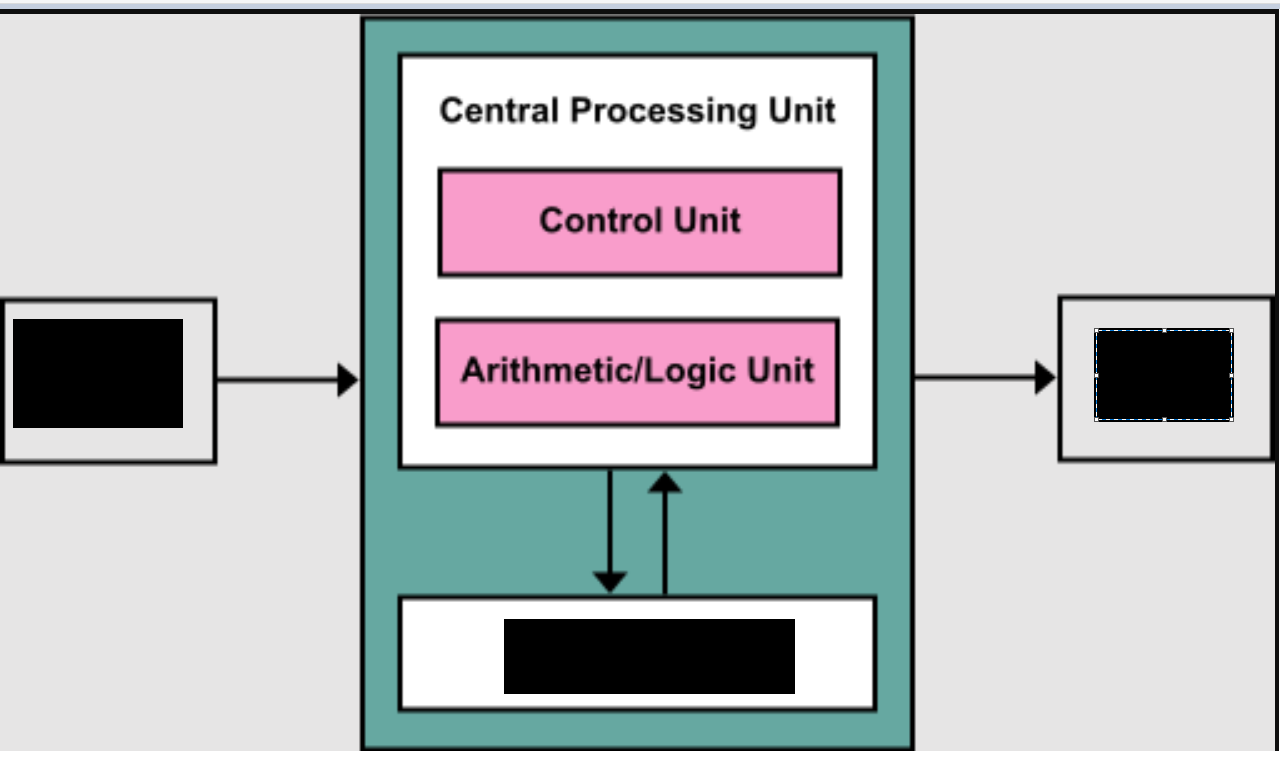
Label missing parts
1 point
1
Question 19
19.
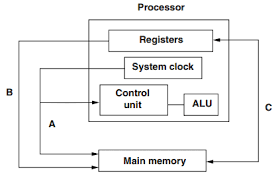
Label the buses A,B,C
A = control bus B = address bus C = data bus
1 point
1
Question 20
20.
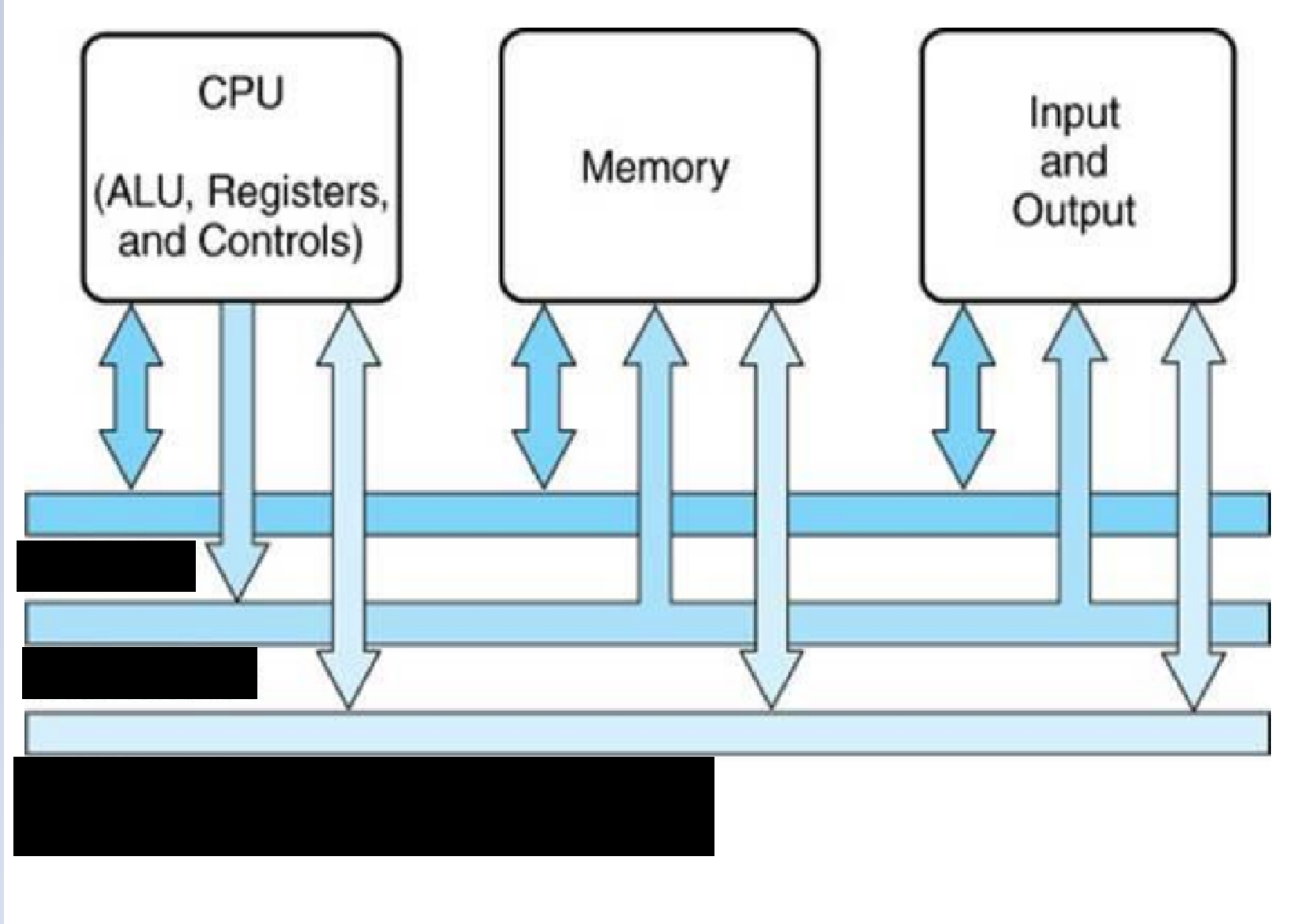
Label the 3 buses
Register Transfer Notation
Register Transfer Notation (RTN) is a symbolic way of representing how data moves between different registers in a computer system. It describes data flow and operations using simple notation.
Why Use Register Transfer Notation?
To clearly represent how instructions are executed at the hardware level.
To show how data moves between registers and memory in a structured way.
To simplify the description of the CPU's internal operations.
1 point
1
Question 21
21.
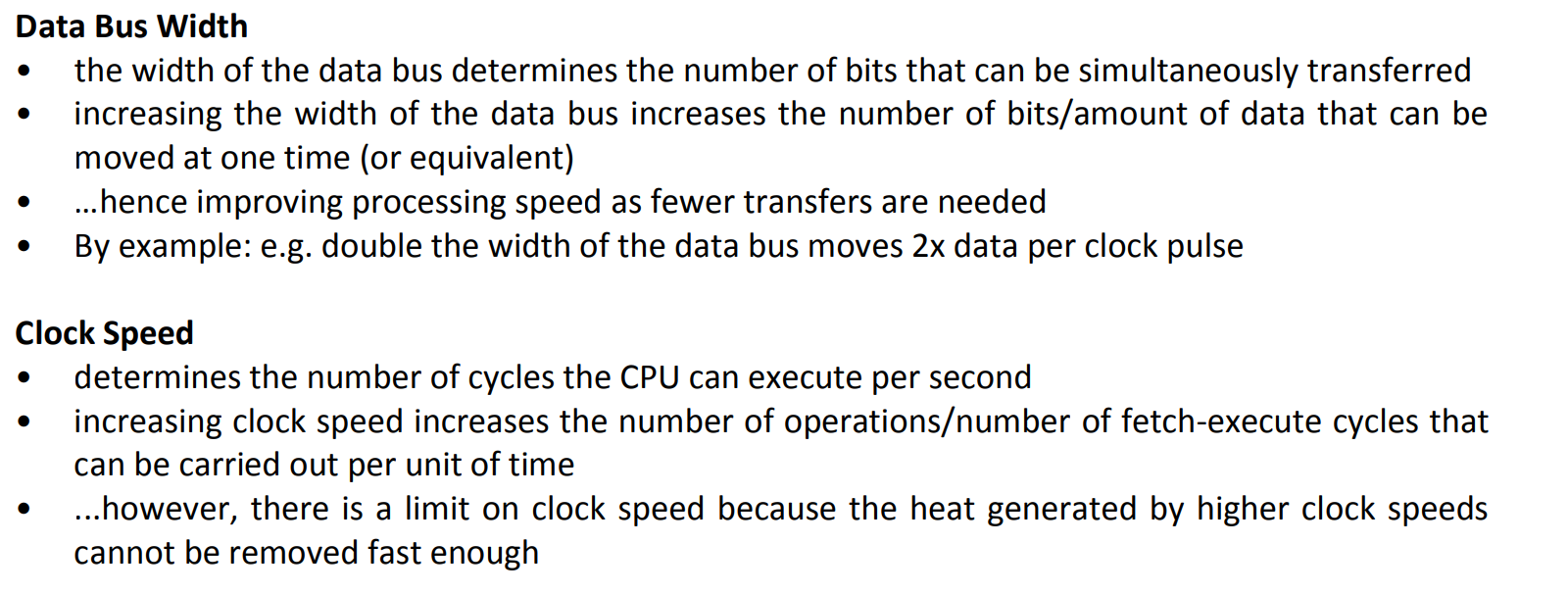
Explain how the width of the data bus and system clock speed affect the performance of a computer system.
1 point
1
Question 22
22.
State the role of each of the following special purpose registers used in a typical processor.
• Program Counter
• Memory Data Register
• Current Instruction Register
• Memory Address Register
Program Counter – stores the address of next instruction to be executed
Memory Data Register – stores the data in transit between memory and other registers // holds the instruction before it is passed to the CIR
Current Instruction Register – stores the current instruction being executed
Memory Address Register – stores the address of the memory location which is about to be accessed
1 point
1
Question 23
23.
Describe the stored program concept for the basic Von Neumann model for a computer system.
– program must be resident in (main) memory to be executed
– program consists of a sequence of instructions
– which occupy a (contiguous) block of main memory
– instructions and data are indistinguishable
– each instruction is fetched, (decoded) and then executed
– instruction fetch and data operation cannot occur at the same time
1 point
1
Question 24
24.
Briefly describe the Von Neumann architecture
- The Von Neumann architecture uses a single processor which follows a linear sequence of fetch-decode-execute.
- In order to do this, the processor has to use some special registers, which are discrete memory locations with special purposes attached.
1 point
1
Question 25
25.
Index Register (IR): A microprocessor register used for modifying operand addresses during the run of a program, typically for doing array operations. Index registers are used for a special kind of indirect addressing where an immediate constant (which is part of the instruction) is added to the contents of the index register to form the address to the actual operand or data.
- Status Register (SR): It sits inside ALU and has the following 3 purposes during a program’s instructions execution. It holds:
o Results of comparisons to decide later for action
o Interim results of arithmetic performed
o Any errors occurred during the arithmetic operations.
1 point
1
Question 26
26.
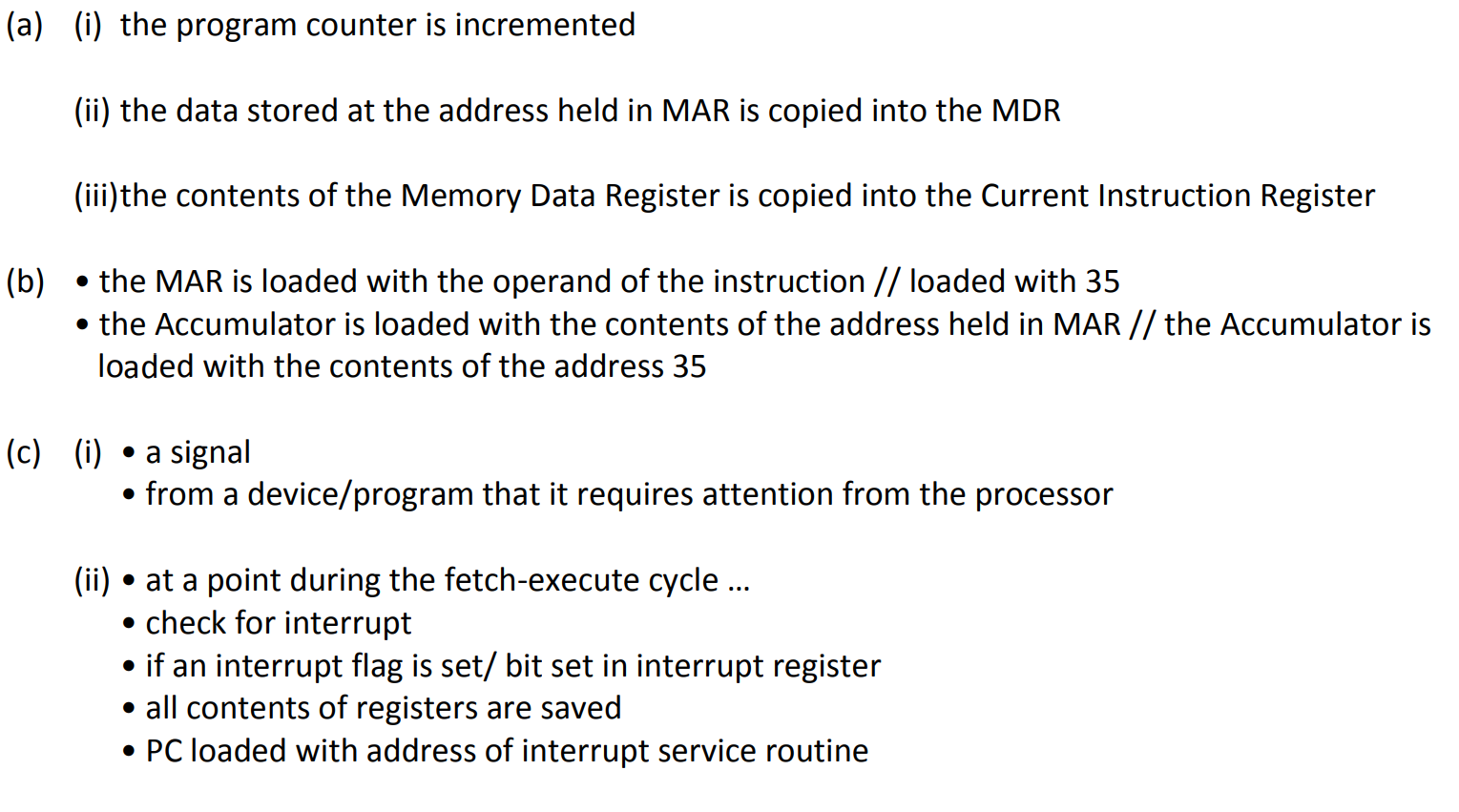
The sequence of operations shows, in register transfer notation, the fetch stage of the fetch execute cycle.
1. MAR ← [PC]
2. PC ← [PC] + 1
3. MDR ← [[MAR]]
4. CIR ← [MDR]
(a) (i) Describe what is happening at step 2.
(ii) Describe what is happening at step 3.
(iii)Describe what is happening at step 4.
(b) Describe what happens to the registers when the following instruction is executed: LDD 35
(c) (i) Explain what is meant by an interrupt.
(ii) Explain the actions of the processor when an interrupt is detected
1 point
1
Question 27
27.
Describe the Fetch-Decode-Execute cycle
The contents of the Program Counter (PC), the address of the next instruction to be executed, is place into the Memory Address Register (MAR).
The address is sent from the MAR along the address but to the Main Memory. The instruction at that address is found and returned along the data bus to the Memory Data Register.
At the same time the contents of the Program Counter (PC) is increase by 1, to reference the next instruction to be executed.
The MDR loads the Current Instruction Register (CIR) with the instruction to be executed
The instruction is decoded and executed using the ALU if necessary. The cycle starts again