Twa kɔ nsɛm atitiriw so
Log in
Sign up for FREE
arrow_back
Laabri

Hardware and Software L4 - What is Primary Storage?

star
star
star
star
star
Last updated over 1 year ago
12 Nsɛmmisa
Extension:

What is Cache Memory?

Cache is a type of high-speed RAM.

It is smaller (holds less data than RAM)a but also much faster than RAM. Your most recent and more used apps get stored into Cache.

Think of Cache like your pocket, and RAM as your backpack. It is much quicker to get something in your pocket, but is is smaller.

https://www.bbc.co.uk/bitesize/guides/zfyyb82/revision/4

1
Asemmisa {{asɛmmisaAhyɛnsode}}
12.

What is Cache memory?

Make a poster about Primary Storage:

RAM ROM and Cache

OR

Quietly do some revision so far with the link

https://play.blooket.com/play?hwId=67e9bf3f33ab8385df626d89

1
1
1
1
1
1
1
1
1
1
1

Primary Storage

Primary storage, are the types of hardware that is built into the computer that stores information.Examples of Primary Storage include: RAM and ROM.

Random Access Memory (RAM) and Read Only Memory (ROM) are built into a computer.

RAM

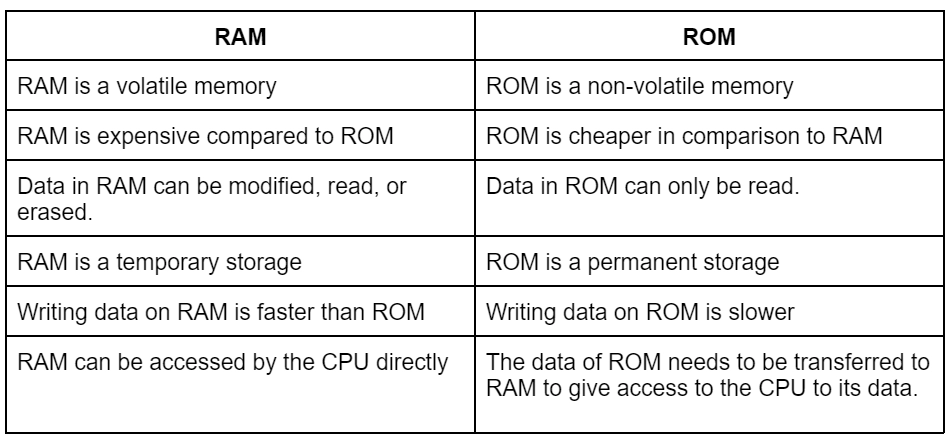
Random Access Memory (RAM) is can be though as "Short term memory" - it loses its data when the power is turned off (this is called volatile memory). It stores the apps and programs you use. The more RAM you have, the more programs you can have open at once without your computer slowing down.

The CPU Fetches instucions from RAM.

ROM

Read Only Memory (ROM) is read only, and used to boot the computer on. It’s data is not lost when the power is turned off (this is called non-volatile).

The instructions to boot the computer is called BIOS (Basic Input Output System) - these instructions are loaded to RAM.

It can not be edited, which is why it is called “Read-Only”.

https://www.bbc.co.uk/bitesize/guides/zfyyb82/revision/2

Asemmisa {{asɛmmisaAhyɛnsode}}
1.

Primary Storage is a type of storage that is build into ...

Asemmisa {{asɛmmisaAhyɛnsode}}
2.

What does RAM stand for?

Asemmisa {{asɛmmisaAhyɛnsode}}
3.

What does RAM hold?

Asemmisa {{asɛmmisaAhyɛnsode}}
4.

You can have more RAM added to your computer

Asemmisa {{asɛmmisaAhyɛnsode}}
5.

Summarise:

What is RAM?

What does it do?

Asemmisa {{asɛmmisaAhyɛnsode}}
6.

RAM is volatile.

Volatile means ...

Asemmisa {{asɛmmisaAhyɛnsode}}
7.

ROM stands for ...

Asemmisa {{asɛmmisaAhyɛnsode}}
8.

What does ROM do?

Asemmisa {{asɛmmisaAhyɛnsode}}
9.

ROM is Non-volatile.

Non-Volatile means ...

Asemmisa {{asɛmmisaAhyɛnsode}}
10.

Data in ROM can be changed.

Asemmisa {{asɛmmisaAhyɛnsode}}
11.

Summarise:

What is ROM?

What does it do?