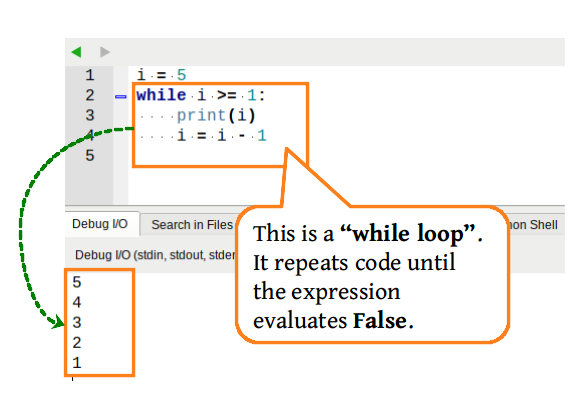
Iteration: Lines of code are repeated a set number of times or until a condition is met.
Count Controlled iteration: Code is repeated a number of times
Condition Controlled iteration: Code is repeated until a condition is met
For Loop: A type of Count Controlled loop.
Increment: A value to increase by (e.g. + 1)
While loops are actually much more useful than a for loop. We use "conditions" like "if statements" to repeat code.
BE CAREFUL YOU DO NOT ACCIDENTALLY MAKE AN INFINITE LOOP!!
while condition:
code to repeat here.
e.g.
counter = 0
while counter < 100:
counter = counter + 1
print (counter)
Look at the code for each question.
What do you think will be the output?
What is the actual output?
What will the be the output for the following code:
counter = 0
while counter < 10:
print(counter)
counter = counter + 1
Look at the code on the right.
Run it and see what it does.
Click on the pencil icon at the top to see the code again.
FIRST EXAMPLE:
Run the program and see what it does
Change the values of the variables to higher numbers. What happens?
SECOND EXAMPLE:
Run the program and see what it does
Follow the annototations on the program.
Help:
print ( ) is used to output text
input( ) is used to get the user to type something
Variables store values that can change.
Name = Value here
https://www.w3schools.com/python/python_for_loops.asp
RECAP
Boolean: a data type that can hold one of two values (true or false)
> Symbol: Greater than
< Symbol: Less than
== Symbol: Compares if both values are the same
!= Symbol: Not equal to
>= Symbol: Greater than or equal to
<= Symbol: Less than or equal to
Selection -
if (condition) :
(indent) program here....
Iteration -
for varName in range (start, end, increment):
(indent) program here....
Create a program that counts from the number 1 all the way to 100 using a while loop!
Create a program for a rocket launch!
Use a while loop to make a Countdown from 10 to 1.
Then output "Blast off!!!"
What does this code do:
myAnswer = ""
while myAnswer != "yes":
myAnswer = input("Is this annoying? ")
What does this code do:
total = 0
myAnswer = ""
while myAnswer != 0:
myAnswer = int(input("Enter cost: "))
total += int(myAnswer)
print(total)
Create a program that asks the user to enter numbers by using a loop until they enter 0. Output the sum of all the numbers
e.g.
User enters 10
User enters 5
User enters 5
User enters 9
User enters 1
Output "Total is 30"
The code below is a simple game of higher or lower.
However it only runs once!
Copy the code and make the following changes:
Add a while loop so that it keeps running until the correct number has been guessed.
Ext: add another condition to the while loop so that the game stops when the user enters "q".
Ext: use import random to get a random number to guess each time.
numberToGuess = 7
print("Guess my number which is between between 1 and 10:")
number = int(input())
if number == numberToGuess:
print("You got it!")
elif number < numberToGuess and number >= 0:
print("Higher")
elif number > numberToGuess and number <= 10:
print("Lower")
else:
print("Not a number")
CHALLENGE:
Create a program to output the song "100 bottles of milk on the wall".
Each verse goes:
100 bottles of milk on the wall!
100 bottles of milk!
Take one down,
pass it around!
There are 99 bottles of milk on the wall!
This continues until there are 0 bottles of milk on the wall.
CHALLENGE:
Create a program that asks the user to enter a number.
Output "*" on the first line
Output "**" on the second line
Output "***" on the third line
and so on until you reach the number entered.
e.g.
User inputs 5.
Output:
*
**
***
****
*****
CHALLENGE:
Create a program called Fizz Buzz.
Use a while loop to output numbers from 0 to 100, but:
If the number is divisible by 3: output "Fizz" instead of the number
If the number is divisible by 5: output "Buzz" instead of the number
If it is divisible by BOTH 3 and 5: output "Fizz Buzz" instead of the number
e.g.
1
2
fizz
4
buzz
fizz
7
8
fizz
fizzbuzz
11
...