756LRIS WS#3 (Salmon) One-Step Equation Story Problems

Last updated 2 months ago
31 questions
1

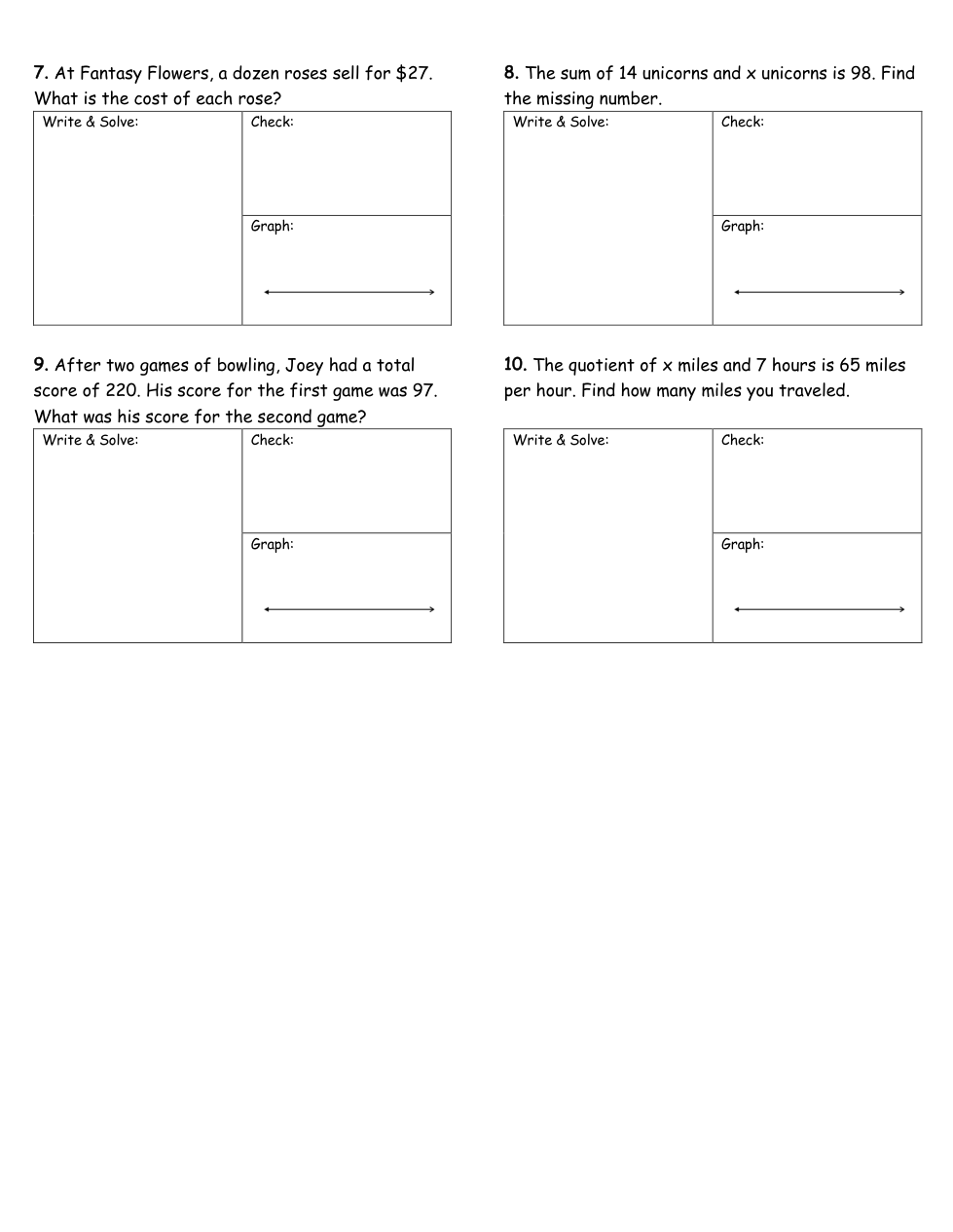
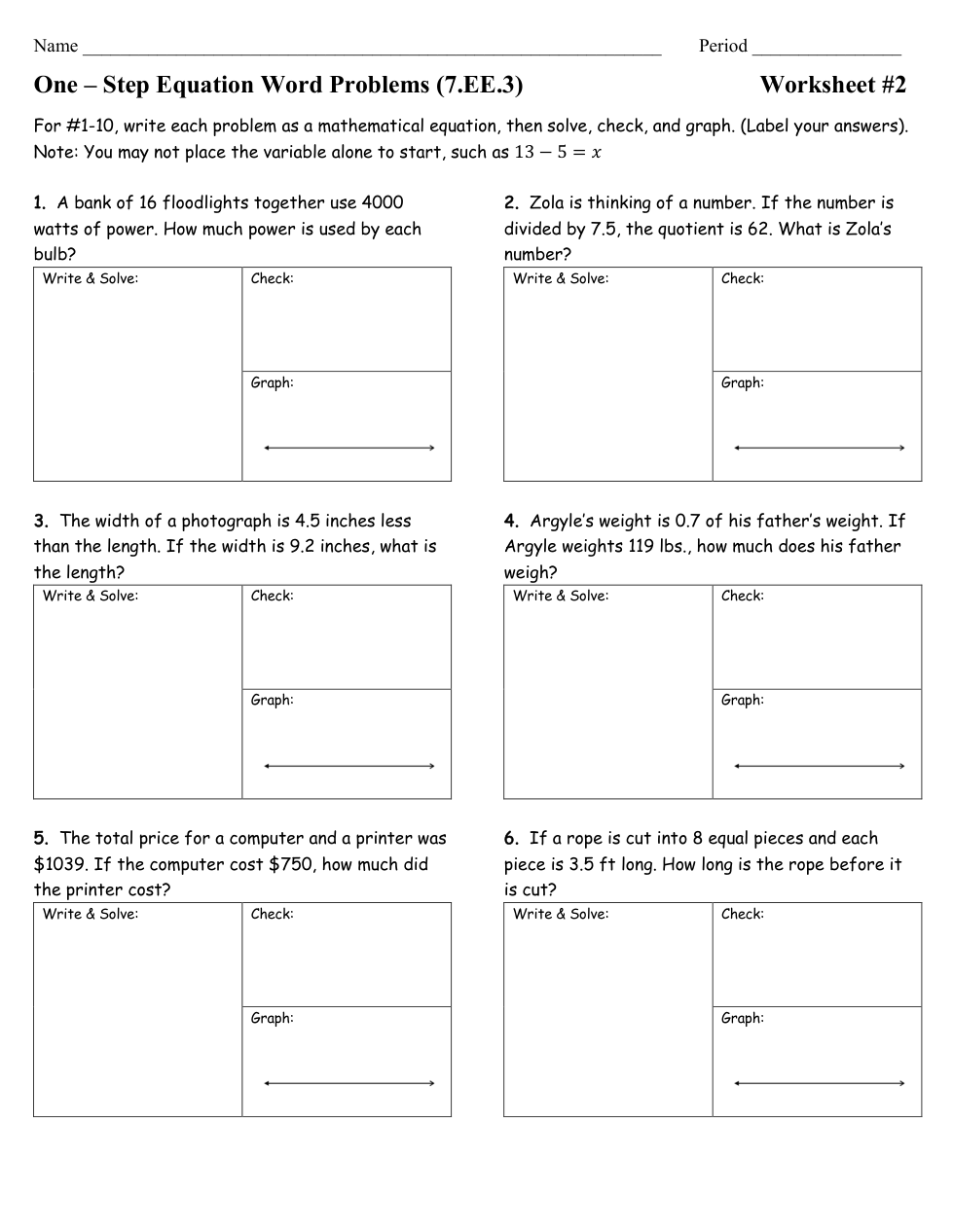
Write your equation using x as the variable.
Write your equation like: 10x=100

1

What is the solution to your equation. Write answer like: x=1

1

Graph your Solution on the number line.

  • Click the graph tab.
  • Click on the graph background to add a point. Click on a point to make it dotted. Click it again to delete it. Add two points to create a line segment.
1

Write your equation using x as the variable.
Write your equation like:

1

What is the solution to your equation. Write answer like: x=1

1

Graph your Solution on the number line.

  • Click the graph tab.
  • Click on the graph background to add a point. Click on a point to make it dotted. Click it again to delete it. Add two points to create a line segment.
1

Write your equation using x as the variable.
Write your equation like: x-10=100

1

What is the solution to your equation. Write answer like: x=1

1

Graph your Solution on the number line.

  • Click the graph tab.
  • Click on the graph background to add a point. Click on a point to make it dotted. Click it again to delete it. Add two points to create a line segment.
1

Write your equation using x as the variable.
Write your equation like: 10x=100

1

What is the solution to your equation. Write answer like: x=1

1

Graph your Solution on the number line.

  • Click the graph tab.
  • Click on the graph background to add a point. Click on a point to make it dotted. Click it again to delete it. Add two points to create a line segment.
1

Write your equation using x as the variable.
Write your equation like: 10+x=100

1

What is the solution to your equation. Write answer like: x=1

1

Graph your Solution on the number line.

  • Click the graph tab.
  • Click on the graph background to add a point. Click on a point to make it dotted. Click it again to delete it. Add two points to create a line segment.
1

Write your equation using x as the variable.
Write your equation like:

1

What is the solution to your equation. Write answer like: x=1

1

Graph your Solution on the number line.

  • Click the graph tab.
  • Click on the graph background to add a point. Click on a point to make it dotted. Click it again to delete it. Add two points to create a line segment.
1

Write your equation using x as the variable.
Write your equation like: 10x=100

1

What is the solution to your equation. Write answer like: x=$1.23

1

Graph your Solution on the number line.

  • Click the graph tab.
  • Click on the graph background to add a point. Click on a point to make it dotted. Click it again to delete it. Add two points to create a line segment.
1

Write your equation using x as the variable.
Write your equation like: 10+x=100

1

What is the solution to your equation. Write answer like: x=1

1

Graph your Solution on the number line.

  • Click the graph tab.
  • Click on the graph background to add a point. Click on a point to make it dotted. Click it again to delete it. Add two points to create a line segment.
1

Write your equation using x as the variable.
Write your equation like: 10+x=100

1

What is the solution to your equation. Write answer like: x=1

1

Graph your Solution on the number line.

  • Click the graph tab.
  • Click on the graph background to add a point. Click on a point to make it dotted. Click it again to delete it. Add two points to create a line segment.
1

Write your equation using x as the variable.
Write your equation like:

1

What is the solution to your equation. Write answer like: x=1

1

Graph your Solution on the number line.

  • Click the graph tab.
  • Click on the graph background to add a point. Click on a point to make it dotted. Click it again to delete it. Add two points to create a line segment.
0

I will know I am successful when:
*I can write, solve, and graph one-step equations.