Twa kɔ nsɛm atitiriw so
Log in
Sign up for FREE
arrow_back
Laabri

Y10-Topic 1: Data Representation - Sound

star
star
star
star
star
Last updated 5 months ago
26 Nsɛmmisa

Learning Objectives: (WAGBA)

  • Understand how analog sound is converted into a digital signal through sampling.

  • Define and explain sampling rate, bit depth, channels, and bit rate.

  • Identify the hardware involved (ADC/DAC).

  • Calculate the file size of a sound file.

Knowledge

Unravelling the Magic

Have you ever wondered how your phone can store thousands of songs? Or how your voice can travel across the world in a video call? It seems like magic, but it's all about converting the sound you hear into a language that computers can understand: binary.

Understanding & Skills
Ɛhia
9
Ɛhia
1
Ɛhia
1
Ɛhia
1
Ɛhia
1
Ɛhia
1
Ɛhia
1
Ɛhia
1
Ɛhia
1
Ɛhia
1
Ɛhia
8
Ɛhia
3
Ɛhia
4
Ɛhia
1
Ɛhia
1
Exit Ticket
Ɛhia
3

Part 1: Analog Sound vs. Digital Data

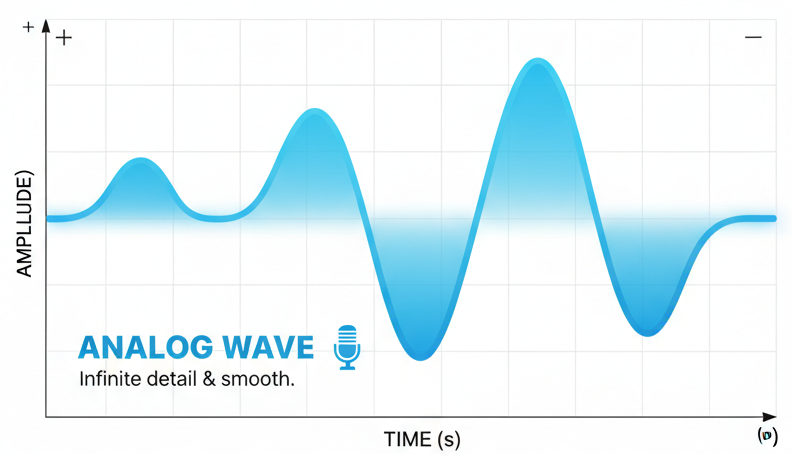
Sound in the real world is analogue. Think of it as a smooth, continuous wave, like a ripple in a pond. It has infinite detail.

Computers, however, are digital. They only understand discrete, specific values—0s and 1s. So, how do we convert the smooth analog wave into blocky digital data?

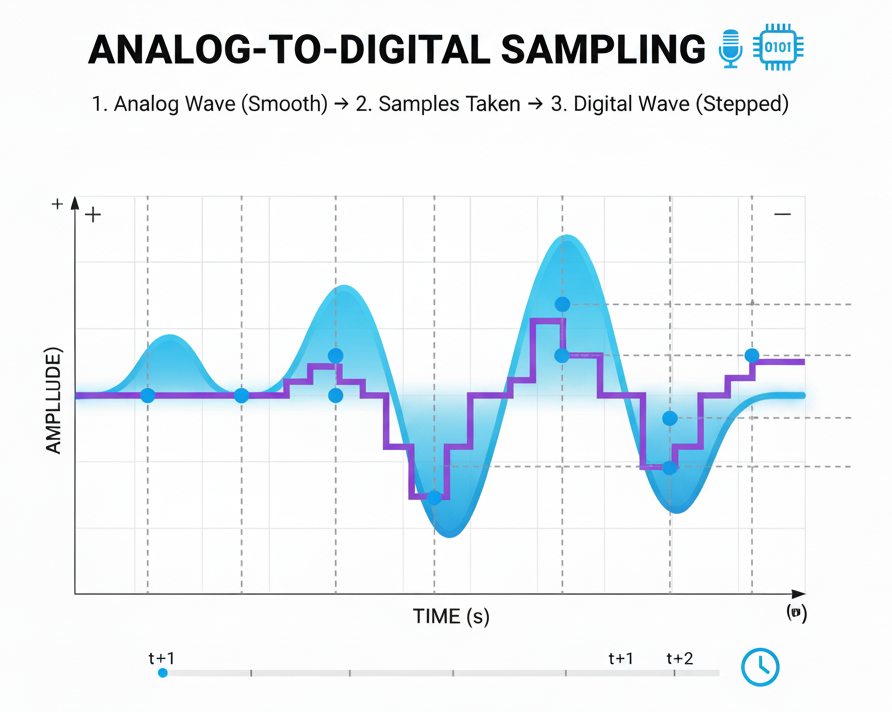
We take samples!

Part 1: Sampling Process

Sampling is the process of measuring the amplitude (height) of the sound wave at regular, fixed intervals. It's like taking a series of "snapshots" of the wave over time.

Imagine tracing the wave, but you can only put a dot down once every second. The collection of these dots is your digital representation of the wave. The more dots you place, the closer you get to the original shape!

Part 1: Sampling Process and sampling rate

Watch this very formative and well-explained video from Sam Loose, one of the dominant Audio engineerss in his own field at Izotope.

Part 2: The Quality of Sound - Rate, Depth, and Channels

How good our digital sound is depends on two key factors: Sampling Rate and Bit Depth.

1. Sampling Rate (or Sampling Frequency)

This is how often we take a sample. It's measured in Hertz (Hz). A common sampling rate for music is 44,100 Hz, which means we take 44,100 "snapshots" of the sound wave every single second!

  • Low Sampling Rate: The digital version is a rough, blocky copy of the original. It loses a lot of detail.

  • High Sampling Rate: The digital version is a much more accurate and faithful representation of the original sound wave.

2. Bit Depth (or Sample Resolution)

This determines how much information we can store for each sample. It's the number of bits (0s and 1s) used to represent the amplitude (loudness) of each snapshot.

  • More bits = more possible amplitude values = greater dynamic range (the difference between the quietest and loudest sounds).

Imagine describing a colour. With a low bit depth (e.g., 2 bits), you might only have 4 options (2²=4) like "black," "white," "grey," "dark grey." With a higher bit depth (e.g., 8 bits), you have 256 options (2⁸=256), allowing for many more shades and a more detailed description.

3. Channels

This refers to how many streams of audio are being recorded.

  • Mono (1 channel): A single audio stream. All sound comes from one direction.

  • Stereo (2 channels): Two separate audio streams, one for the left speaker and one for the right. This creates a sense of space and direction.
1
1
1
1
1
Asemmisa {{asɛmmisaAhyɛnsode}}
5.

Convert 44,100 Hz to KHz.

Part 3: The Hardware - Making it Happen

The conversion process requires special hardware, usually found on a computer's sound card or motherboard.

So how does it actually happen?

  1. An input device like a microphone captures the analogue sound wave and converts it into an analogue electrical signal.

  2. The Analog-to-Digital Converter (ADC) receives this signal. This is the component that performs the sampling process to turn the analogue signal into a stream of binary data.

  3. This digital data is then processed and stored by the computer.

  4. To play the sound back, the process is reversed. The Digital-to-Analog Converter (DAC) reads the binary data and converts it back into an analogue electrical signal.

  5. This signal is sent to an output device like speakers or headphones, which vibrate to recreate the sound waves for your ears to hear.

Ɛhia
1
Asemmisa {{asɛmmisaAhyɛnsode}}
6.

Drag the components onto the correct stage of the sound journey.

  • DAC

  • Speakers

  • Headphones

  • ADC

  • Microphone

  • Recording

  • Playback

Ɛhia
1
Ɛhia
1
Ɛhia
1

Part 4: Calculating File Size

Now we can put everything together to figure out how much space a sound file takes up!

  • First, we calculate the Bit Rate: the number of bits of data that are processed every second.

Formula: Bit Rate (bps) = Sampling Rate (Hz) x Bit Depth x Number of Channels

  • Next, we use the bit rate to find the total file size.

Formula: File Size (bits) = Bit Rate (bps) x Time (seconds)

To convert this to bytes, remember: 8 bits = 1 byte.

Example:

Let's try an example. Calculate the file size in megabytes (MB) for a 3-minute (180 seconds) stereo (2 channels) audio track with a sampling rate of 44,100 Hz and a bit depth of 16. (Assume 1 MB = 1,000,000 bytes).

  1. Bit Rate = 44,100 x 16 x 2 = 1,411,200 bps

  2. Total Bits = 1,411,200 x 180 = 254,016,000 bits

  3. Total Bytes = 254,016,000 / 8 = 31,752,000 bytes

  4. Total MB = 31,752,000 / 1,000,000 = 31.75 MB

Ɛhia
3
Asemmisa {{asɛmmisaAhyɛnsode}}
10.

You are recording a 1-minute (60 seconds) podcast. It is a mono recording with a sampling rate of 22,050 Hz and a bit depth of 8. What is the file size?

Asemmisa {{asɛmmisaAhyɛnsode}}
11.
Mmuae Afoforo a Wobɛpaw:

rate

microphone

amplitude

digital

depth

larger

sampling

analogue

KiloHertz (KHz)

Asemmisa {{asɛmmisaAhyɛnsode}}
12.

The number of times a sound wave repeats per second is called its 'amplitude.'

Asemmisa {{asɛmmisaAhyɛnsode}}
13.

Sound is converted to an audio file by taking ‘samples’ of its amplitude at different points in time.

Asemmisa {{asɛmmisaAhyɛnsode}}
14.

Speakers produce sound by vibrating a diaphragm.

Asemmisa {{asɛmmisaAhyɛnsode}}
15.

The number of possible values for amplitude of a sound is a quality we call ‘bit rate’.

Asemmisa {{asɛmmisaAhyɛnsode}}
16.

Metadata contains information about the sound file as a whole.

Asemmisa {{asɛmmisaAhyɛnsode}}
17.

Each audio channel has its own samples.

Asemmisa {{asɛmmisaAhyɛnsode}}
18.

The height of a sound wave is called its 'amplitude.'

Asemmisa {{asɛmmisaAhyɛnsode}}
19.

Sound is converted to an audio file by taking ‘samples’ of its amplitude at different points in time.

Asemmisa {{asɛmmisaAhyɛnsode}}
20.

Increasing the number of samples you take per second will decrease the size of an audio file.

Asemmisa {{asɛmmisaAhyɛnsode}}
21.

Match the key terms with the statements.

Draggable itemarrow_right_altCorresponding Item

Bit depth

arrow_right_alt

Taking amplitude values of a sound wave

Sampling

arrow_right_alt

Separate audio track with its own sampling

Metadata

arrow_right_alt

Number of times a sound wave repeats per second

Sampling rate

arrow_right_alt

Height of the sound wave

Frequency

arrow_right_alt

Range of possible values for amplitude when sampling

Hertz

arrow_right_alt

Bits of data per second of audio

Bit rate

arrow_right_alt

Information about the sound file, included with the sound file

Amplitude

arrow_right_alt

Unit of frequency

Channel

arrow_right_alt

Number of samples taken per second

Asemmisa {{asɛmmisaAhyɛnsode}}
22.

Describe the function of three pieces of hardware involved in the capture or production of digital audio.

Asemmisa {{asɛmmisaAhyɛnsode}}
23.

Order the following steps for the 'sampling' process.

  1. Each of them is taken in as a single ‘sample’.

  2. Amplitude values are taken at different points in time.

  3. These values are converted into binary through ADC.

  4. Thousands of samples are taken per second.

  5. The binary values are stored as an audio file.

Asemmisa {{asɛmmisaAhyɛnsode}}
24.
Asemmisa {{asɛmmisaAhyɛnsode}}
25.
Asemmisa {{asɛmmisaAhyɛnsode}}
26.

In your own words, explain to a friend why a song streamed on Spotify (high quality) has a much larger file size than a voice message you send on your phone (low quality). Use at least two of the key terms we learned today (e.g., sampling rate, bit depth, channels).

Asemmisa {{asɛmmisaAhyɛnsode}}
1.

What does sampling rate measure in sound processing?

Asemmisa {{asɛmmisaAhyɛnsode}}
2.

How does higher bit depth affect sound quality?

Asemmisa {{asɛmmisaAhyɛnsode}}
3.

What does a single channel in audio mean?

Asemmisa {{asɛmmisaAhyɛnsode}}
4.

What is a common sampling rate for music?

Asemmisa {{asɛmmisaAhyɛnsode}}
7.

What does an input device like a microphone do?

Asemmisa {{asɛmmisaAhyɛnsode}}
8.

What does the Analog-to-Digital Converter (ADC) do?

Asemmisa {{asɛmmisaAhyɛnsode}}
9.

What is the role of the Digital-to-Analog Converter (DAC)?