Designing a Temperature-Stable Lunch Box Insert
Real-World Phenomenon
People use cooler packs in lunch boxes to keep food cold. The pack may start frozen or very cold, and over time it warms up as it absorbs thermal energy from the food and the air inside the lunch box. Engineers design these inserts to keep lunch box temperatures low for as long as possible by changing the pack size, insulation, or materials.
Devices can be designed to either release or absorb thermal energy during a chemical and/or physical process. Cooler packs are devices designed to absorb thermal energy, which helps keep nearby items cool. This typically happens through a physical process such as warming, melting, or phase change.
A common cooler insert begins frozen. As it absorbs thermal energy from the warmer surroundings, the insert’s temperature increases. If the insert contains a material that melts, the melting process can absorb a large amount of thermal energy while the temperature stays near the melting point for a period of time. This can help keep the lunch box temperature lower for longer.
Diagram 1.

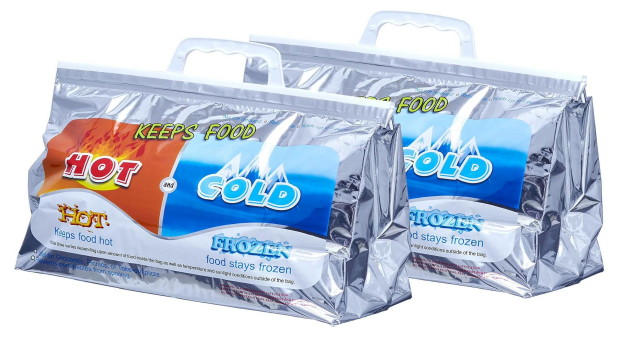
Source: https://www.walmart.com/ip/Superio-Hot-Cold-Insulated-Bags-Food-Delivery-Grocery-Shopping-Bags-Storage-Frozen-Travel-Disposable-Cooler-Bag-Reinforced-Thermal-Lunch-Bag-2-13-x5/13130550326
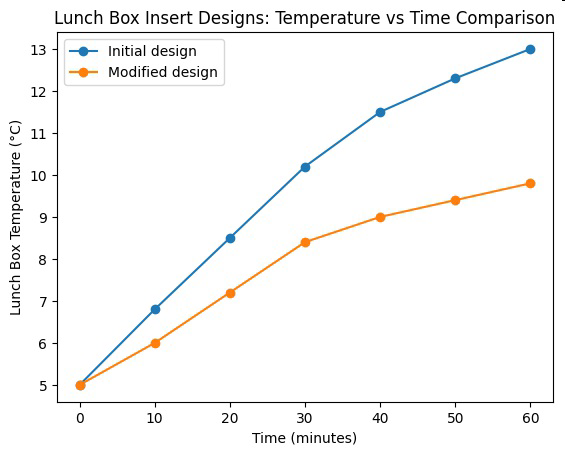
Engineers test cooler pack designs by measuring the temperature inside a lunch box over time. A useful cooler pack should keep the lunch box temperature below a target value (for example, below $10^\circ \text{C}$) for as long as possible. If the lunch box warms too quickly, engineers might modify the design.
Design modifications can include adding more cooling material (increasing mass), changing the shape to increase surface contact, or adding insulation to slow heat transfer from outside the lunch box. The goal is to improve performance based on evidence from temperature data.
This is an engineering design process: define the problem (keep lunch cool), build a device (cooler insert), test it (collect temperature data), and modify the design based on results. By analyzing temperature graphs and applying ideas about thermal energy transfer and phase change, students can explain how the device works and why some designs keep the lunch box cool longer than others.
Table 1. Initial Design
Time (minutes) | Lunch Box Temperature (A°C) |
|---|
0 | 5 |
10 | 6.8 |
20 | 8.5 |
30 | 10.2 |
40 | 11.5 |
50 | 12.3 |
60 | 13 |
Graph of Information - Figure 1.
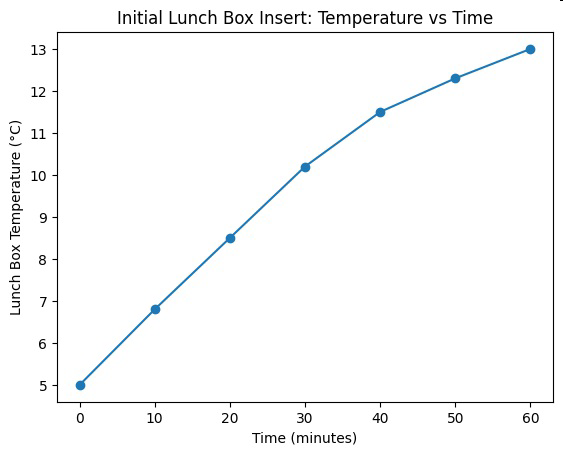
Table 2. Modified Design
Time (minutes) | Lunch Box Temperature (oC) |
|---|
0 | 5 |
10 | 6 |
20 | 7.2 |
30 | 8.4 |
40 | 9 |
50 | 9.4 |
60 | 9.8 |
Graph of Information - Figure 2.