Přejít k hlavnímu obsahu
Přihlásit se
Sign up for FREE
arrow_back
Knihovna

Magnetic storage

star
star
star
star
star
Poslední aktualizace 3 months ago
20 Dotazy
1
1
1
1

Advice

Data transfer rate is the rate at which data can be sent from a storage device to a computer (or vice versa). Data access time is the time it takes to locate specific data stored on the storage media.

3 Storage devices and media

Box outline decoration

In this chapter you will learn about:

  • storage devices:

    • magnetic (hard disk drive (HDD) and magnetic tape drive)

    • optical (CD, DVD and Blu-ray read/write devices)

    • solid state (solid-state drive (SSD), pen drive and flash drive)

  • storage media:

    • magnetic media (magnetic disks and magnetic tape)

    • optical (CD, DVD and Blu-ray discs)

    • solid state (including SD, XD and CFast).

Star icon

Secondary storage includes all non-volatile devices that are not part of primary memory. They allow data to be stored as long as required by the user. This type of storage is much larger than RAM and ROM (primary memory), but data access time is considerably longer. All applications, the operating system, device drivers and general files (for example, documents, photos and music) are stored in secondary storage. There are three different categories of secondary storage which are based on technology that uses the following media:

  • magnetic

  • optical

  • solid state.

It is very important to distinguish between the terms storage media and storage device. Media is the hardware on which the data is actually stored (for example, a CD or a DVD); whereas the storage device is the hardware used to read from or write to the media (for example, a CD/DVD reader or writer).

Otázka 1
1.

What type of storage device is an SSD?

Otázka 2
2.

Which of the following is an example of optical storage media?

Otázka 3
3.

What is the primary function of secondary storage?

Otázka 4
4.

What distinguishes storage media from storage devices?

3.1 Magnetic media and magnetic storage devices

Using the properties of magnetism is one of the oldest known methods for the electronic storage of data; its roots go back to the nineteenth century.

Today, magnetic media rely on the property that an iron oxide coating can be magnetised to represent a binary 1-value and demagnetised to represent a binary 0-value. Because each magnetised area is very small, this allows a huge amount of data to be stored. One of the big advantages of this technology is that the magnetic state of the iron oxide is permanent unless it is written over again. The two most common devices that use these magnetic properties to store data are magnetic tape drives and hard disk drives (HDD).

1
1
1
1
1
1
1
1

3.1.1 Magnetic tape drives

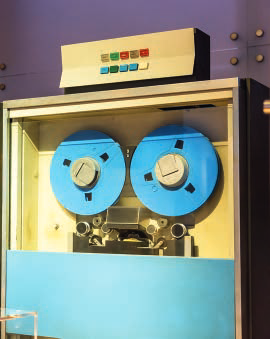
A magnetic tape is a very thin strip of plastic which is coated in a magnetic layer (iron oxide). They are read from or written to by a read/write head in a magnetic tape storage device. The data is stored as a magnetised area (which represents a 1) or demagnetised area (which represents a 0). Data is read from the tape using serial access (in other words, data can only be read in the same order that it was written). This type of storage is useless in real-time or online applications (due to the very slow data access speeds) and is best suited to offline or batch processing. However, due to their vast storage capacity, magnetic tapes are still used on large industrial or university computers.

Magnetic tape drive

Figure 3.1 Magnetic tape drive

Uses of magnetic tapes

  • Use in applications where batch processing is used (for example, clearing bank cheques, utility billing (gas, electricity, water), and producing pay slips). In these applications there is no need for any specific processing order and speed of data access is not essential).

  • Used as a backup media where vast amounts of data need to be stored.

  • Used in long-term archiving of data; magnetic tapes have huge data storage capacities and are known to be very stable, which makes them ideal for long-term storage.

Advantages of magnetic tape

  • They are generally less expensive (per byte) than the equivalent hard disk drive.

  • It is a very robust technology (they do not deteriorate much over time and remain stable).

  • They have a huge data storage capacity.

  • The data transfer rate is actually fast (this should not be confused with data access time which is very slow for magnetic tapes).

Disadvantages of magnetic tape

  • Very slow data access times (they use serial access, which means all the previous data needs to be read until the required data is found) - whilst magnetic tape data access time is slow, the data transfer rate is still high.

  • When updating, another tape is needed to store the final updated version; this requires the use of a master tape (the original tape) and a transaction tape (which contains all the changes to be made) to produce a new master tape. This is clearly a slow way of updating data, and can also introduce errors, which is why magnetic tapes are no longer a common method of storing data).

  • They are affected by magnetic fields; a strong magnet (for example, one found in a loudspeaker) can corrupt data stored on the tape.

1
1
1
1

3 STORAGE DEVICES AND MEDIA

3.1.2 Hard disk drives (HDD)

Hard disk drives (HDD) are still one of the most common methods used to store data on a computer. Data is stored in a digital format on the magnetic surfaces of the hard disks (or platters, as they are usually called). A hard disk drive will very often have more than one platter depending on its capacity. A number of read/write heads can access all of the platter surfaces in the disk drive (normally each platter will have two surfaces where the data is stored). These read/write heads can move very quickly – typically they can move from the centre of the disk to the edge of the disk (and back again) 50 times a second. Data on an HDD can be read using direct access – this means, unlike magnetic tape, earlier data does not have to be read first before the required data is found. We will now look in more detail at how HDD works:

  • Actuators are used to move the read/write heads (voice coils are used as the actuators; these are similar to the electromagnets used in speakers – hence their name).

  • A read/write arm swings the read/write head back and forth across the platter; the platter is rotating at up to 10 000 rpm (revolutions per minute).

  • Each read/write head contains a tiny magnet which allows the data on the platter to be read.

  • Platters are made from glass, ceramic or aluminium which are coated in iron oxide.

  • There are two read/write heads per platter (one for the top surface and one for the bottom surface).

  • Data is stored in concentric, circular tracks; each track is broken up into sectors (see Figure 3.4).

  • A map of the sectors is stored on the HDD and is known as a file allocation table (FAT); when the computer wants to store new data, it looks at the FAT map to find out which sectors are free and then moves the read/write heads to the correct location – this greatly speeds up the writing process.
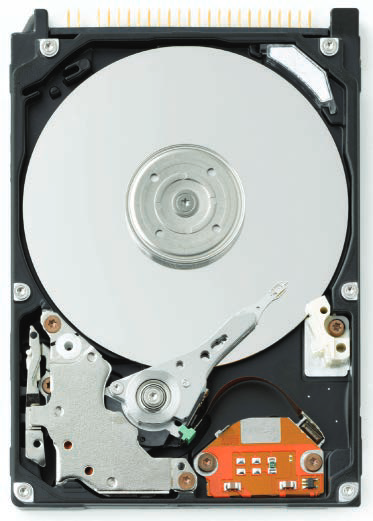
Internal view of a hard disk drive showing platter and read/write mechanism

Figure 3.3 Hard disk drive – the hard disk (platter) is the media and the hard disk drive (HDD) is the storage device.

While hard disk drives have much faster data access times than magnetic tape, there are still small delays. Many applications require the read/write heads to constantly seek the correct blocks of data; this means a large number of head movements. The effects of latency then become very significant. (Latency is defined as the time it takes for a specific block of data on a data track to rotate around to the read/write head). Users will sometimes notice the effect of latency, especially if many different applications are open, when they see messages such as: ‘Please wait’ or, at its worst, ‘not responding’. HDDs can be either fixed or portable.


Uses of fixed hard disk drives

  • To store the operating system, systems software and working data/files.

  • Storing applications software.

  • Used in real-time systems (for example, robots, control of a chemical plant) and in online systems (for example, booking airline tickets, automatic stock control (using EPOS)).

  • Used in file servers for computer networks.

Advantages of fixed hard disk drives

  • They have a very fast data transfer rate and fast access times to data.

  • They have very large memory capacities.

Disadvantages of fixed hard disk drives

  • They can be fairly easily damaged (for example, if the correct shut-down procedure on a computer has not been correctly carried out, it is possible to sustain a head crash).

  • They have many moving parts which can affect their overall reliability.

  • Their read/write operation can be quite noisy when compared to solid-state drives.

3.1.3 Portable hard disk drives

Portable hard disk drives are essentially HDDs external to the computer and can be connected to the computer using one of the USB ports. In this way, they can be used as a backup device or another way of transferring files between computers.

Uses of portable hard disk drives

  • They can be used as backup systems to prevent loss of data.

  • They can be used to transfer data/files/software between computers.

Advantages of portable hard disk drives

  • The data access time and data transfer rate are very fast.

  • They have a large memory capacity.

  • They can be used as a method of transferring information between computers.

Disadvantages of portable hard disk drives

  • As with fixed disk drives, they can be easily damaged if the user accidentally drops it or does not correctly shut down the drive after use.

  • Data transfer rate is not as fast as for fixed hard drives.

1
Otázka 17
17.

What is a primary use of portable hard disk drives?

1
1
1
Otázka 5
5.

What material is used to coat magnetic media for storage?

Otázka 6
6.

What do magnetised areas on magnetic media represent?

Otázka 7
7.

What is a key advantage of magnetic storage technology?

Otázka 8
8.

What are two common devices that utilize magnetic storage?

Otázka 9
9.

What does magnetization represent in magnetic media?

Otázka 10
10.

What type of drives primarily use magnetic storage?

Otázka 11
11.

What component is commonly used in magnetic media?

Otázka 12
12.

What happens to the magnetic state when data is rewritten?

Otázka 13
13.

What type of data access do magnetic tapes use?

Otázka 14
14.

Why are magnetic tapes still used in large systems?

Otázka 15
15.

What is a disadvantage of magnetic tape technology?

Otázka 16
16.

What kind of applications are best for magnetic tape?

Otázka 18
18.

What is a disadvantage of portable hard disk drives?

Otázka 19
19.

How do portable hard disk drives connect to computers?

Otázka 20
20.

What is an advantage of portable hard disk drives?