Log in
Sign up for FREE
arrow_back
Library

Compare and Order Practice

star
star
star
star
star
Last updated about 3 hours ago
42 questions
1
1
1
1
1
1
1
1
1
1
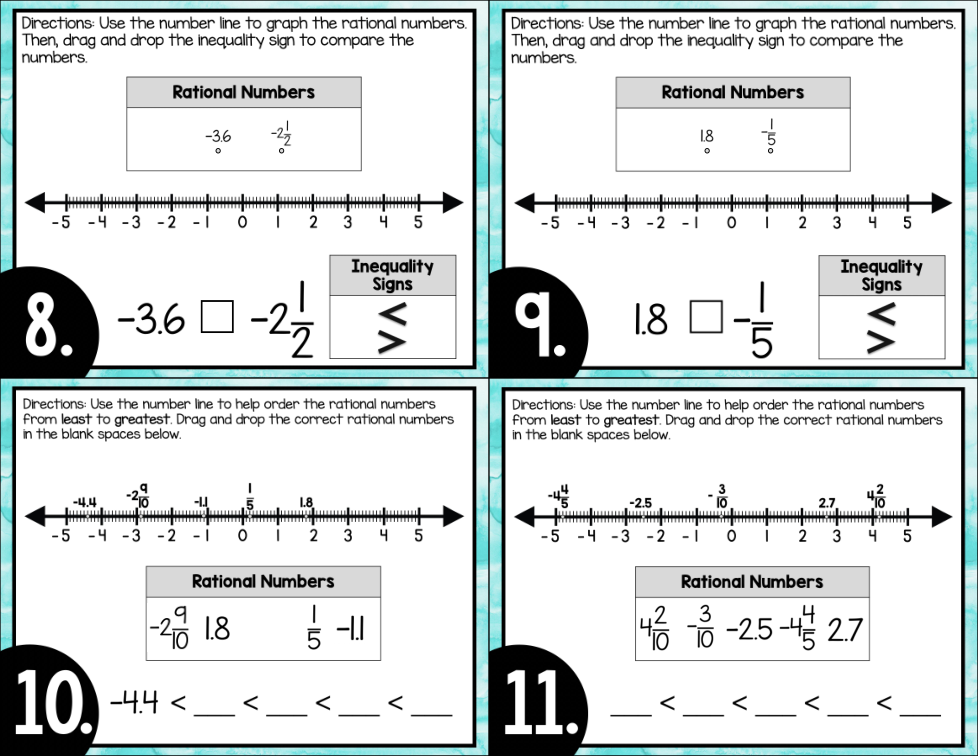
Question 10
10.

1
1
1
1
1
1
1
1
1
1
1
1
1
1
1
1
1
1
1
1
1
1
1
1
1
1
1
Question 37
37.

1
1
1
1
1
Question 1
1.

  • Click a Graph tab (Graph 1, Graph 2, and so on) for each graph you need to plot.
  • Click on the graph background to add a closed point. Click on a closed point to turn it into an open point. Click it again to delete it. Add two points to create a line segment.
Question 2
2.

  • Click a Graph tab (Graph 1, Graph 2, and so on) for each graph you need to plot.
  • Click on the graph background to add a closed point. Click on a closed point to turn it into an open point. Click it again to delete it. Add two points to create a line segment.
Question 3
3.

Question 4
4.

  • Click a Graph tab (Graph 1, Graph 2, and so on) for each graph you need to plot.
  • Click on the graph background to add a closed point. Click on a closed point to turn it into an open point. Click it again to delete it. Add two points to create a line segment.
Question 5
5.

  • Click a Graph tab (Graph 1, Graph 2, and so on) for each graph you need to plot.
  • Click on the graph background to add a closed point. Click on a closed point to turn it into an open point. Click it again to delete it. Add two points to create a line segment.
Question 6
6.

Question 7
7.

  • Click a Graph tab (Graph 1, Graph 2, and so on) for each graph you need to plot.
  • Click on the graph background to add a closed point. Click on a closed point to turn it into an open point. Click it again to delete it. Add two points to create a line segment.
Question 8
8.

  • Click a Graph tab (Graph 1, Graph 2, and so on) for each graph you need to plot.
  • Click on the graph background to add a closed point. Click on a closed point to turn it into an open point. Click it again to delete it. Add two points to create a line segment.
Question 9
9.

Question 11
11.

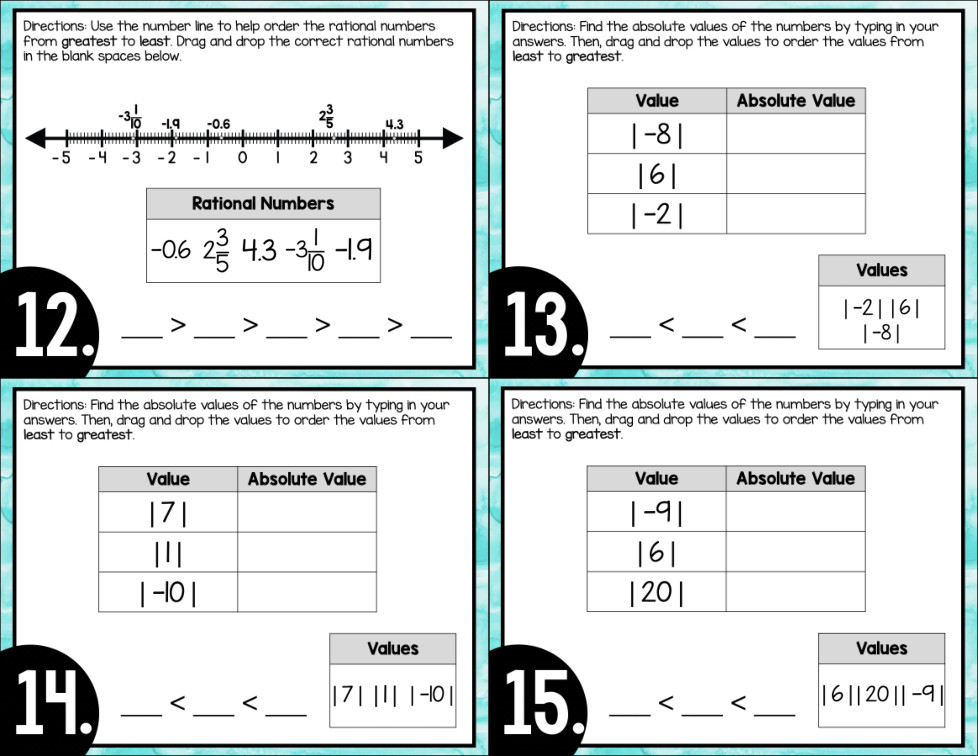
Question 12
12.

Question 13
13.

  • Click a Graph tab (Graph 1, Graph 2, and so on) for each graph you need to plot.
  • Click on the graph background to add a closed point. Click on a closed point to turn it into an open point. Click it again to delete it. Add two points to create a line segment.
Question 14
14.

  • Click a Graph tab (Graph 1, Graph 2, and so on) for each graph you need to plot.
  • Click on the graph background to add a closed point. Click on a closed point to turn it into an open point. Click it again to delete it. Add two points to create a line segment.
Question 15
15.

Question 16
16.

  • Click a Graph tab (Graph 1, Graph 2, and so on) for each graph you need to plot.
  • Click on the graph background to add a closed point. Click on a closed point to turn it into an open point. Click it again to delete it. Add two points to create a line segment.
Question 17
17.

  • Click a Graph tab (Graph 1, Graph 2, and so on) for each graph you need to plot.
  • Click on the graph background to add a closed point. Click on a closed point to turn it into an open point. Click it again to delete it. Add two points to create a line segment.
Question 18
18.

Question 19
19.

  • Click a Graph tab (Graph 1, Graph 2, and so on) for each graph you need to plot.
  • Click on the graph background to add a closed point. Click on a closed point to turn it into an open point. Click it again to delete it. Add two points to create a line segment.
Question 20
20.

  • Click a Graph tab (Graph 1, Graph 2, and so on) for each graph you need to plot.
  • Click on the graph background to add a closed point. Click on a closed point to turn it into an open point. Click it again to delete it. Add two points to create a line segment.
Question 21
21.

Question 22
22.

Question 23
23.

Question 24
24.

Question 25
25.

Question 26
26.

Question 27
27.

Question 28
28.

Question 29
29.

Question 30
30.

Question 31
31.

Question 32
32.

Question 33
33.

Question 34
34.

Question 35
35.

Question 36
36.

Question 38
38.

Question 39
39.

Question 40
40.

Question 41
41.

Question 42
42.