Log in
Sign up for FREE
arrow_back
Library

Copy of Lewis Dot Structures (5/28/2026)

star
star
star
star
star
Last updated about 3 hours ago
15 questions
1
1
1
1
1
1
1
1
1
1
1
1
1
1
1

Lewis Dot Structures

  1. Lewis dot structures are a simplified method to display the valence electron (outermost electrons) arrangement on an atom.
  2. It is these valence electrons that will take part in chemical reactions. In a chemical bond, atoms either share, donate, or accept these electrons.
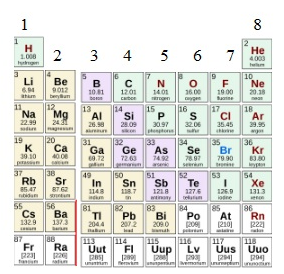
  3. Use the provided periodic table of the representative elements (groups 1-2 and 13-18 elements) to determine the number of valence electrons for each element.
  4. Use a dot to represent a valence electron.
  5. When adding dots around each element abbreviation, space out the dots, adding one dot to each side prior to pairing them up.
Question 1
1.

Click on the "Show Your Work" button and construct a Lewis Dot Structure for the following atom.

Click on the "Scribble" tool to add the necessary number of dots around the element symbol.

Tip - add one dot at a time in each side (there are four sides - remember the invisible box around the element symbol) before you attempt to pair the dots up.

Question 2
2.

Click on the "Show Your Work" button and construct a Lewis Dot Structure for the following atom.

Click on the "Scribble" tool to add the necessary number of dots around the element symbol.

Tip - add one dot at a time in each side (there are four sides - remember the invisible box around the element symbol) before you attempt to pair the dots up.

Question 3
3.

Click on the "Show Your Work" button and construct a Lewis Dot Structure for the following atom.

Click on the "Scribble" tool to add the necessary number of dots around the element symbol.

Tip - add one dot at a time in each side (there are four sides - remember the invisible box around the element symbol) before you attempt to pair the dots up.

Question 4
4.

Click on the "Show Your Work" button and construct a Lewis Dot Structure for the following atom.

Click on the "Scribble" tool to add the necessary number of dots around the element symbol.

Tip - add one dot at a time in each side (there are four sides - remember the invisible box around the element symbol) before you attempt to pair the dots up.

Question 5
5.

Click on the "Show Your Work" button and construct a Lewis Dot Structure for the following atom.

Click on the "Scribble" tool to add the necessary number of dots around the element symbol.

Tip - add one dot at a time in each side (there are four sides - remember the invisible box around the element symbol) before you attempt to pair the dots up.

Question 6
6.

Click on the "Show Your Work" button and construct a Lewis Dot Structure for the following atom.

Click on the "Scribble" tool to add the necessary number of dots around the element symbol.

Tip - add one dot at a time in each side (there are four sides - remember the invisible box around the element symbol) before you attempt to pair the dots up.

Question 7
7.

Click on the "Show Your Work" button and construct a Lewis Dot Structure for the following atom.

Click on the "Scribble" tool to add the necessary number of dots around the element symbol.

Tip - add one dot at a time in each side (there are four sides - remember the invisible box around the element symbol) before you attempt to pair the dots up.

Question 8
8.

Click on the "Show Your Work" button and construct a Lewis Dot Structure for the following atom.

Click on the "Scribble" tool to add the necessary number of dots around the element symbol.

Tip - add one dot at a time in each side (there are four sides - remember the invisible box around the element symbol) before you attempt to pair the dots up.

Question 9
9.

Click on the "Show Your Work" button and construct a Lewis Dot Structure for the following atom.

Click on the "Scribble" tool to add the necessary number of dots around the element symbol.

Tip - add one dot at a time in each side (there are four sides - remember the invisible box around the element symbol) before you attempt to pair the dots up.

Question 10
10.

Click on the "Show Your Work" button and construct a Lewis Dot Structure for the following atom.

Click on the "Scribble" tool to add the necessary number of dots around the element symbol.

Tip - add one dot at a time in each side (there are four sides - remember the invisible box around the element symbol) before you attempt to pair the dots up.

Question 11
11.

Click on the "Show Your Work" button and construct a Lewis Dot Structure for the following atom.

Click on the "Scribble" tool to add the necessary number of dots around the element symbol.

Tip - add one dot at a time in each side (there are four sides - remember the invisible box around the element symbol) before you attempt to pair the dots up.

Question 12
12.

Click on the "Show Your Work" button and construct a Lewis Dot Structure for the following atom.

Click on the "Scribble" tool to add the necessary number of dots around the element symbol.

Tip - add one dot at a time in each side (there are four sides - remember the invisible box around the element symbol) before you attempt to pair the dots up.

Question 13
13.

Click on the "Show Your Work" button and construct a Lewis Dot Structure for the following atom.

Click on the "Scribble" tool to add the necessary number of dots around the element symbol.

Tip - add one dot at a time in each side (there are four sides - remember the invisible box around the element symbol) before you attempt to pair the dots up.

Question 14
14.

Click on the "Show Your Work" button and construct a Lewis Dot Structure for the following atom.

Click on the "Scribble" tool to add the necessary number of dots around the element symbol.

Tip - add one dot at a time in each side (there are four sides - remember the invisible box around the element symbol) before you attempt to pair the dots up.

Question 15
15.

Click on the "Show Your Work" button and construct a Lewis Dot Structure for the following atom.

Click on the "Scribble" tool to add the necessary number of dots around the element symbol.

Tip - add one dot at a time in each side (there are four sides - remember the invisible box around the element symbol) before you attempt to pair the dots up.